
Inspiring
April 27, 2017
Question

Sometimes my fonts get changed to Italic in pdf

  • April 27, 2017
  • 1 reply
  • 2546 views

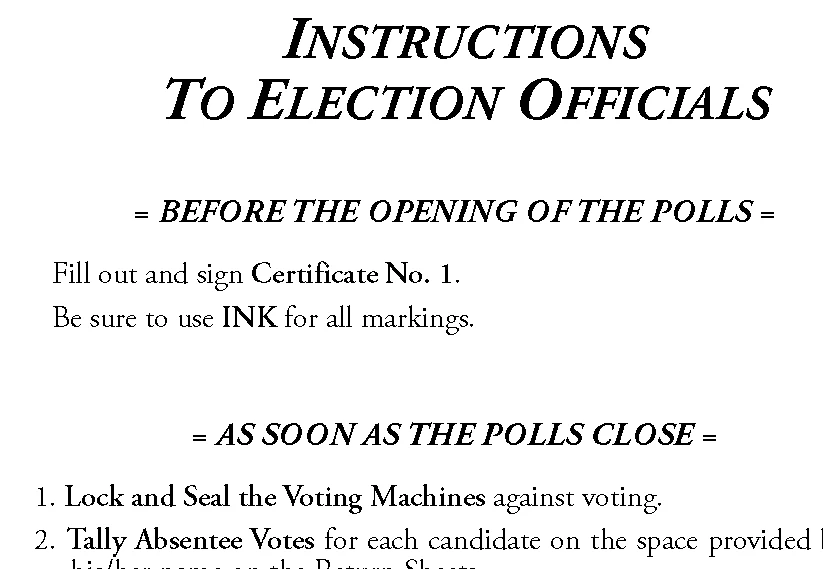
Here's an example. None of this is italic in the Framemaker document. But when I save to pdf, Every instance of Adobe Garamond Pro Bold gets converted to italic. But it's only the bold - the regular survives intact. In the past it's happened with other fonts. Illumination?

Thanks,

Jack
    This topic has been closed for replies.

    1 reply

    Jeff_Coatsworth
    Community Expert
    Community Expert
    April 28, 2017

    What version of FM? If you use the regular font and tell the character tag definition to bold it, does that survive the transition to PDF? How are you creating the PDF - print to the Adobe PDF "printer" or Save As PDF? 

    Inspiring
    April 28, 2017

    Thank you, Jeff.

    Version: 2017, although I have had the same problem in multiple earlier versions.

    Also: it's intermittent. A similar document from the same template worked just fine last fall.

    Character tag: I'm not using one. The paragraph tag specifies Adobe Garamond Pro Bold, which is listed separately from Adobe Garamond Pro.

    I'm using Save As PDF (it crashes on print to pdf)

    Inspiring
    April 28, 2017

    Well, first I'd suggest getting the new update for FM2017 installed; then I would look at the font itself - maybe it's got something in it that's wonky - if you try using it in other programs, does it behave the same way when PDFed? Are you running the full version of Acrobat or just the "headless" one that ships with FM?


    Acrobat: full version. And it's happened with earlier versions.

    Font: it's happened with other fonts, too.

    Other programs: not yet.

    Update: I'll try it.

    Thanks again for your help.