
Inspiring
December 13, 2023
Answered

Structured document / images /alignment
  • December 13, 2023
  • 1 reply
  • 428 views

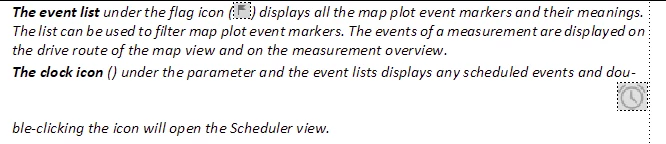
I am currently trying to add an icon (similar to the flag icon in the first paragraph) to the next paragraph. My former colleague added the flag icon and I am new to using Framemaker... I have been able to add the clock icon between the brackets after the bolded 'the clock icon' text, but every time I try to Save the XML-file, the image (of the clock icon) moves to the right (as seen in the image above). I think this has something to do with it being a structured document, but I have no idea what to do... Please help.

This topic has been closed for replies.
Correct answer frameexpert

Open the document in FrameMaker, put your cursor near the first icon and choose Structure > Structure View. Look at the element representing the icon and see if it has any attributes set. There may be an attribute that determines its position; for example position="inline". Then check the element representing the clock icon and see if it is the same. If you need further help, please post a screenshot of the Structure View around the icons.

1 reply

frameexpert
Community Expert
frameexpertCommunity ExpertCorrect answer
Community Expert
December 13, 2023

Open the document in FrameMaker, put your cursor near the first icon and choose Structure > Structure View. Look at the element representing the icon and see if it has any attributes set. There may be an attribute that determines its position; for example position="inline". Then check the element representing the clock icon and see if it is the same. If you need further help, please post a screenshot of the Structure View around the icons.

Matt-Tech Comm Tools
Community Expert
Community Expert
December 14, 2023

Rephrasing what Rick said...look at the successfully placed flag icon, and match the structure and attributes that are working in that location.

Also, using Structure > Validate may shed light on what is needed if the visual inspection doesn't help you resolve the issue.

-Matt Sullivan, FrameMaker Course Creator, Author, Trainer, Consultant
Inspiring
December 18, 2023

OK thanks to you both, I will try again. Will get back to you if there is no success.


The placement attribute was not right, I changed it to 'inline' and the graphic moved to the place I intended to put it. Thank you both again!