
Known Participant
October 31, 2023
Question

Table Formatting

  • October 31, 2023
  • 4 replies
  • 825 views

Hi everyone,
I'm creating a table using the "anchor frame" and "text frame" tools that have content that needs to be hidden, but the problem is that when hidden, the table will have unnecessary extra space.
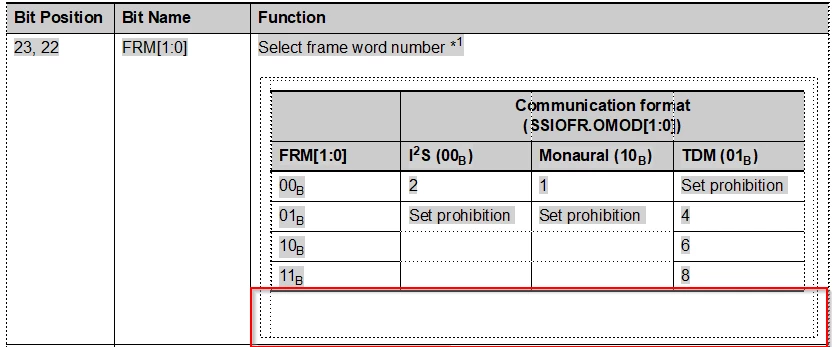

Is there any solution to solve this case? Please suggest.

Best regards,
Quan

    This topic has been closed for replies.

    4 replies

    frameexpert
    Community Expert
    Community Expert
    November 1, 2023

    Here is what is possible with scripting. To try it, copy the code to a text file and save it with a .jsx extension. Control-click on the text frame containing the table to select it and choose File > Script > Run and select the script. It will resize the height of the text frame to match the table's height. The script could be enhanced to run automatically, etc.


    A note to other scripters: See how I have broken the script down into discreet functions, each having its own task. Please let me know if you have any questions or comments.


    #target framemaker
    
    main ();
    
    function main () {
    
        var doc;
        
        doc = app.ActiveDoc;
        if (doc.ObjectValid () === 1) {
            processDoc (doc);
        }
    }
    
    function processDoc (doc) {
    
        var textFrame, tbl;
        
        // See if a text frame without a named flow is selected.
        textFrame = doc.FirstSelectedGraphicInDoc;
        if ((textFrame.ObjectValid () === 1) && (textFrame.Flow.Name === "")) {
            // Get the table object in the text frame.
            tbl = getTbl (textFrame, doc);
            if (tbl) {
                processTblFrame (tbl, textFrame, doc);
            }    
        }
    }
    
    function processTblFrame (tbl, textFrame, doc) {
        
        var PT, row, height;
        
        // Constant for point value.
        PT = 65536;
        
        // Calculate the location of the bottom of the last row,
        // relative to the top of the text frame.
        row = tbl.LastRowInTbl;
        height = (row.LocY + row.Height) - textFrame.LocY;
        
        // Resize the text frame's height.
        textFrame.Height = height;
    }
    
    function getTbl (textFrame, doc) {
    
        var textList, tbl;
        
        textList = textFrame.GetText (Constants.FTI_TblAnchor);
        if (textList.length === 1) {
            tbl = textList[0].obj;
            return tbl;
        }
    }
    Quân2929Author
    Known Participant
    November 2, 2023

    Hi @frameexpert ,
    Thanks for your solution,
    When I apply this code to the current file, will it affect other files?

    frameexpert
    Community Expert
    Community Expert
    November 2, 2023

    It will only work on the selected text frame (Control+Click to select it). As I said, it could be modified to work in all kinds of ways.

    Jeff_Coatsworth
    Community Expert
    Community Expert
    October 31, 2023

    I would create 2 copies of the table in 2 separate frames - one with all you want to show & the second with the cells truncated.

    Quân2929Author
    Known Participant
    November 1, 2023

    hi @Jeff_Coatsworth ,

    I will test and apply this solution

    Best regards,
    Quan

    Community Expert
    October 31, 2023

    Hi, @Quân2929 ,

    looking at your screenshot I think you want the surrounding text-frame to automatically get smaller as content gets hidden.

    That does not happen as a text-frame has a specified size and will not change dynamically.

    You can change the size of the text-frame manually or by using a script.

    Regards

    Stephan

    Quân2929Author
    Known Participant
    October 31, 2023

    Hi @mk-will ,
    Thank you for your answer, I also think it is not possible to shrink the frame automatically. If there is any other solution, please contact me.
    Best regards,
    Quan

    Community Expert
    October 31, 2023

    Hi Quan,

    Which anchor gets the condition? The anchor of the anchored frame? Or the table?

    The anchored frame should get the condition.

    If the space comes from an empty paragraph, then you have to apply the condition also to the paragraph mark of the previous paragraph.

    Best regards, Winfried

    Quân2929Author
    Known Participant
    October 31, 2023

    Hi @Winfried Reng ,

    This is an image from my original and I still don't understand what you mean.

    Looking forward to your guidance!
    Best regards,
    Quan