
Known Participant
May 29, 2014
Question

Text colour of links is wrong in HTML Help output from Frame 12

  • May 29, 2014
  • 2 replies
  • 3184 views

Hi, this is my first project using Frame12 to generate CHMs directly using the 'Publish' command.

Mostly it's going well, but I've run into a snag with the colour of text in hyperlinks.

In Frame, I have some colour definitions set up (a dark green, and a dark red), and am using a couple Character styles to apply these to different hyperlinks. It all looks fine in Frame.
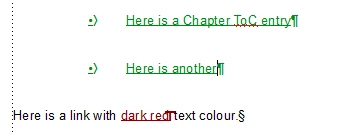
However now I go to the Publish pod's Settings and looking in the Style Mapping tab. The output style is set to [Source], so the colour it's going to use should surely just be an RGB Hex code in CSS, corresponding to the RGB colour definition I've set up in Frame? And look the same?

Well, the dark red link is showing fine...
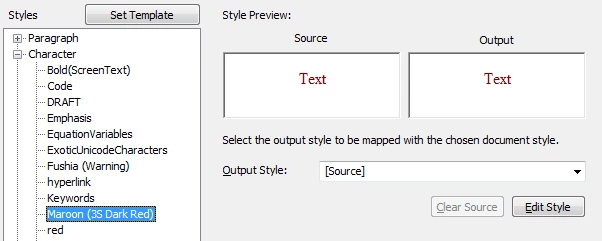
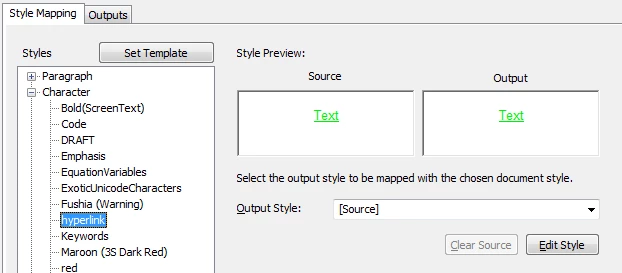
...but the dark green is displaying as a totally different bright lime green! both as Source and Output?! Why is it doing this?
Then it gets worse! Because here is what I actually get in the CHM output file...
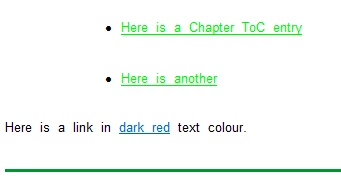
...the dark red has gone blue! And the dark green is still light green. Just to prove that HTML Help is perfectly capable of displaying the correct shade of dark green when it wants to, you can see the Footer line I'm adding (Using the "Import Template" bit of the Publish settings).

Any suggestions as to what's going on?
It seems to me that the CHM is somehow deciding that these are hyperlinks, so is overiding their colour, using the traditional blue for an unvisited link (the dark red one then goes purple when it's been visited). The lime green stays lime green the whole time.

I can't explain why the green goes wrong in the Style Mapping dialog while the red doesn't go wrong until the CHM.

    This topic has been closed for replies.

    2 replies

    Participating Frequently
    May 30, 2014

    Hi David,

    For the hyperlink turning blue, you can add to inherit-color style in your css for <a> tag.

    If you add

    a

    {

    color: inherit;

    };

    in your css-file, It will override the <a> tag's color to its parent's color property. Note that it will change the color property for all the anchored tags.

    So the "dark red" text will display in red even if it is a link.

    David__DAuthor
    Known Participant
    May 30, 2014

    riteshksriv wrote:

    Hi David,

    For the hyperlink turning blue, you can add to inherit-color style in your css for <a> tag.

    Ah-ha! Now *that* sounds like it explains what's going on.

    But I'm afraid I haven't managed to make it correct the problem yet

    How do I get access to the underlying CSS file to modify the anchor tag?  If I click "Export Styles" on the dialog...

    ...it will let me save a RHStyleMapping.css file, which I can open in Notepad, insert your suggested CSS, save and then click Import Styles to bring it back in again....

    Is that how I'm meant to do it? I added the lines you suggest, but it had no effect on the problem.

    The contents of that RHStyleMapping.css file doesn't seem to bear much relation to my paragraph and character formats - there are a few basic para formats defined in it matching my Frame para styles,

    but most aren't mentioned. Instead there's about a bazillion lines about table formatting, none of which seems to relate to my source at all.

    Participating Frequently
    May 30, 2014

    CHM does not support inherit property(Maybe it uses IE7 or less) so you will need to specify the color you want for your links.

    a

    {

    color: red;

    };

    And use override style feature in the output tab for this styling.

    If you are generating CHM go to Microsoft HTML Help tab. click override style and import a css file which has only the given styling.

    For your convenience, I have added the screenshot of the dialog.

    Matt-Tech Comm Tools
    Community Expert
    Community Expert
    May 29, 2014

    Hi David,

    You're nearly there, but need to choose the Output Style (should be labeled CSS Style) that you want displayed in the output.

    Otherwise, regardless of output (CHM, HTML, EPUB), you are asking Fm to describe the formatting of the output. That's kind of like asking Word to "properly" describe the formatting of content when imported into FrameMaker. Specifically, since you're using PANTONE colors, you'd not want to use RGB or HEX values of those colors in your Fm docs, and this feature will greatly simplify your process.

    Just choose the "style" for displaying the content, and if needed modify the conversion CSS for the project (In Rh it's called RHStyleMapping.css) and you'll be set.

    I'd provide more detail, but am teaching online today. LMK if you find the right file to modify.

    -Matt

    -Matt SullivanFrameMaker Course Creator, Author, Trainer, Consultant
    David__DAuthor
    Known Participant
    May 29, 2014

    But Matt, surely if I set Output Style to [Source], Frame is meant to write some CSS under the hood which simply matches the Frame source as closely as possible?

    I appreciate this may be messy in some cases, but I simply don't see why it should be a problem here.

    I have defined my colour in FrameMaker:

    Frame doesn't "natively" store Pantone values: instead it writes suitable RGB or CYMK approximations, as defined in the Colour Library. In this case, I've asked it to use an RGB approximation, and although the dialog is rather obtusely expressing this as percentage values out of 100, this still equates to a perfectly servicable RGB hex value equivalent for Pantone 355.

    Then, in my Character Designer, I set up a character tag called "hyperlink", and specify that it should be "Pantone 355" (in reality, the RGB equivalent I've asked for):

    So, in the Publish > Settings > Style Mapping dialog, all Frame has to do is concoct some CSS that is something like hyperlink {color:#RRGGBB}

    How can it get the RGB values wrong? We've already established what they are in the Color Definition dialog, and they look fine in the Frame source on screen. Surely chosing Output Style: [Source] means it should keep using them? I don't understand how/why it's writing different ones. I don't see how it's like asking Word to do anything - there's no ambiguity in the RGB colour defined in Frame for that character style, nor any ambiguity about which text is part of the style.

    In the case of the dark red coloured text, the Style Mapping dialog shows me that it *is* using the right RGB ........ but then the CHM isn't.

    Matt-Tech Comm Tools
    Community Expert
    Community Expert
    May 29, 2014

    First, a PANTONE color is a spot ink, regardless of the color model used to display on screen. If you choose to convert this to a process color, it still uses RGB on the screen, whether it's a CMYK or an RGB approximation. If your PANTONE library is one of the CMYK or other approximations, then they're just that...approximations.

    This isn't an Fm shortcoming, it's just how printing and monitors work.

    Your colors within HTML output (including CHM) will use HEX values, and if you don't specify colors to use, Fm will try to use what it "sees", which is not likely what you want.

    Asking Fm to process this as inline formatting is not likely to provide perfect results, just as asking Fm to define and display Headings and numbered lists is not likely to provide perfect results.

    You're making a lot of assumptions here, which if true would certainly make web design easier. Arnis provided a great overview above, and if there are conflicts with what I've written, use his descriptions instead.

    The settings you're using are intended for people without a need for specific and accurate settings. They are quite easy to set up, but the output is somewhat generic. At best, you'll end up with convoluted and bloated inline HTML formatting.

    You want specific CSS settings, thus you must define them.

    You want clean accurate web output, so you're going to need to define it in web terms. You do that by defining the Output Style. One method of defining the proper settings is to click the Edit Style button to explicitly define what you need in the output.

    -Matt SullivanFrameMaker Course Creator, Author, Trainer, Consultant