Participant
June 7, 2019
Answered

TOC alignment issues

  • June 7, 2019
  • 2 replies
  • 1035 views

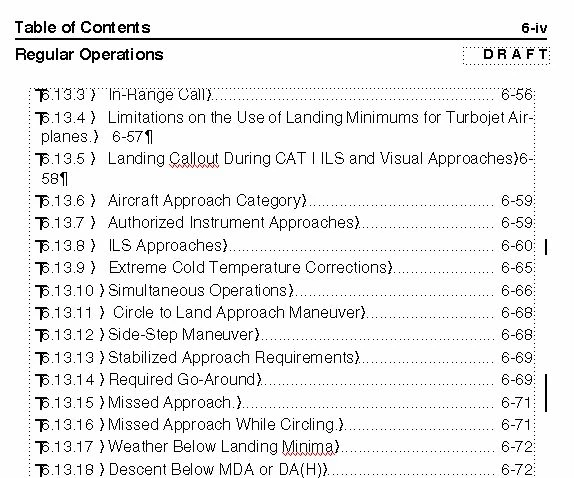
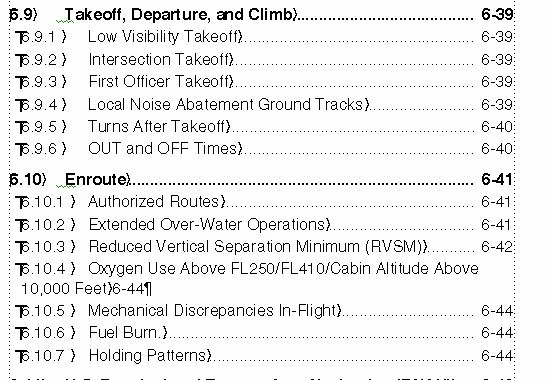
How do we correct this alignment issue where long titles incorrectly wrap justified left on the second line.  The text should remain center of the page and not bleed into the chapter/page area or flush left area. See 6.10.4 below & 6.13.4 which has text in the chapter/page area.  Also why is Frame 2019 generating revision bars in my tocs?  Did not have this in Frame 2015.

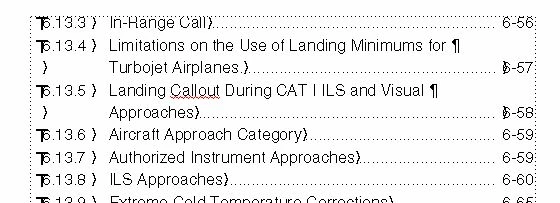
We would like it to auto format like this...

This topic has been closed for replies.
Correct answer Barb Binder

Hi Christopher:

Bernd is correct on needing a left indent on the paragraph style that matches the tab stop—this creates a hanging indent.

A trick I have used to partially control the TOC breaks is to add a non-breaking space to the text in the body of the document. For example, add a non-breaking space on page 6-57 (not in the TOC) after "for" and "Turbojet" to get Fm to put "for Turbojet Airplanes" together on the next line (use Esc space h or Control+space). This will not work in all situations because it may cause breaks in the document at inappropriate spots. In my experience, it works in many situations, and limits the line breaks added manually after I update the TOC.

InDesign has clever feature that I wish FrameMaker would add—it's called a last-line right indent—and is meant for your specific situation:

Page numbers get lost in multi-line TOC entries:
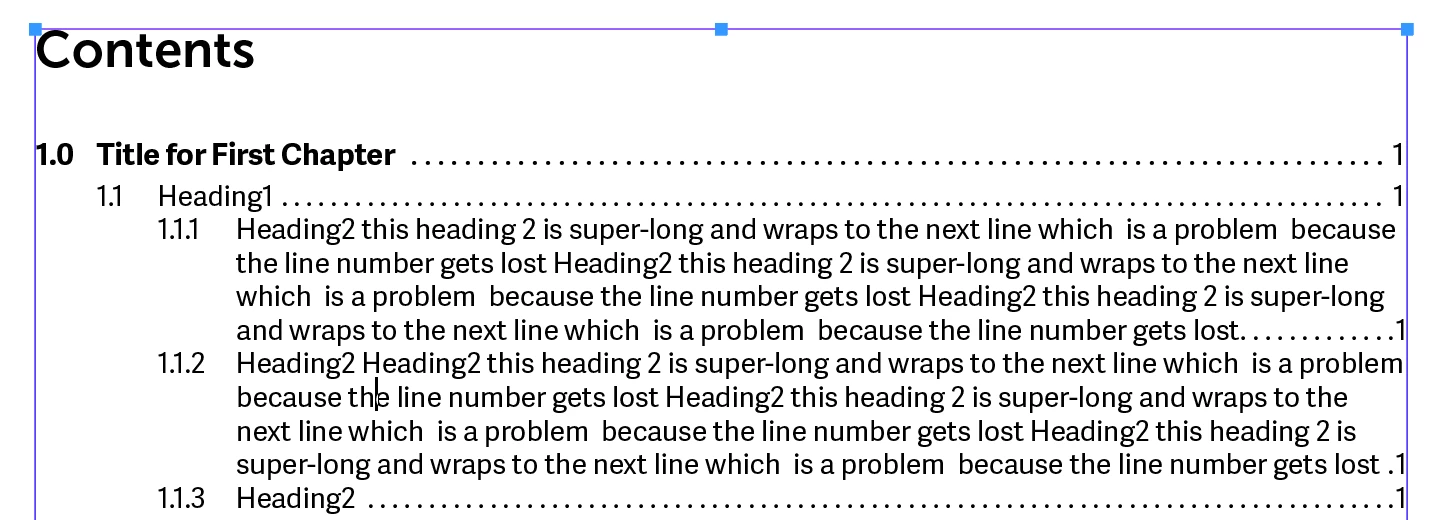
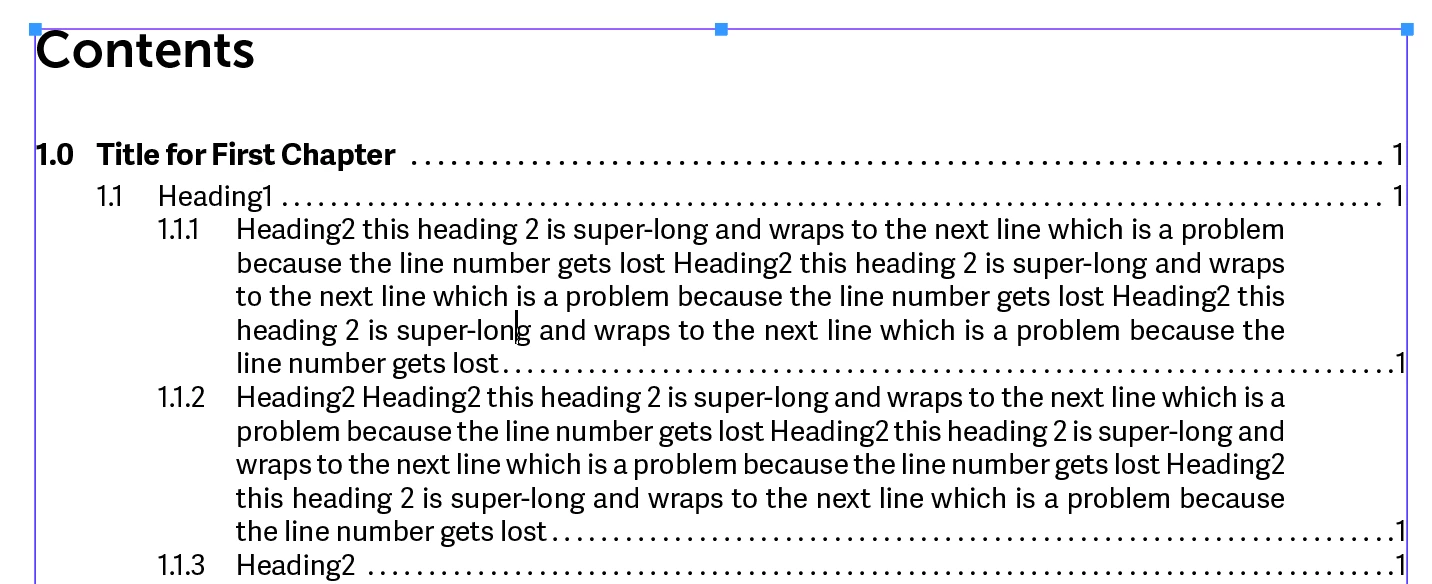
So you can define a right indent pull in all the lines on the right-hand side, and then direct just the last line to go back out.
If anyone thinks this would a good addition to FrameMaker, you can put in a feature request here: Tracker. Link back to this page for the example, and add a link to this page so that others can vote it up, if they also see a need. I will vote for it.

Finally, you can use Format > Document > Change bars to clear any existing change bars in your TOC. However, even if I have automatic change bars on in the document and in the TOC, they don't show up in the TOC unless I make a manual change in the TOC entry. (FrameMaker 2019 version 15.0.3.603)

~Barb

2 replies

Barb Binder
Community Expert
Barb BinderCommunity ExpertCorrect answer
Community Expert
June 10, 2019

Hi Christopher:

Bernd is correct on needing a left indent on the paragraph style that matches the tab stop—this creates a hanging indent.

A trick I have used to partially control the TOC breaks is to add a non-breaking space to the text in the body of the document. For example, add a non-breaking space on page 6-57 (not in the TOC) after "for" and "Turbojet" to get Fm to put "for Turbojet Airplanes" together on the next line (use Esc space h or Control+space). This will not work in all situations because it may cause breaks in the document at inappropriate spots. In my experience, it works in many situations, and limits the line breaks added manually after I update the TOC.

InDesign has clever feature that I wish FrameMaker would add—it's called a last-line right indent—and is meant for your specific situation:

Page numbers get lost in multi-line TOC entries:

So you can define a right indent pull in all the lines on the right-hand side, and then direct just the last line to go back out.

If anyone thinks this would a good addition to FrameMaker, you can put in a feature request here: Tracker. Link back to this page for the example, and add a link to this page so that others can vote it up, if they also see a need. I will vote for it.

Finally, you can use Format > Document > Change bars to clear any existing change bars in your TOC. However, even if I have automatic change bars on in the document and in the TOC, they don't show up in the TOC unless I make a manual change in the TOC entry. (FrameMaker 2019 version 15.0.3.603)

~Barb
~Barb at Rocky Mountain Training
Participant
June 10, 2019

Thank You Barb that was very helpful and I have shared it with my Co-workers

Barb Binder
Community Expert
Community Expert
June 10, 2019

Great! Glad I could help, Christopher.

~Barb

~Barb at Rocky Mountain Training
Be.eM
Inspiring
June 8, 2019

The left indent in the paragraph format must be set to the tab position. This will make sure that any second line will start where the text in the first line starts. No way I'd know of to automatically keep long lines out of the page number area, though. I'm doing this with manually entered line breaks after generating the TOC.

If you enter one additional (redundant) tab after the <$paratext> building block on the reference page, the page number will still be placed on the right, even if the line breaks. That additional tab won't have any impact on a single line entry.

Bernd