
Inspiring
December 6, 2011
Answered

TOC indenting a heading that shouldn't be indented

  • December 6, 2011
  • 1 reply
  • 849 views

Hi, Gang!

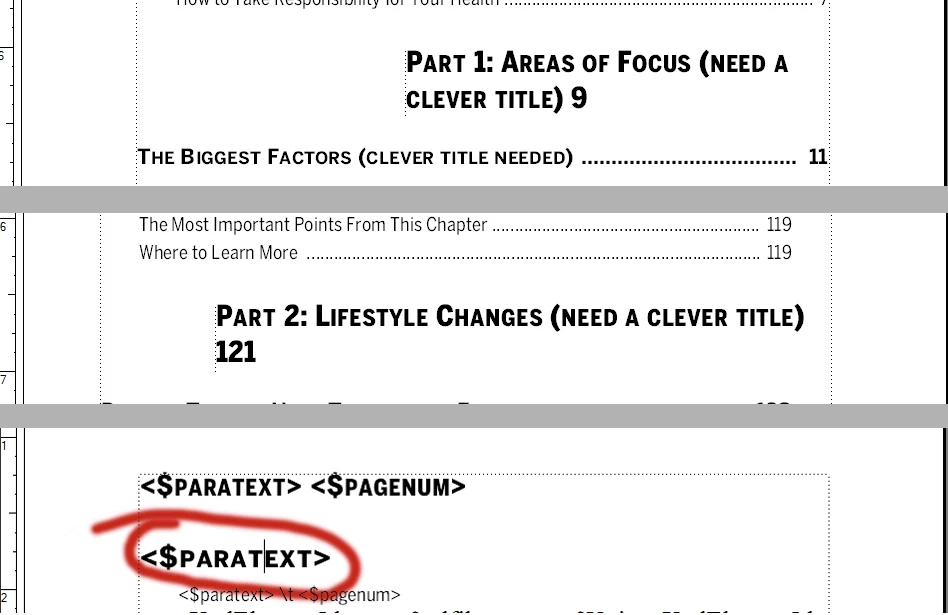
I've created a TOC for a book and the TOC entries for the two divider pages are indenting when they should not be. The TOC style for the divider page heading has no indentation and the entry on the TOC reference page looks correct. To make things stranger, the two entries are indenting by different amounts in the TOC.

Here's a screen capture that shows 1) the first TOC entry (indented a lot), 2) the second TOC entry (indented less, but still indented), and 3) the divider page style on the reference page.

I'm stumped.

Does anyone have any ideas why this indentation would be happening?

Many thanks!
    This topic has been closed for replies.
    Correct answer Van Kurtz

    Rocky,

    OR, control-click the text frame and UNCHECK allow for sideheads. For reasons unknow to me, sometimes Framemaker turns this on when you are creating a new TOC or Index.

    Van

    1 reply

    Arnis Gubins
    Inspiring
    December 6, 2011

    It looks like there's a sidehead being applied to the first & second TOC entries. Check your tags, i.e. place your cursor in each and look at the Status bar. If you see an asterisk (*) after the tag name, there's an override.

    Van Kurtz
    Van KurtzCorrect answer
    Inspiring
    December 6, 2011

    Rocky,

    OR, control-click the text frame and UNCHECK allow for sideheads. For reasons unknow to me, sometimes Framemaker turns this on when you are creating a new TOC or Index.

    Van