

Copy link to clipboard
Copied
As described in my previous post https://community.adobe.com/t5/framemaker-discussions/navigation-panel-problem-responsible-html5/td-... I have created an additional "Heading 1 new html page", to add the choice to have a new html page for each such heading. This paragraph style is a copy of the old Heading 1. For the TOC I have created a copy of Heading 1TOC, called Heading 1 new html pageTOC.
This works fine when I publish as Responsible HTML5. But I also publish pdf.
The TOC looks a bit odd - in at least 3 ways.
1) The new Heading1 new html page entries have the correct font, size etc, but the page number isn't right justifed (as for the regular Heading 1.) There seems to be a missing <tab>. (If I enter it manually in the TOC, it looks fine until the next update, when the tab's are lost.)
2) The TOC indentation is messed up. All Heading 2TOC entries in a chapter having the new Heading1 new html page have been moved to the left.
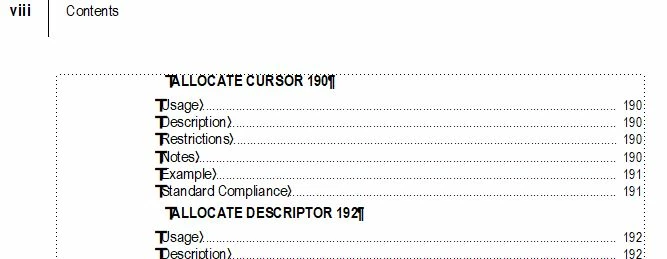
3) A chapter following a chapter having the new Heading1 new html page, will be on a new page in the TOC.
How can I make the new "Heading 1 new html pageTOC" to behave just as the original "Heading 1TOC"?
Copy link to clipboard
Copied
Chances are that anyone with insight will need to see what you have on Reference Page TOC in the xxxTOC.fm file and may also need some details for the Paragraph Formats therein applied.
Copy link to clipboard
Copied
Reference Page? That's a new world to me.
Which part of it? Here's one (of 2) part of it where Heading 1 is mentioned:
(Also found in HTML Mapping Table.)
I did just add the new Heading 1 new html page to the table, but no changes in the output.
Paragraph Format? Which ones? I have compared the values found in the paragraph designer for the old and new Heading 1 styles, and I can't find any differences.
Copy link to clipboard
Copied
re: Reference Page? That's a new world to me.
In your file with a name ending in …TOC.fm.
View » Reference Pages
Page forward or back to the page named "TOC".
You'll see some markup there, for example:
openXmlElementId <$relfilename>:<$UniqueXmlElementId> <$RelativeXmlElementId>¶
<$paratext> <$pagenum>¶
openObjectId <$relfilename>:<$ObjectType> <$ObjectId>¶
<$paratext> <$pagenum>¶
<$paratext> <$pagenum>§
Each one of those lines is a separate paragraph, with a separate Paragraph Format, auto-created by FM when you first generated the TOC. In the example above, the bottom line is ¶ Heading2TOC.
The Paragraph Formats of each of those lines controls how they render into the published TOCs.
Copy link to clipboard
Copied
This is how it looks:
How do I which line which belongs to which Paragraph Format?
Should I add an entry for my new "Heading 1" here?
Copy link to clipboard
Copied
One of those <$paratext> lines should already be in Heading1TOC format.
Click in each and see what's reported in the window footer, or Paragraph Designer.
Copy link to clipboard
Copied
One of them where in (the old) Heading1TOC format. I have now made a copy of it for my new "Heading1 new htmlpageTOC".
The following Heading 2TOC entreis now are properly indentated.
But the "Heading1 new htmlpageTOC" still has no right justified page numbers. (And the following Chapter still starts on a new page in the TOC.)
Copy link to clipboard
Copied
re: One of them where in (the old) Heading1TOC format. I have now made a copy of it for my new "Heading1 new htmlpageTOC".
Why did you do that?
If a TOC refpage contains a format not auto-created by FM, FM is unlikely to use it for anything.
Copy link to clipboard
Copied
Pure trial and error.
Am I not supposed to edit the reference pages? How am I then supposed to get my new Heading style work properly?
Copy link to clipboard
Copied
Various RPs are indeed intended to be edited, including TOC, but it requires knowing how they work. I rarely find it necessary to actually edit RP TOC, but do routinely modify the Paragraph Catalog for formats with names ending in …TOC.
A generated …TOC.fm file contains {optionally} some hand-entered leading static text, but everything else is going to be auto-created format named paranameTOC, based on what you specified for paranames during Insert » Create TOC. Reference Page TOC is consulted during regeneration and render of the …TOC.fm file, but only for the generated paras. Anything else on the RP is ignored.
Now, getting the TOC to look as desired for PDF is one thing (and relatively straightforward). Getting the HTML export to be ideal can present additional challenges (and is not a workflow I'm really familiar with).
Copy link to clipboard
Copied
Now, getting the TOC to look as desired for PDF is one thing (and relatively straightforward). Getting the HTML export to be ideal can present additional challenges (and is not a workflow I'm really familiar with).
Let's start with the PDF TOC look as desired. (I *think* I've got the HTML5 output as desired already.)
Get ready! An upgraded Adobe Community experience is coming in January.
Learn more