Inspiring
November 30, 2017
Answered

Transparent Images...

  • November 30, 2017
  • 2 replies
  • 1695 views

Hi All,

Does Framemaker 12 allow Transparent Images???

I am trying to embed Company Logo on the Cover Page.

I have imported PNG & GIF Image into the Cover Page but image comes-in as a Square Box with White Background.

Appreciate any help.

Thank You.
    This topic has been closed for replies.
    Correct answer Matt-Tech Comm Tools

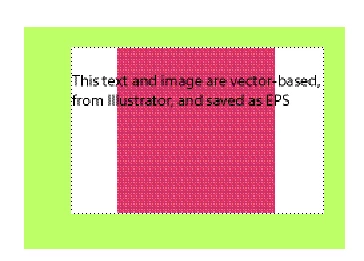
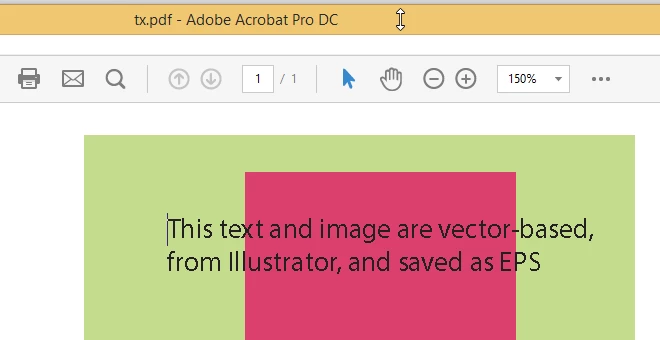
    Here's what I got with Fm12. The green block was created in Fm, the  text and pink block are vector-based, and created in AI and saved as EPS.

    Is your logo vector-based?

    For reference, here's what it looked like in Fm

    2 replies

    Matt-Tech Comm Tools
    Community Expert
    Community Expert
    November 30, 2017

    If you don't have another option, I'd be happy to do it for free.

    (ok, well, I'll ask that you sign up for my free Fm newsletter at techcommtools.com!)

    -Matt Sullivan, FrameMaker Course Creator, Author, Trainer, Consultant
    AixtronAuthor
    Inspiring
    November 30, 2017

    Thanks All,

    It was a Company Takeover.

    New logo is provided from South Korea, will have to request in EPS.

    Small companies do lack essential tools, so trying to improvise.

    This Forum has been very valuable source of information.

    Community Expert
    December 1, 2017

    Hi,

    You can also use Inkscape to save as EPS.

    Inkscape is a free vector graphics editor.

    https://inkscape.org/en/

    Best regards

    Winfried

    Matt-Tech Comm Tools
    Community Expert
    Community Expert
    November 30, 2017

    Save as an EPS. It may still in Fm appear to have a white background, but you should find that the PDF has a transparent background.

    -Matt Sullivan, FrameMaker Course Creator, Author, Trainer, Consultant
    AixtronAuthor
    Inspiring
    November 30, 2017

    Thanks Matt,

    Difficulties persists...

    Top Logo is from Transparent Logo imported from Powerpoint - Simple Cut & Paste.

    3rd Logo is Adobe Illustrator (AI) file, imported into the Framemaker.

    2nd Logo is EPS File (AI file, opened in Acrobat and then Saved it as an EPS File.

    2nd Logo was imported into the Framemaker which it did not display in FM but shows up in the PDF Output.

    4th Logo is PNG File.

    In any case, none of these logos are showing transparent, they all have a white background.

    Jeff_Coatsworth
    Community Expert
    Community Expert
    November 30, 2017

    This the resulting PDF we're looking at?