

LinSims
Community Expert
September 11, 2020
Answered

Weird spacing in TOC after conversion to PDF

  • September 11, 2020
  • 12 replies
  • 4126 views

I have a chapter heading that is converting to PDF weirdly, but only for one file. The tags used for the headings are identical in both files. The tag used in the generated TOC is identical for both entries.


This is what it looks like in the generated TOC:
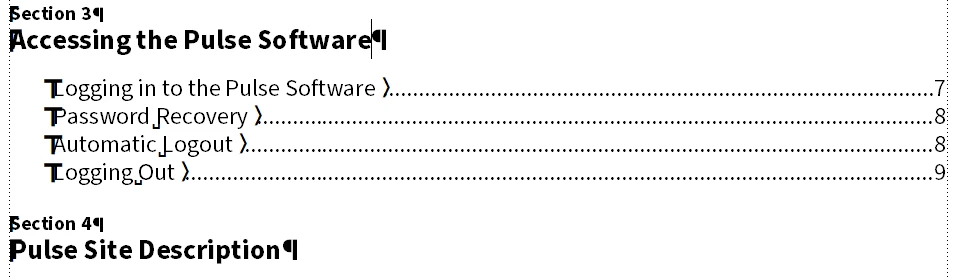
 

This is what it looks like after the PDF output is created. 
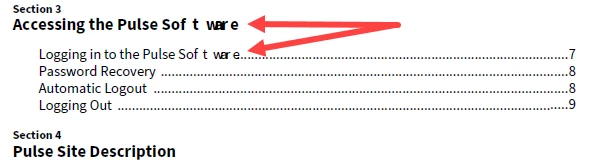
 

Why is the word Software so oddly spaced in both entries after conversion to PDF? It's only those two headings that convert so oddly. All the others are spaced correctly.

This topic has been closed for replies.
Correct answer pulkitn

The issue reported was occuring due to following facts :

  • "Asian Composer " was checked in for English content , FrameMaker expects this setting to be checked in case of CJK language only.
  • "Language " selected was Chinese for English content .


Issue will not occur once proper setting is followed  for english content .

Thanks 
Pulkit Nagpal
FM & FMS Engg.

12 replies

Barb Binder
Community Expert
September 12, 2020

Hi Lin:


PDFs have evolved over the years, and unlike the CC applications, FrameMaker did not do a good job keeping up until recently.


  1. The Publish pod produces modern PDFs: fully compliant PDF/A1, PDF/A2, PDF/A3, PDF/X1, PDF/X2, PDF/X3, and PDF/X4, and allows you to specify your settings as you export. 
  2. Save as PDF uses the last settings specified in the Publish pod.
  3. File > Print uses the older export technology and produces PDFs that do not conform to current standards.


~Barb 

~Barb at Rocky Mountain Training
LinSims
LinSimsAuthor
Community Expert
September 12, 2020

Using File > Print still produces a PDF that opens in Acrobat, which is the bit I'm interested in. 


The only thing I use Acrobat for is creating PDFs for publication or commenting. Occassionally I use it to export graphics, add or remove pages, combine files, or compare files.


Have standards changed enough that I need to be worried about this? I can send the PDF out with the words messed up in the TOC if so, but it irks me no end to do so. It also puzzles me that it's only those two places this happens, and it's the same word it happens to. There's a problem somewhere, but it doesn't appear to be anything I can fix.


LinSims
LinSimsAuthor
Community Expert
September 12, 2020

After a LOT of fussing, including removing the original TOC files and creating new ones, doing a MIF wash, reinstalling Acrobat, and using the Publish pod instead of Save as PDF, I finally got a version that did not have the weird spacing for the word "Software" in the TOC (and only in the TOC, and only that word, even in other titles with multiple words in them).


I used File > Print Book. The oldest way of creating a PDF from FrameMaker there is, and it worked. Rock-solid, reliable Print Book, how I love thee.


Someone remind me what the difference is between the 3 methods of generating a PDF output are, please?