
Lara M T
Known Participant
September 17, 2018
Question

Why won't the Italic angle work in Frame 2015?

  • September 17, 2018
  • 3 replies
  • 531 views

I am using the DTLArgoT font (as required by my company's brand guidelines), but I cannot get it to italicize in the Frame 2015 document. Here is what my character designer looks like:
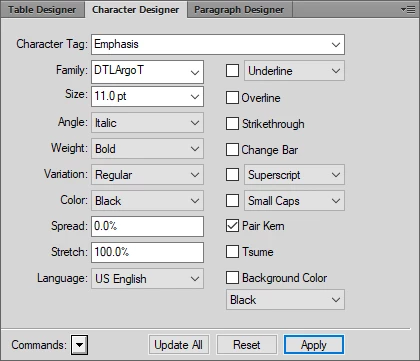
As you can see, the Angle is Italic, but the text still looks normal in the document. I tried using Arial, and with that font the Italic angle works.  Is there a way to get this to apply to the DTLArgoT font?

    This topic has been closed for replies.

    3 replies

    Barb Binder
    Community Expert
    Community Expert
    September 17, 2018

    Hi Lara:

    Here's a link to a free version:

    http://fontsgeek.com/fonts/DTL-Argo-T-Italic

    ~Barb

    ~Barb at Rocky Mountain Training
    Matt-Tech Comm Tools
    Community Expert
    Community Expert
    September 17, 2018

    Ah, nice catch, I thought we were discussing an icon font...

    -Matt Sullivan, FrameMaker Course Creator, Author, Trainer, Consultant
    Matt-Tech Comm Tools
    Community Expert
    Community Expert
    September 17, 2018

    What you're doing in Word is to have the application approximate italic, by slanting characters. Not a good idea, typographically, but perhaps ok for your purposes. An italic font is designed to complement the regular and other versions. Fm stopped supporting the "slanting" of characters many versions ago.

    Your font designer should be able to produce an italic version with little effort if all that's required is "slanting"

    -Matt

    -Matt Sullivan, FrameMaker Course Creator, Author, Trainer, Consultant
    Matt-Tech Comm Tools
    Community Expert
    Community Expert
    September 17, 2018

    To use italic, you'll need to have an italic version installed. Same with bold, bold+italic, etc.

    Does Windows show more than one version of the DTLArgoT font installed?

    -Matt

    -Matt Sullivan, FrameMaker Course Creator, Author, Trainer, Consultant
    Lara M T
    Lara M TAuthor
    Known Participant
    September 17, 2018

    I have DTLArgotT Bold and DTLARgoTLight Regular installed. Do I need to install an italicized version?

    I am able to use italics in Word, but I guess Frame is different.

    Matt-Tech Comm Tools
    Community Expert
    Community Expert
    September 17, 2018

    Oh, one more thing...

    If you "just" need a character to use a single character as a graphic, you should be able to use Illustrator to Convert Text to Outline and then use Illustrator to "slant" the image. You'd have to use it as an imported graphic, but it would be the same quality as the other images if imported as AI, EPS, or PDF.

    -Matt

    -Matt Sullivan, FrameMaker Course Creator, Author, Trainer, Consultant