



Copy link to clipboard
Copied
I'm putting in a small table in my document. I want to wrap the text around it. Is it possible and how do I do it?


 1 Correct answer


It's possible, but tricky. There are two ways to do this.
- Create a text frame and insert the table inside the text frame. Caveats here are that the text frame will not resize with the table, so you have to do that by hand. Also, if you use a tag with autonumbering for a table title, the autonumbering is disconnected from any tables in the main flow and also any tables in other text frames. In other words, if the table title is inside the text frame, the autonumbering restarts at 1 every time. Las

 6
Replies
6
6
Replies
6


Copy link to clipboard
Copied
A table in a text frame inside an anchored frame would work.
Copy link to clipboard
Copied
It's possible, but tricky. There are two ways to do this.
- Create a text frame and insert the table inside the text frame. Caveats here are that the text frame will not resize with the table, so you have to do that by hand. Also, if you use a tag with autonumbering for a table title, the autonumbering is disconnected from any tables in the main flow and also any tables in other text frames. In other words, if the table title is inside the text frame, the autonumbering restarts at 1 every time. Lastly, text frames inserted like this are floating and will not move with the text.
- Use an anchored frame, then insert a text frame inside the anchored frame, and then insert the table in the text frame. Set the position properties for the anchored frame to Run Into Paragraph. Tables inside an anchored frame will move with the text, but you run into the same issues with resizing the text frame. Oddly, the autonumbering does seem to connect to tables inserted in the main flow.
Also note that FrameMaker only runs around one side of either a text frame or an anchored frame, not both.
Copy link to clipboard
Copied
If an autonumbering problem arises, it can be worked around.
Copy link to clipboard
Copied
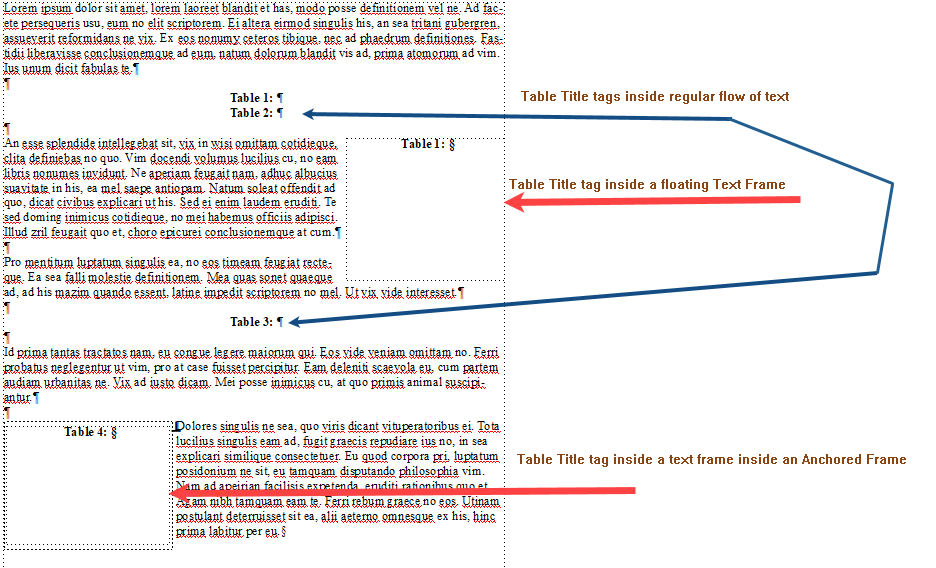
There's usually a way around it, yes. I haven't actually done this before, and didn't have time to do a lot of testing. I just found it odd that if you put the table inside a text frame, the autonumbering got disconnected, but if you put the table inside a text frame inside a graphic frame, it incremented.
Testing consisted of inserting a paragraph with the table title tag inside the main flow followed by a table title inside a text frame, followed by a table title inside a text frame inside an anchored frame followed by a table title inserted in a paragraph. The table title inside the anchored frame incremented. The one inside the text frame restarted.
Copy link to clipboard
Copied
I like the second option, it worked nicely. Thanks
Copy link to clipboard
Copied
I think Bob and I posted the same answer at almost the same time. 


Get ready! An upgraded Adobe Community experience is coming in January.
Learn more
 AdChoices