

JonBe
Inspiring
May 12, 2021
Question

Bizarre bug with processing a document where the 'Element Validation' panel/pod is absent

  • May 12, 2021
  • 5 replies
  • 1123 views

Env Windows 10 1909, FM 2019 15.0.5.838 (x64)


My client has a process, coded in c++, to add line numbers to a structured document. I know... why! The line number has to be outside of the text frame, so it could not be a element, and the inbuilt line numbering was not customisable. The line numbers are required for legislative review. Another customer uses a similar process for the same reason. another process removes the line numbers.


Recently after this process was run, sometimes the line numbers would not stick, that is not be there when the document was saved, and worse, other changes would also not stick.


To cut to the chase (this has taken me many hours), the symptom is that after the process to add or remove line numbers was performed, when clicking the X to close the document, FrameMaker displayed a Save File dialog, even although the document had been saved by the code. Saving manually via File->Save also made no difference.
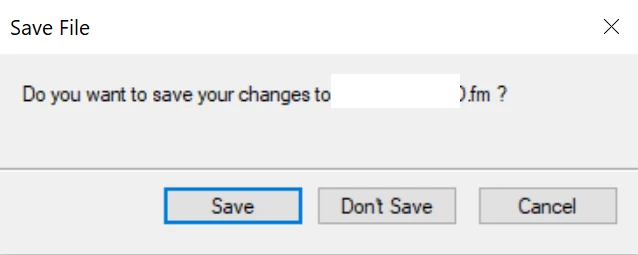
After clicking Save FrameMaker showed the following dialog.
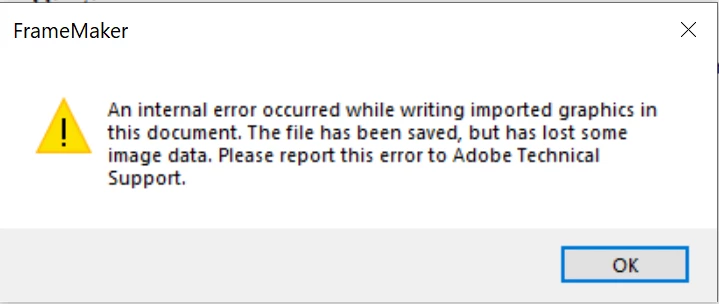
After clicking OK FrameMaker showed the first dialog.

Clicking Don't Save would allow the document to be closed. Sometimes the document when opened, woudl not have the line numbering on or off as expected. I also expect that the loss of other changes was related to subsequent processing, where the code has very little error checking, so would continue, if the FDK calls returned errors. 


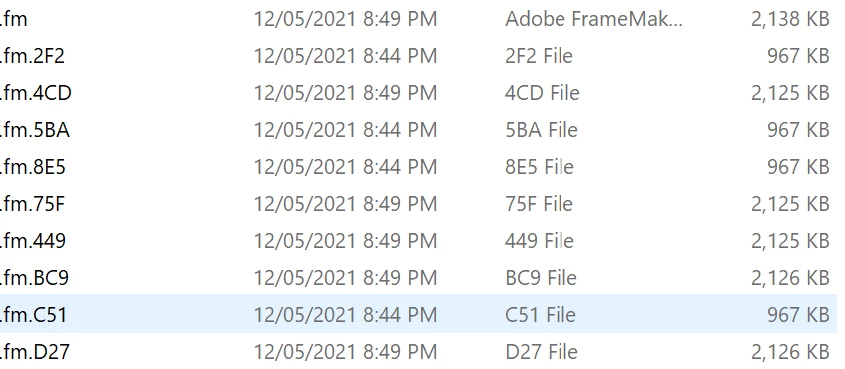
The other symptom is the presence of temporary or intermediate files as shown below. How many there were seemed to influence whether changes were lost.
Now the bizarre bit. My customer could re-produce this problem at will, usually at a critical time, while I never could. In investigating why this was, I worked out that the failure did not occur with certain workspaces, mine for example. In drilling down to work out why, I discovered it was the complete absence of the  'Element Validation' panel/pod, that is Structure->Validate has never been run with the workspace, so the //palette element attribute app-data="#lt;palette kit-data=#quot;3 32 #quot;/>" does not exist in the fws or cfws file for the workspace. Once the 'Element Validation' panel/pod has been shown, and the //palette exists, even if the 'Element Validation' panel/pod has been hidden, the problem does not occur! Bizarre.


I will update FM2019 in my own environment to see if the problem still occurs as well as testing with 2020. It looks like the error dialog regarding an internal error and the temporary or intermediate files have been reported by others. Maybe the absence of the  'Element Validation' panel/pod was a factor there too?


I am not sure how I can report this as a bug to Adobe!


Time to put my head down!


Jon

This topic has been closed for replies.

5 replies

JonBe
JonBeAuthor
Inspiring
June 24, 2021

An update - the problem of the creation of intermediate files was still occuring, even with the element validation pod shown, in my customers environment. After an afternoon of try this/try that, I found the cause to be the FDK call F_ApiSimpleSave. Replacing this call with F_ApiSave, with the appropriate properties set, resolved the problem. The customer has now been through a week of production, in circumstances where the problem occured a lot, without a single occurence.


I am much happier creating a bug report with this as the cause! ☺

JonBe
JonBeAuthor
Inspiring
May 15, 2021

The problem still occurs with Update 8 (15.0.8.979) installed.

frameexpert
Community Expert
Community Expert
May 14, 2021

Hi Jon. How is the plug-in invoked? Through a menu command or is it triggered by one of FrameMaker's events?

JonBe
JonBeAuthor
Inspiring
May 15, 2021

Hi Rick,


From a menu command. There is no obvious sign of a problem when either the add or remove line number process is running, except they seem to take longer (not quantified). Memory usage (observed, need perfmon logging to be sure)  remains at about the same amount throughout. The remove process also triggers the problem, which is surprising, given it is just removing the anchored frames. I will try Update 8 next, to see if that makes any difference for 2019.


Thanks.


Jon

frameexpert
Community Expert
Community Expert
May 17, 2021

OK. I asked because sometimes invoking scripts through events can cause odd script/FDK issues.

JonBe
JonBeAuthor
Inspiring
May 13, 2021

Another factor with this bug is that if the Preference 'Lock files on Network' is checked, the problem does not occur.


So if either 'Lock files on Network' is checked or the 'Element Validation' panel/pod has been shown in the current workspace, hidden or shown, the problem does not occur.


I should have included in the description that the line numbering is achieved by adding anchored frames, outside of the page text frame.


Today I have tested with 15.0.7.973 (I cannot install Update 8 as there seems to be a problem with the download page) and 16.0.1.817, and the problem still occurs, if 'Lock files on Network' is not checked or the 'Element Validation' panel/pod has never been shown in the current workspace.


Now to find the time to create a bug report!


Matt-Tech Comm Tools
Community Expert
Community Expert
May 13, 2021

If the line number process is happening within Fm, the first thing to do is to disable that process to see if it's causing the issue.

However, the odd naming issue looks like it would be solved by resetting your preferences.

See https://techcomm.tools/fm-prefs for more info.


-Matt

-Matt Sullivan, FrameMaker Course Creator, Author, Trainer, Consultant
JonBe
JonBeAuthor
Inspiring
May 14, 2021

Hi Matt,


Many thanks for taking the time to reply.


Isn't it a moot point to suggest not using the line numbering process? The line numbering process is what is having the problem. I am sure you are not suggesting that the customer manually add thousands of line numbers, remove them, rinse and repeat?


In any case, the work around of having the Element Validation panel/pod in the workspace, hidden or shown, allows the process to work perfectly, and alleviates the horror of having to do it manually.


With changing the preferences are you referring to either Automatic Backup on Save or Auto Save?

With these checked FrameMaker creates a *.backup.fm or a *.auto.fm. These are not what this bug creates. These preferences are not used in my customers environment as any saves, CTRL+s for example, are automatically sent to the back end CMS system, and any processes that change documents also save automatically.


If I rename one of the temp/intermediate files, created by the bug, and open it in FrameMaker I see a copy of the original document at various stages of the line numbering process.


Jon

JonBe
JonBeAuthor
Inspiring
May 12, 2021

I forgot to add (I am a little bit tired :-)) that I tested using the Blank workspace. The line numbering process would fail. Once I showed the 'Element Validation' panel/pod, the process did not fail!