
Legend
August 9, 2018
Answered

run-in headings

  • August 9, 2018
  • 1 reply
  • 1047 views

A colleague wants to include a URL after a level 2 heading, on the same line – to save space on the page – but not in the ToC.

"Easy!" I thought, and started setting up a run-in heading … but it didn't do what I'd hoped for, because I'm already using the 'across all columns and sideheads' option: as soon as I select 'run-in', the heading skips neatly inside the main column. Any tips for how to achieve the desired layout will be welcome.

layout without run-in

required layout
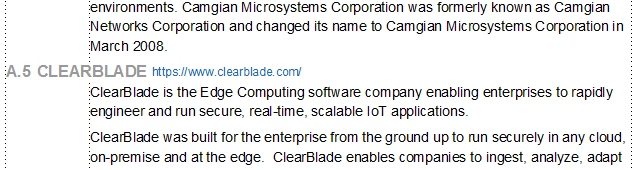
Content untouched by human hand, at least since colleague copy/pasted it from various websites. Leading not yet adjusted.

This topic has been closed for replies.
Correct answer Matt-Tech Comm Tools

Duplicate and rename the para tag used after the first A.5.

Set the dupe to use all columns and side heads.

Then proceed as you'd originally planned.

-Matt

1 reply

Matt-Tech Comm Tools
Community Expert
Matt-Tech Comm ToolsCommunity ExpertCorrect answer
Community Expert
August 9, 2018

Duplicate and rename the para tag used after the first A.5.

Set the dupe to use all columns and side heads.

Then proceed as you'd originally planned.

-Matt

-Matt Sullivan, FrameMaker Course Creator, Author, Trainer, Consultant
SchweineKarl
Inspiring
August 13, 2018

Hello FP,

I'm working on a dictionary where I have to separate the terms from the explanation.

Initially I wanted to use a side head, but that didn't work because of the different lengths of the terms.

Finally, I created a one-line table with 2 columns for each term and turned off the borders.

(See the screen shots, one is with borders and text symbols switched on; the other without them).

This way, I can just grab the divider and drag it to the right or left in order to make it flush with the length of the previous term.

One big advantage here, is that I don't have to mess around with changing Tab settings for each term.

The background color of the first column also serves to indicate how long the text block extends downward, which makes it easier to

see where one term ends and the next one begins.

Maybe you can use this in adapted form for your situation as well.

Regards,

Carel.

Legend
August 14, 2018

Thanks, Carl – there are some interesting ideas there … and your content looks like a lot more fun than mine ;-}