



Question
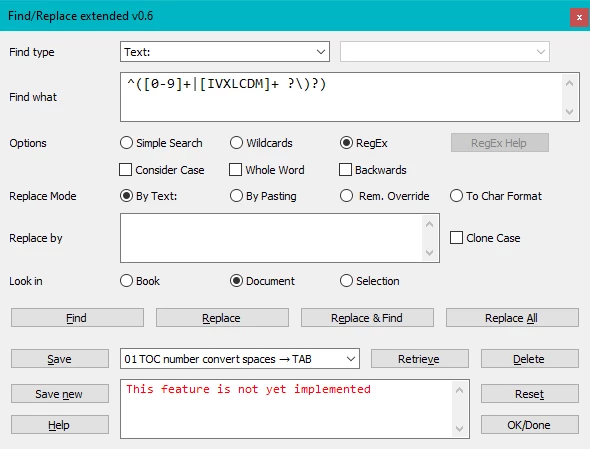
Script FMfindRepl version 0.6
Dear friends,
Even if this project may be to ambitious for my knowledge I’m at least one step further than what I presented Barb Binder in November.
- The script is intended for the unstructured interface. Any structure related find or replace stuff is left out.
- FMfindRepl v0.6 finds everything which I can handle (see the second page of the documentation (aka help file).
- The script does not yet replace anything. I see many challenges ahead. Just look at the famous comment by Russ Ward in https://forums.adobe.com/thread/895626: now, lets jimmy the text range in memory to place it directly.
- While the script reacts on the change of the active document (Notify function) it does not find in books or a selection.
- The help file currently displays the pdf “Developer-log”. Later it will open the according web-page.
- The RegEx support is rudimentary. It opens a web page.
- The script has only an English interface, even if you run it in a French FrameMaker. This will change towards version 1.0, because this will require fine-tuning the UI.
Nevertheless some features go beyond the standard Find/Change panel:
- Error messages and information about searched items is presented in an edit area rather than a separate dialogue which must be dismissed.
- The reason of the whole project was to save and retrieve settings by a name. The settings are kept in an xml file.
- When selecting a find category which comprises a catalogue (e.g. Character Tag) you get an additional drop down list to select from.
- The various options are enabled depending on the find category. This avoids dangerous or anyhow not used constellations. This required change of the drop-down lists for the Replacement modes to radio buttons.
Installation
- Download https://daube.ch/zz_tests/FMfindRepl.zip
- Expand the ZIP
- Copy file FMfindRepl.jsx and directory FMfindRepl into the Startup folder of FM
- File allerlei.fm (FM-15) is a test file containing all objects which can be searched for.
Usage
- With a document open you can invoke the panel by ESC q f d.
- While the panel is open you may switch to another document for further tests.
- Use the HELP button to get my developer-log pdf with a complete description of the UI.
Remarks
- Concerning the statement of Stefan in https://community.adobe.com/t5/framemaker/can-i-create-a-library-of-regex-searches/m-p/11451335 «For Find/Change there are "many to many" relations between find and change strings.» I try to conquer this by the table asFindType in file FMfindRepl_en.xml.
- Those looking into the code: it is my personal style. It is not yet streamlined: you find incomplete comments, duplicate portions and superfluous parts.
- Why two buttons: Save and Save new? See the docu, page 9.
- The project so far consumed 214 working hours.
Please send messages concerning errors directly to me.


 AdChoices