
Participant
February 26, 2020
Answered

Any way to change the language?

  • February 26, 2020
  • 2 replies
  • 4086 views

I'm on Windows 10 (on a Surface) and when I installed the app it set itself in spanish. I'm from a spanish speaking country so that may be the reason but I'm more comfortable using my programs in english and it's best for tutorials, so I wanna know how I can change the language since I'm not seeing the option anywhere...
Correct answer Sue Garibaldi

Hi Perg. 


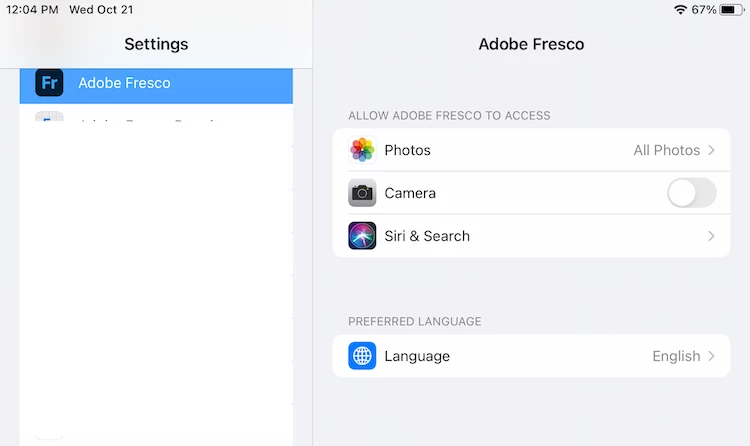
If you go to iOS Settings > Fresco you should see these settings:


If you don't, please make sure you're using the most recent version of Fresco. If you're using v2.0 of Fresco and still are not seeing it, please post a screenshot of what you do see. 


Sue. 

2 replies

Participant
May 9, 2020

I'm having the exact same problem. I've tried:

  • Changing every language setting in Windows to English
  • Changing my default installation language in Adobe Cloud to English
  • Changing my location for both Windows and my Adobe account to United States
  • Using a VPN set to United States to download and install Adobe Fresco

None of this has worked. Adobe Fresco is still installing in Spanish. Why don't we get to choose the language? It's ok to default the selection to Spanish if somehow you detect that might be a good option for us, but give us the option to change it (either during the installation or in the program's options).


Using professional software in a different language than the one you're used to (even if you are fluent in it) is a nightmare.

Sjaani
Community Expert
Community Expert
February 26, 2020

I don't believe there are language settings within Fresco. Does the Surface Pro have OS language settings which you could alter? Maybe there's something there which chooses the language for apps?

Inspiring
October 20, 2020

I am on iOS where many apps offer language settings. So that should not be difficult to implement. I'm swedish and I can say that the swedish "translation" is completely ludicrous! Lots of made-up words that are just confusing and ridiculous! Please make it possible to select english!! Please!!

Sue Garibaldi
Sue GaribaldiCorrect answer
Inspiring
October 21, 2020

Hi Perg. 


If you go to iOS Settings > Fresco you should see these settings:


If you don't, please make sure you're using the most recent version of Fresco. If you're using v2.0 of Fresco and still are not seeing it, please post a screenshot of what you do see. 


Sue.