
Fresco 2.7.1. – my brushes disappeared
Apparently, Fresco updated itself on my iPar Pro 11 to 2.7.1. Whatever it means. Anyway, a silly popup window appeared at first asking me to learn somethong about Fresco. Lol, thank you, but no, thank you. I have beee using this app for a while already. It would be nice if you'd fix this nonsense nag screen one day.
But it got even worse: most of my by brushes suddenly disapeared. They are still listed by their names. But the preview isn't here anymore, and tipping on such a ghost brush shows either no effect at all or this nichtssagend "bitte warten" rotating circle.
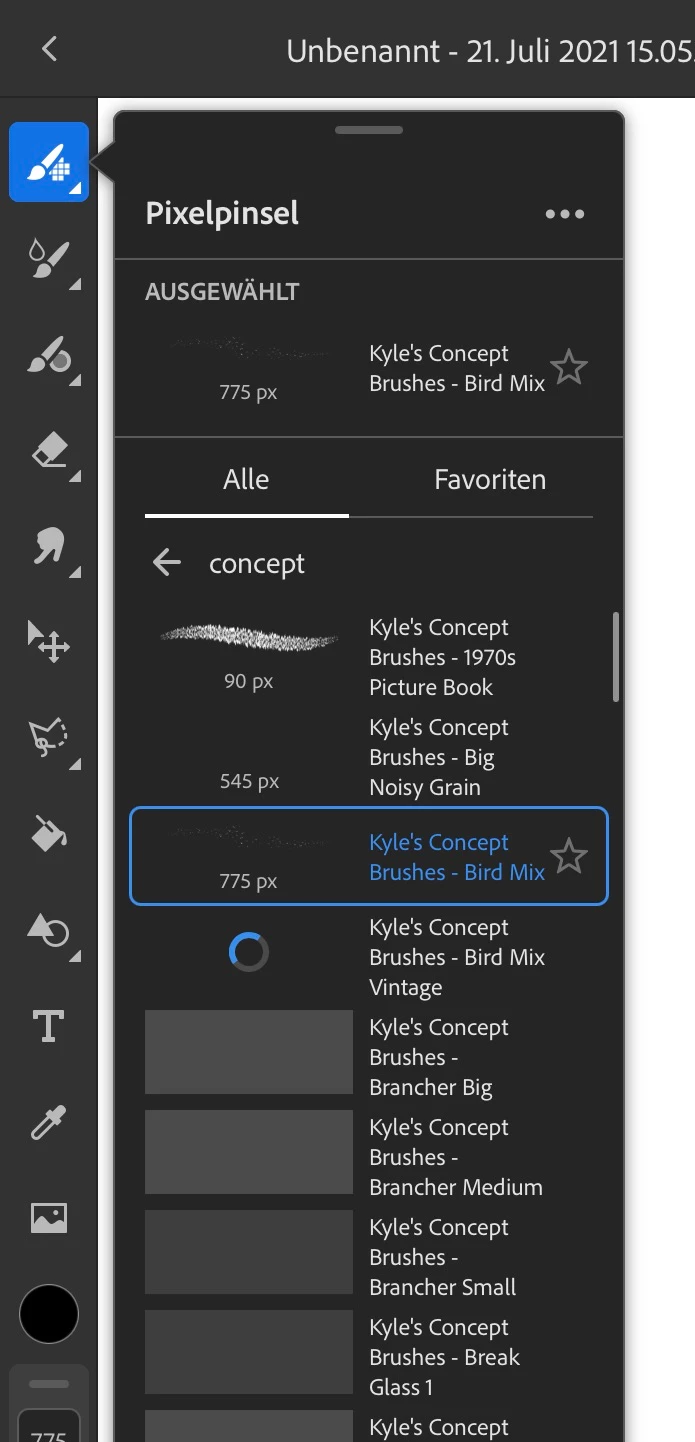
Now you may think, no problem, they have to be reloaded for some reason. Some ov them, actually, do appear after a while. Still, entire brush sets are still not appearing – after a day & night of waiting, while I left the app running for that reason. Loading tempo about 1 brushes per 10 minutes or alike. It does not look like the brushes come back to my iPad in this life. So there are some questions.
- What is the reason for this misbehaviour?
- Adobe, what are you going to do to fix it?
- Adobe, why don't you communicate in advance that such misbehaviour is likely to occur?
- How do I reload my brushes now?!
- How do I prevent this unwanted automated"updating" of this very APP in the future?
- Why didn't I use Pro Create for this project?
I am currently working on some illustrations and have to keep the timeline, which is now impossible with this non working app.
 AdChoices