Semi Neural
Participant
August 30, 2022
Answered

Fresco (Windows 10) is incredibly buggy

  • August 30, 2022
  • 1 reply
  • 290 views

The program is super fun to use but it has a LOT of bugs and stuff that are annoying:

PC specs:
CPU: i7-6700
RAM: 16GB, 2133mhz
GPU: Nvidia RTX 3070
OS: Windows 10 Pro

Some bugs and improvement suggestions:
1) Resizing brushes using [ and ] requires individual taps on the same key to go down or up by 1, so changing brush sizes is incredibly time consuming and ruining the workflow.
2) Installing new brush packs makes some of the features un-usable, for example CTRL+C/V.
3) Using the Fill tool crashes the program sometimes and will also make some features un-usable like in bug number 2.
4) Drawing a stroke with a brush and then undoing (CTRL+Z) will draw a random dot of the brush somewhere on the canvas, and everytime you undo it will place another dot in the same place and you need to keep deleting it which is incredibly annoying.

Hope I can get an answer soon! this program is amazing but really buggy.

This topic has been closed for replies.
Correct answer Anshul_Saini

Hi @Semi Neural,


We are sorry for the delayed response. Would you mind uninstalling the current GPU driver and installing the latest Nvidia Studio Driver to check whether that helps or not? Also, have you tried repairing or resetting the app or reinstalling the app from Creative Cloud?


For the issue of copy & pasting, we are unable to replicate it at our end.

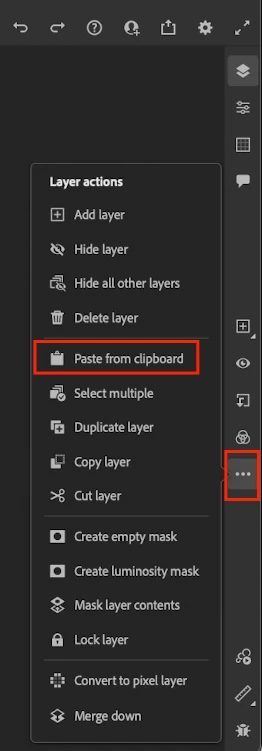
Please try the option "pasting from clipboard" under the Layer action menu in the meantime, or reopen the document to resume the copy & paste functionality using the keyboard shortcuts.


Moreover, for the resizing of the brushes using the keyboard is requested by many users. Would you mind upvoting this UserVoice & adding your comment there? This will help us prioritize the request.


Please try the sets I suggested above and let me know how it goes. I will be looking forward to your response.


Thanks & Regards,

Anshul Saini

1 reply

Anshul_Saini
Community Manager
Anshul_SainiCommunity ManagerCorrect answer
Community Manager
September 23, 2022

Hi @Semi Neural,


We are sorry for the delayed response. Would you mind uninstalling the current GPU driver and installing the latest Nvidia Studio Driver to check whether that helps or not? Also, have you tried repairing or resetting the app or reinstalling the app from Creative Cloud?


For the issue of copy & pasting, we are unable to replicate it at our end.

Please try the option "pasting from clipboard" under the Layer action menu in the meantime, or reopen the document to resume the copy & paste functionality using the keyboard shortcuts.


Moreover, for the resizing of the brushes using the keyboard is requested by many users. Would you mind upvoting this UserVoice & adding your comment there? This will help us prioritize the request.


Please try the sets I suggested above and let me know how it goes. I will be looking forward to your response.


Thanks & Regards,

Anshul Saini