
Participant
February 4, 2023
Answered

How do I make a fresco desktop shortcut?

  • February 4, 2023
  • 1 reply
  • 3306 views

I recently downloaded fresco and cant find a way to get the ico file, i made a shortcut for the app and added it to a folder with my other adobe apps but the ico I found is a different size and quiality, does anyone have the original file or can tell me where to find it?
This topic has been closed for replies.
Correct answer Anubhav M

Hello @Yiangos5CE7,


Thanks for reaching out. I am assuming you are trying to create a shortcut for Fresco on Windows. If so, kindly try the following steps and check if it helps:

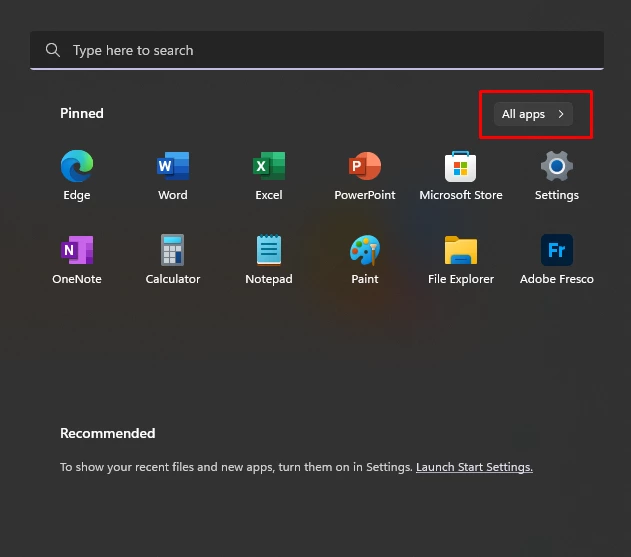
  • Open the Start menu, and click/tap on All apps.


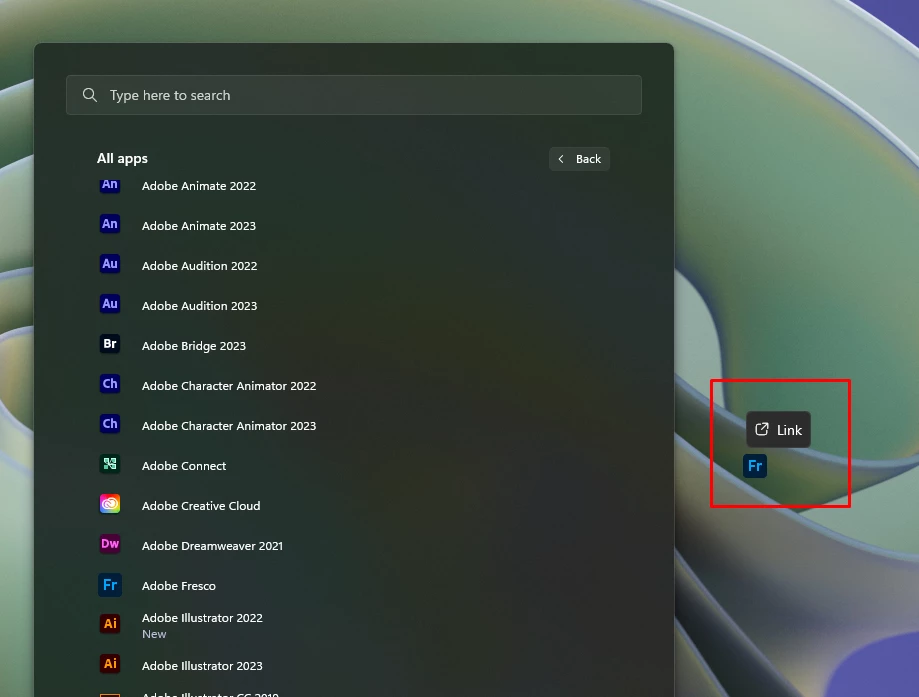
  • Drag an app (ex: "Adobe Fresco") you want from All apps to your desktop until you see Link above the app icon you are dragging, then drop the app on the desktop.


  • From there, you can move the shortcut to any location that you need.


Feel free to reach out if you have more questions or need assistance. We'd be happy to help.


Thanks,

Anubhav

1 reply

Anubhav M
Community Manager
Anubhav MCommunity ManagerCorrect answer
Community Manager
February 6, 2023

Hello @Yiangos5CE7,


Thanks for reaching out. I am assuming you are trying to create a shortcut for Fresco on Windows. If so, kindly try the following steps and check if it helps:

  • Open the Start menu, and click/tap on All apps.


  • Drag an app (ex: "Adobe Fresco") you want from All apps to your desktop until you see Link above the app icon you are dragging, then drop the app on the desktop.


  • From there, you can move the shortcut to any location that you need.


Feel free to reach out if you have more questions or need assistance. We'd be happy to help.


Thanks,

Anubhav