Answered
How to disable anti-aliasing on brushes?
As the title say, i want to disable antialiasing on pixel brushes, but idk how to, i'm running the free version of adobe fresco

As the title say, i want to disable antialiasing on pixel brushes, but idk how to, i'm running the free version of adobe fresco
Hello!
I don't think you can, I cannot be entirely sure because each brush comes with its own settings (they differ between brushes) and I have too many brushes to check them all. Definitely not on the basic ones such as pencil, charcoal etc...
If anything can be enabled/disabled, it will be situated in the brush settings (see screenshot)
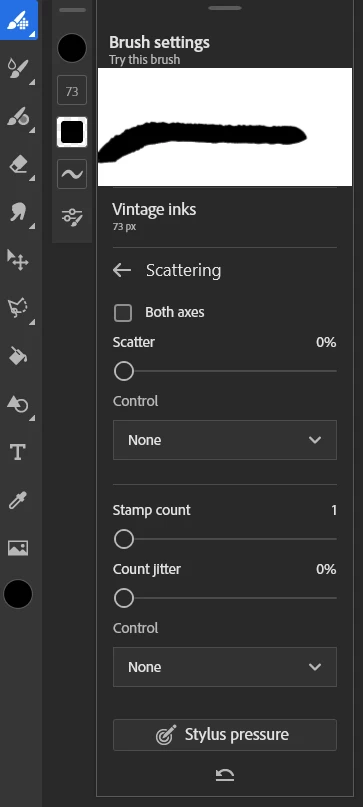
One thing you could do, is tweak an existing brush in Photoshop, and save it through your libraries.
In Photoshop you'll have way more control over what brushes do
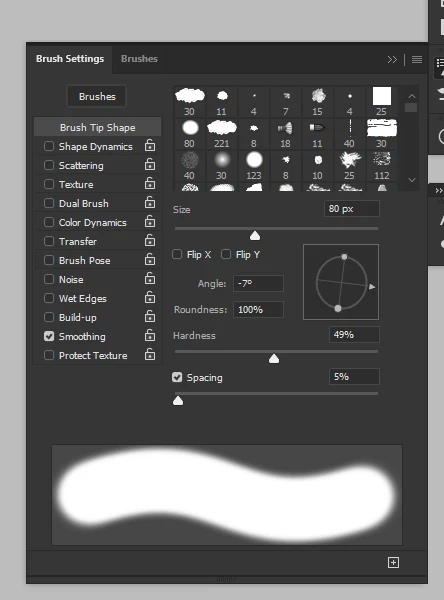
I hear there will be more options to create ones own brushes at some point, so maybe you can hang in there and see if future version enable you do do that.
see the "what's coming" section in the app settings

Already have an account? Login
Enter your E-mail address. We'll send you an e-mail with instructions to reset your password.
 AdChoices