
jörgr7461908
Inspiring
October 25, 2021
Answered

No pressure sensitivity on wacom intuos pro

  • October 25, 2021
  • 3 replies
  • 4886 views

Hi all,
the pressure sensitivity of my wacom intuos pro works perfectly well on all adobe CC programms except on Adobe Fresco. In the settings I find  the options for adjusting the pressure sensitivity, but no matter how I choose them, there is no change in the stroke that I can draw in the little test field. Unsurprisingly, the pressure I put on my pen has no effect on the stroke, whatever brush I use in a document.  Also tilting  shows no effects on the brushstrokes. I did play aroundwith the brush settings a lot, so far unsuccessfully.  


Is there any known procedure to get the pen sensitivity working with the intuos pro or did I just overlook an option to activate it in Adobe Fresco? 


Any of your help would be greatly appreceated!
This topic has been closed for replies.
Correct answer jörgr7461908

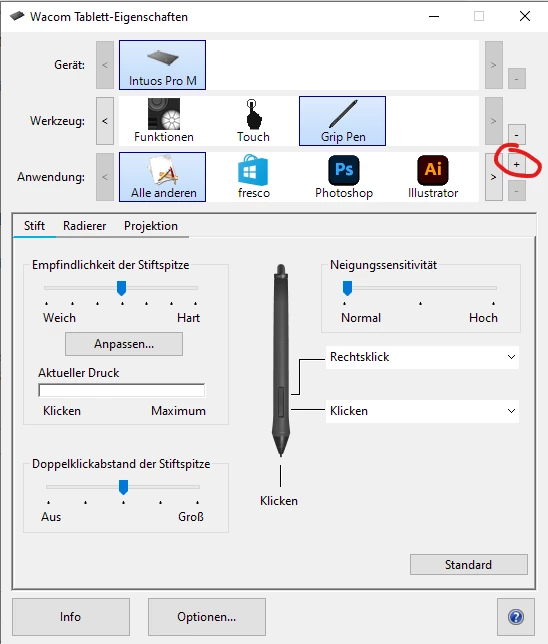
Hi Renato, once you launch the application, you can click on the "+" on the driver window. This will open a pop-up window from where you can select the desired application. 

3 replies

jörgr7461908
Inspiring
January 20, 2023

Hello to all of you!

Recently I also ran into severe problems with Illustrator. The program decided to crash without any notice right after opening a file and my first activities (choosing a font, drawing a path whatsoever). I found out, this would not happen, having my Intuos Pro Tablet unplugged. I uninstalled the latest drivers, reinstalled the last version I remembered working without this issue (WacomTablet_6.4.0-10). I plugged in the tablet again and Illustrator worked fine again. And as an extra bonus I found the missing pressure sensitivity in Fresco working like a charm (provided that the windows ink option in the tablet driver is activatet for fresco!) So, at least for me the problem seems to be solved. I hope this helps some of those among you, who encountered the same problems! Cheers, Jörg.

Participant
November 18, 2021
I had the same problem but now, it works.  


Community Expert
October 26, 2022

Sometimes it can get dicey with Tablet drivers.  I don't have too much problem with Wacom, I had problems with Huion Drivers randomly turning itself off without warning.

Anshul_Saini
Community Manager
Community Manager
October 27, 2021

Hi there,


Sorry about the trouble. We are unable to replicate the issue. We checked on Windows 11 with Wacom Intuos Pro, and the stylus pen pressure is working. I would request you to share a few more details like:

  • OS, its build no. and version of Fresco.
  • Please check the app settings under Stylus pressure "Test area" with the default settings (reset if changed). The stronger the pressure you apply, does the stroke get thinner?
  • Is this happening with a specific brush or all?
  • Does reinstalling the Wacom tablet driver or Fresco help resolve the issue?


Also, have you tried the Wacom troubleshooting steps for pen pressure (https://support.wacom.com/hc/en-us/articles/1500006343962-Why-is-my-pen-pressure-not-working-)?


We are here to help. We just need more information.


Regards,

Anshul Saini

jörgr7461908
Inspiring
October 28, 2021

Hello Anshul Saini,

Thank you for your reply!


The operating system is Windows 10 (Edition Windows 10 Pro | Version 20H2 | Systembuild 19042.1288).

The tablet is a Wacom Intuos Pro M (Model: PTH-651 | Version 1.0.0209)

After yesterday´s update I am running Fresco 3.0.1. But the problem is still here and it occured from the first version on.


A change in the settings as well as a reset of the Stylus pressure-settings does not show any effect in the test area. I can only produce a constant stroke, no change in thickness whatsoever. 


This is not dedicated to a specific brush, there is no pressure-response on any of the brushes in Fresco.


As of today no reinstallations or resets of Fresco or the Wacom drivers have made the difference.


The pen pressure is working fine in Photoshop, Ilustrator and all other applications where supported. Sadly, just Fresco somehow is refusing to cooperate properly.


Thanks again for your efforts!

Best regards, Jörg.

Rohit Guglani
Adobe Employee
Adobe Employee
October 28, 2021

Hello Jörg,


Thanks for the additional details. Will it be possible for you to share a video with us, we are not seeing any issues on Fresco side and it should work same as it's working in Photoshop & Illustrator. 

Also, can you check on Wacom Desktop Center if there are any new drivers which need to be installed? We tried on Wacom driver version 6.3.44-3. 


Thanks for your support,


Rohit