
Inspiring
July 4, 2023
Answered

Paint Bucket Doesn't Fill Selection Fully
  • July 4, 2023
  • 1 reply
  • 954 views

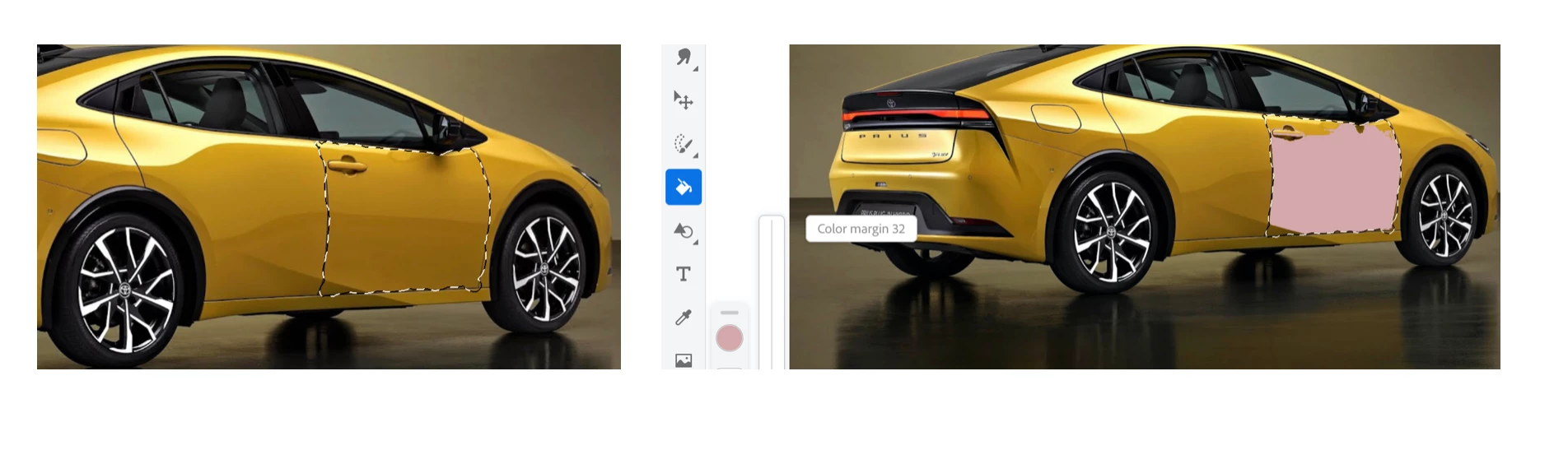
So what is going on here? I made a selection as shown on the L. Then I use the paint bucket to fill in the selection and instead of getting a complete fill, it's only a partial fill. Notice the unfilled areas at the top and bottom L of the selection. Now if I tap all these areas, they do get filled but shouldn't the initial tap in the selection fill it completely?

This topic has been closed for replies.
Correct answer thejanebradbury

When you have the Fill tool increase the Color Margin option - I can just see it in your screenshot. The higher the number the more of the area it will fill.

1 reply

thejanebradbury
Community Expert
thejanebradburyCommunity ExpertCorrect answer
Community Expert
July 5, 2023

When you have the Fill tool increase the Color Margin option - I can just see it in your screenshot. The higher the number the more of the area it will fill.

ttibsenAuthor
Inspiring
July 6, 2023

Yes - that worked. Putting up the color margin to the top 10% of the scale did fill it completely. Thanks for pointing that out JB.