
October 1, 2019
Answered

Palm rejection

  • October 1, 2019
  • 5 replies
  • 18112 views

Good evening. 

I tried doing a search before posting this question but didn't have any luck. So.... Does Adobe Fresco support Palm Rejection? I found answers for other Adobe applications but didn't find any postings about this in Fresco. Thanks in advance for your help. 
Correct answer Michael J. Hoffman

Hi Boomer,


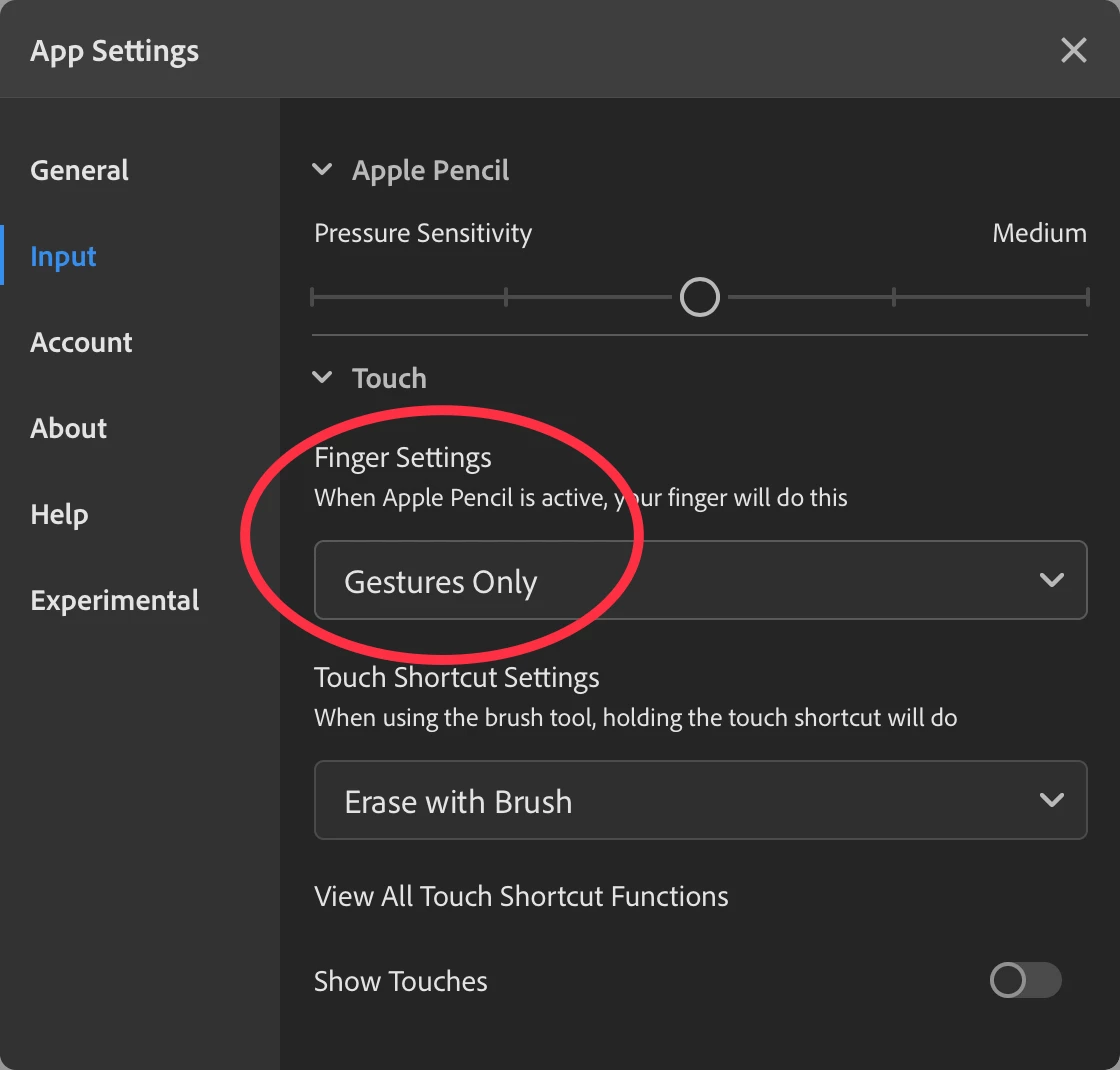
If you're drawing with Apple Pencil, palm rejection isn't needed if you change the settings to draw with Pencil only. If you're not using Apple Pencil, I'm not quite sure what the palm rejection capability is. Perhaps an Adobe person could comment on that.


5 replies

Participant
October 12, 2024

I know this thread is a bit old but its been 5 years since so id like to ask, does adobe fresco still only support apple pen? I have gotten a surface pro recently and i was wondering if i could use the surface's slim pen to draw.

Anshul_Saini
Community Manager
Community Manager
October 15, 2024

Hi @RafaelOliveira02,


I totally understand your concern! I checked the system requirements, and it shows that the Surface Pro and Surface Pen are supported for Fresco. However, it doesn’t specify individual pen models like the Slim Pen. You could definitely give it a try and see how it performs—and if it works well, we’d love to hear your feedback in the community!


Let us know if you have any other questions!


Best,

Anshul Saini

Participant
October 16, 2024

Hello Anshul,

i have been using fresco for 2 days now and it seems to work fine. there is no compatibility issues that i have noticed.

Participant
April 14, 2020

Hallo. Im using Apple Pencil nas palm rejection is needed. 
i have same settings as you have and still this is happening:

Participant
August 31, 2020

This is happening to me too but on a different app. Were you able to figure out what the problem was?
Thanks. 

Participant
November 13, 2020

Same.  Any answers?

Participating Frequently
November 6, 2019

Bumping this because this seems to have gotten worse.  Every single time I rest my palm on my screen, the Undo action is activated. It's almost rendering Fresco unusable.  My settings look exactly like the screenshot above.  Any fixes yet?

Community Expert
December 27, 2019

Are you using an iPad or the Windows version?  I know there was a app update not too long ago,  but  I don't know if it addressed that. The next update won't happen until after the first of the year,  when the Adobe offices reopen after the holiday break

Richards Gallery
Known Participant
December 27, 2019

I'm using an iPad Fresco version 1.2.1 and still get random undo's.  I'm not 100% sure but it seems to happen if I resize or rotate the canvas.  It would also be nice if someone from Adobe acknowledged the problem

Community Expert
October 2, 2019

Like what Michael said.   With drawing apps on the iPad using Apple Pencils regardless of who it is,  its a good rule of thumb to go into the preferences and change the touch to genstures only or something like that if you want to completely turn on palm rejection

Michael J. Hoffman
Community Expert
Michael J. HoffmanCommunity ExpertCorrect answer
Community Expert
October 1, 2019

Hi Boomer,


If you're drawing with Apple Pencil, palm rejection isn't needed if you change the settings to draw with Pencil only. If you're not using Apple Pencil, I'm not quite sure what the palm rejection capability is. Perhaps an Adobe person could comment on that.


Sue Garibaldi
Community Manager
Community Manager
October 1, 2019
Thanks Michael. Apple Pencil is the only pressure-sensitive stylus supported in Fresco.