
drevious
Participant
April 27, 2024
Answered

PC Windows Ink pen issue

  • April 27, 2024
  • 4 replies
  • 3039 views

Hi all.


So all problems people are having here in terms of "performance" (which is only lag, not performace in the end) is a common problem with Photoshop as well and Windows Ink and Wacom tablets. With Photoshop you can just fix it with simple txt file placed into Photoshop folder that force system to think Ink is on but you than turn it off in Wacom Settings resulting in having no lags and all pressure sensitivity settings working in Photoshop.


But here in Fresco is different case becuase I guess trick with txt file doesnt work (anyone knows where Fresco is installed on PC? I honestly can't find it since it's installed somewhere by Creative Cloud...), so Fresco is unusable on PC. Lags with Windows Ink are too big and without it it loses all pen features. Adobe try to make some fix please.


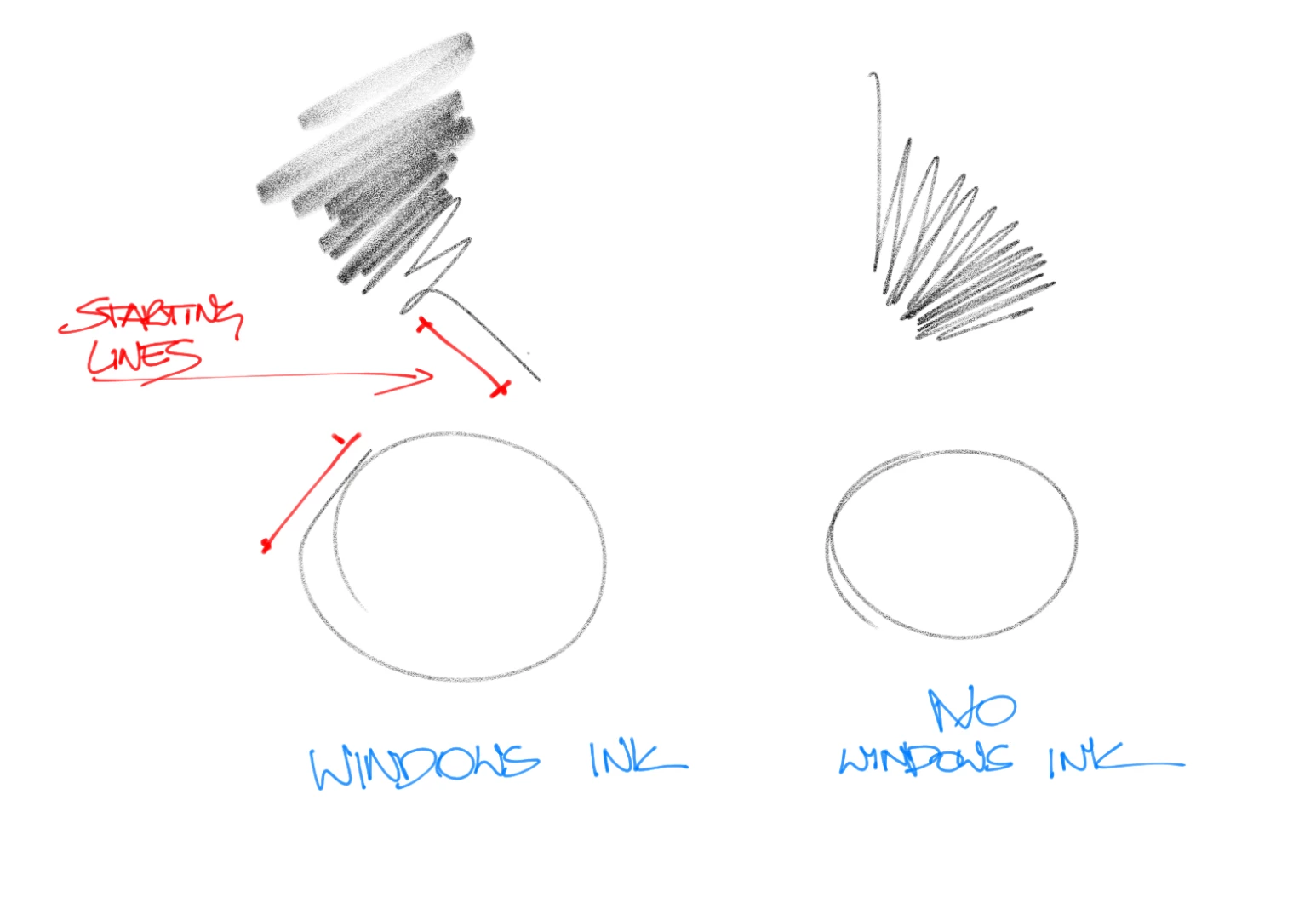
Left side lines with Windows Ink on, lag before start making straight lines, on right without Windows Ink. Buttery smooth but no angle and pressure sensitivity...


Correct answer Mr.24792498on26

UPDATED
FIXED IT!!

So I dont know whats going on driver-wise but here is how i fixed it:
-Go to settings>bluetooth & devices>Pen & ink
Then turn on "let me use my pen as a mouse when its available'' inside ''Aditional Pen setiings"

-You also need to turn on "Use your handwriting to enter text" in the ''Shell Handwriting" section
-Then restart your pc and that should solve it.

Hope this works for others!

4 replies

Mr.24792498on26Correct answer
Participant
May 16, 2024

UPDATED
FIXED IT!!

So I dont know whats going on driver-wise but here is how i fixed it:
-Go to settings>bluetooth & devices>Pen & ink
Then turn on "let me use my pen as a mouse when its available'' inside ''Aditional Pen setiings"

-You also need to turn on "Use your handwriting to enter text" in the ''Shell Handwriting" section
-Then restart your pc and that should solve it.

Hope this works for others!

Ultimatebeetle
Inspiring
July 9, 2024

Thank you!!!!!! It was very frustrated......

Participant
May 16, 2024

Fixed it, so I dont know whats going on driver-wise but here is how i fixed it:
Go to settings>bluetooth & devices>Pen & ink
Then turn on "let me use my pen as a mouse when its available'' inside ''Aditional Pen setiings"

Hope this works for others!

Participant
May 16, 2024

same here, this is literally the only post i've seen about it!!! Adobe please fix this!!!

Community Manager
April 29, 2024

Hello @drevious,

We understand that encountering technical issues can be frustrating. Would you mind performing a clean reinstallation of the Wacom drivers by following the steps shared in this help article (https://adobe.ly/3xQjXTu) and checking if it helps?

Looking forward to hearing from you.


Thanks,

Anubhav