
Participant
August 21, 2023
Answered

Sync Discontinuation 2024... how does Fresco even work, then?

  • August 21, 2023
  • 2 replies
  • 1874 views

Can someone explain - how does Fresco even continue to work without cloud sync? It's a fundamental part of how the app functions. I pay a premium for cloud storage. When I draw something, Fresco takes it off my iPad and syncs it to the cloud whether I want it to or not. I don't get a say in this process. If I want to edit that drawing in 6 months, Fresco pulls it down from the cloud and opens it. I think only the "Recent" files are stored locally, temporarily.

So if Adobe is discintinuing cloud sync services... I mean, can I even download a hundred files locally, if Fresco will only hold onto a dozen recent files? Sure, I could export PDF backups to a drive, but that just rescues the art, it doesn't solve where my actual Fresco project files live, and how I get them back onto the glass in the future?  As I create more work in 2024 does it just save locally? And when I run out of local storage, how do I backup a Fresco project file so that I can still work with it in the future? 

Getting really tired of Adobe pulling the rug out from under me every other year. Ideas, Draw, Fresco, this whole product evolution has been a service train wreck.
This topic has been closed for replies.
Correct answer thejanebradbury

The ability save files created in Fresco to the Cloud is not going away. Files with the .psdc or .aic (for Illustrator) etc save to the Cloud as usual, syncing across devices. 


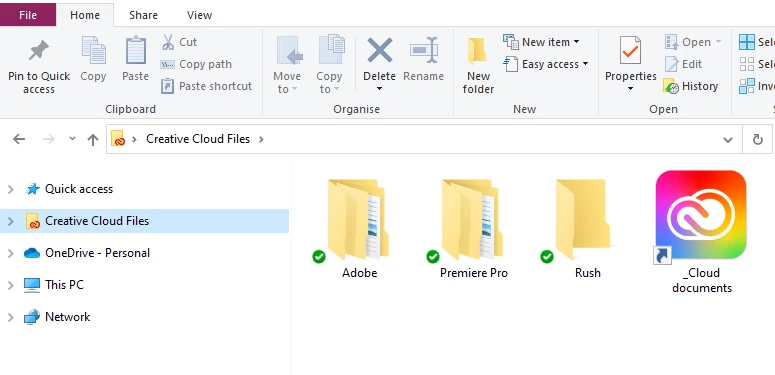
The Synced Files discontinuation is for the folder that we see on our hard drives called Creative Cloud Files. That worked exactly like One Drive or Dropbox; save any type of file in it to see it on other devices and share it. That isn't where Fresco, or Photoshop etc cloud files are saved.

2 replies

thejanebradbury
Community Expert
thejanebradburyCommunity ExpertCorrect answer
Community Expert
August 22, 2023

The ability save files created in Fresco to the Cloud is not going away. Files with the .psdc or .aic (for Illustrator) etc save to the Cloud as usual, syncing across devices. 


The Synced Files discontinuation is for the folder that we see on our hard drives called Creative Cloud Files. That worked exactly like One Drive or Dropbox; save any type of file in it to see it on other devices and share it. That isn't where Fresco, or Photoshop etc cloud files are saved.

Sjaani
Community Expert
Community Expert
August 22, 2023

One can only guess that they will have an alternative solution in the works. Whether Fresco becomes a save locally product or not we won't know until Adobe releases more information.

Beyond that this article does tell you that the files will continue to be in your local Creative Cloud Files folder, but no longer synced to their cloud. So 3rd party cloud options would be required for sharing.