Exit
  • Global community
    • Language:
      • Deutsch
      • English
      • Español
      • Français
      • Português
  • 日本語コミュニティ
  • 한국 커뮤니티
1

Missing CoreSync Library ?

Community Beginner ,
Apr 25, 2015 Apr 25, 2015

I'm using OSX Mavericks.

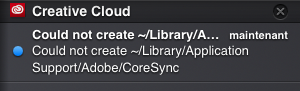
While installing Creative Cloud, I'm getting the notification "Could not create -Library/Application support/Adobe/CoreSync.

The installation process then stops..

How to proceed ??

Thx

Capture d’écran 2015-04-25 à 19.27.46.png

TOPICS
Creative Cloud
15.2K
Translate
Report
Community guidelines
Be kind and respectful, give credit to the original source of content, and search for duplicates before posting. Learn more
community guidelines

correct answers 1 Correct answer

LEGEND , Apr 25, 2015 Apr 25, 2015

Please follow below steps :

1) Right click on Finder icon and  select "Go-To" Folder option.
2) You will get a text box, type-in below command and then hit 'Return' key.( Do not miss ~ symbol)

~/library

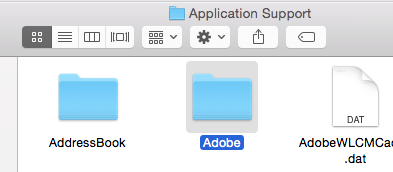
3)Then navigate to Application Support>Adobe

.

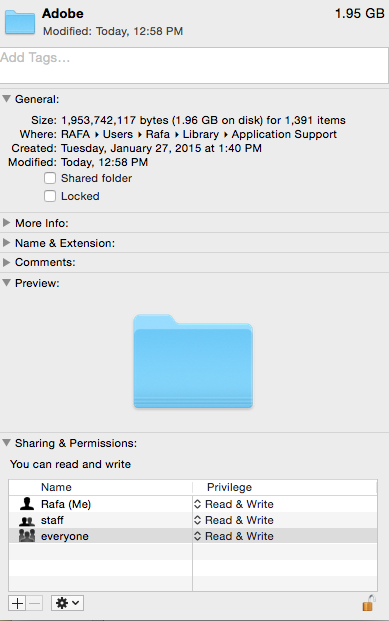
Right click on Adobe folder and select "GetInfo" option.

Expand the Sharing & Permissions section.

Click the lock icon in the lower-right corner. Enter your administrator user name and password when prompted, and then click OK.

Please click on '+' symbol

...
Translate
LEGEND ,
Apr 25, 2015 Apr 25, 2015

Please follow below steps :

1) Right click on Finder icon and  select "Go-To" Folder option.
2) You will get a text box, type-in below command and then hit 'Return' key.( Do not miss ~ symbol)

~/library

3)Then navigate to Application Support>Adobe

.

Right click on Adobe folder and select "GetInfo" option.

Expand the Sharing & Permissions section.

Click the lock icon in the lower-right corner. Enter your administrator user name and password when prompted, and then click OK.

Please click on '+' symbol , it will open list of user accounts. Add Currently logged in user name and Administrator option,

Then provide "Read & Write" permission to Currently logged in user name and Administrator option,.

Click the Gear icon, and select Apply to Enclosed Item. Close the Get Info dialog box.

Then try to install Creative Cloud app , you should be able to install ,

Still face any issue?? feel free to post

Translate
Report
Community guidelines
Be kind and respectful, give credit to the original source of content, and search for duplicates before posting. Learn more
community guidelines
Community Beginner ,
Apr 26, 2015 Apr 26, 2015

It's ok, Thank you for your support !!!!

Translate
Report
Community guidelines
Be kind and respectful, give credit to the original source of content, and search for duplicates before posting. Learn more
community guidelines
LEGEND ,
Apr 26, 2015 Apr 26, 2015

You are welcome

Translate
Report
Community guidelines
Be kind and respectful, give credit to the original source of content, and search for duplicates before posting. Learn more
community guidelines
Community Beginner ,
May 07, 2015 May 07, 2015

I still have this issue. I don't understand why? it was with an update. It worked fine before but once the update hit i got this issue. I thought it would be fixed with lightroom CC but i still get the same issue


IScreen Shot 2015-05-07 at 1.07.26 PM.pngScreen Shot 2015-05-07 at 1.08.06 PM.png

Translate
Report
Community guidelines
Be kind and respectful, give credit to the original source of content, and search for duplicates before posting. Learn more
community guidelines
Community Beginner ,
May 07, 2015 May 07, 2015

Never mind, once I started using some logic I concluded i'd read my exact error. I was having an issue with the READ AND WRITE of the lightroom folder in ApplicationSupport>Adobe>Lightroom

I fixed those because that folder was all jacked up. Thanks adobe for making folders with screwed up permissions!

Translate
Report
Community guidelines
Be kind and respectful, give credit to the original source of content, and search for duplicates before posting. Learn more
community guidelines
New Here ,
Mar 05, 2016 Mar 05, 2016
LATEST

you are a hero

Translate
Report
Community guidelines
Be kind and respectful, give credit to the original source of content, and search for duplicates before posting. Learn more
community guidelines
New Here ,
Nov 28, 2015 Nov 28, 2015

Thank you!  After a few months of trying to figure this out your plan of action worked.  Thank you so very much.

Translate
Report
Community guidelines
Be kind and respectful, give credit to the original source of content, and search for duplicates before posting. Learn more
community guidelines