
Edu Couchez
Inspiring
August 4, 2025
Open for Voting

P: Photoshop 26.10 Selective Color UI Changed

  • August 4, 2025
  • 30 replies
  • 2698 views

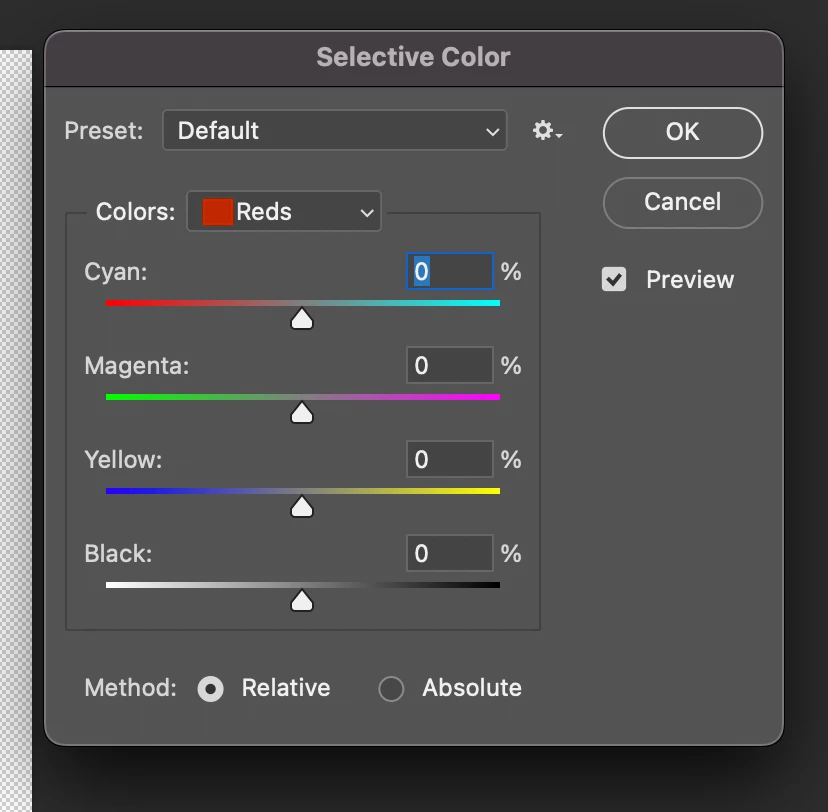
So... one of the best Photoshop tools I've used for decades for color correction has been replaced overnight by a duplicate of "Color Balance." I can't simply no longer correct individual colors as I did intuitively before. Why has a tool that worked perfectly been destroyed? The change has been so disastrous and counterintuitive that I can only think it's a silly programming error!
30 replies

Inspiring
November 19, 2025

The bug it has introduced is worse.

Sliders reset all of a sudden or the changes won't get applied after clicking ok. 

Very annoying.

Version 27.0 btw.

slvnk
Inspiring
November 3, 2025

best! Thank you!

davescm
Community Expert
Community Expert
October 31, 2025

@Scott_BFAR I see no 'defending' in my replies. In fact, if a bug report or idea is seen as attack and defense then it will not go anywhere. What I did do was point out that, despite the UI changes, the functionality behind selective colour which I use every day had not changed, but then invited others to show what functional changes they were seeing. Some did so, and the difference was that I use selective colour as an adjustment layer, those that were pointing out further changes behind the UI were using it from the menu. That is a useful data point for Adobe's developers which did not come out in the original 'idea'.


So please do not accuse me of posting my own experience with the UI for the adjustment layer, which I don't see as OK but which I can ignore, with the wider issues which came to light later in the thread.

Dave

Inspiring
October 31, 2025

I see Davescm defending Adobe's move on this and saying nothing has changed, but in fact it has. I do art reproduction, and selective color has been one of my most used tools. It doesn't behave the way it did before, and the UI is different in two different places, as has been pointed out here. 


This was a poor move on Adobe's part. I strongly dislike this change. I would word it stronger if not for the rules of the forums here, if you get my point. This was just a terrible and confusing change that didn't need to happen. 


The previous UI mimicked four color printing more than RGB monitor and was very convenient and easy to understand. After some time with the new UI, I still find it confusing. The fact that the UI is different in two different places is just super poor UI management. 


Note that the ONLY person on this thread that sees this as OK is Adobe's community expert. Not a single user here has said they like it. 

Participant
October 29, 2025

@Sameer K 

I updated, nothing has changed.

Participant
October 29, 2025

@Semaphoric this does not work. It's still the same after unchecking the "Modern user Interface" and restarting photoshop. Is there any solution?

Sameer K
Community Manager
Community Manager
October 29, 2025

Hey, @katres27083183. Photoshop 27.0 is now available via the Creative Cloud desktop app. Please update via the Creative Cloud desktop app, and check how it goes from there. 


Thanks!
Sameer K
(Type '@' and type my name to mention me when you reply)

Participant
October 29, 2025

This does not work.

terri@flow
Participant
October 17, 2025

Whyyyyy oh why did you mess with my selective color tool? It was beautiful as it was and this new slider is driving me nuts. It most definitely is NOT working the same and I can't simply "ignore it." The results are very different and I find it impossible to get the result I'm trying to see. Is there no way to revert to legacy?

PECourtejoie
Community Expert
Community Expert
October 16, 2025

FYI, I use 26.6 at work, no choice, and CTRL+3, 4... works to change the colors, in the image>Selective Color. CTRL+1 and CTRL+0 does scale the interface.

Participant
October 10, 2025

When you have to correct about 250 images, you don't want to use re-editable adjustment layers.
I only make small corrections for fine-tuning and I don't have time for the 'modern way'.