
Inspiring
July 25, 2021
Answered

3D revolve creates shape with white lines?

  • July 25, 2021
  • 2 replies
  • 746 views

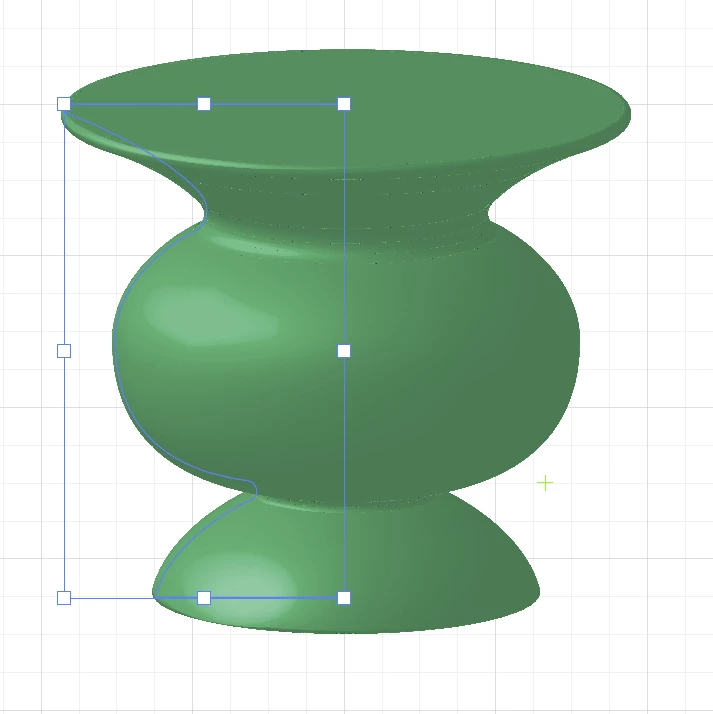
I use 3D revolve to make a vase. The resulting vase has some very fine white gaps. They are not evenly spaced. They are more pronounced at concave areas. It's hard to see almost like perforations. If I zoom in, the vase gets bigger but the gaps don't.

How do I get rid of these gaps?
This topic has been closed for replies.
Correct answer michelew83603738

What is your output? These gaps don't really exist and often will disappear if you simply move the object on the artboard or they may get bigger. It is a preview problem. Just output it to the medium you wanted and you shouldn't have a problem.

2 replies

michelew83603738
Community Expert
michelew83603738Community ExpertCorrect answer
Community Expert
July 25, 2021

What is your output? These gaps don't really exist and often will disappear if you simply move the object on the artboard or they may get bigger. It is a preview problem. Just output it to the medium you wanted and you shouldn't have a problem.

Inspiring
July 26, 2021

I exported the ai file to a jpg and those white gaps are still there. If this is merely a preview issue, then how do I get the real view?


Is there a renderer like a 3D program that I need to activate?

Monika Gause
Community Expert
Community Expert
July 26, 2021

Which antialiasing did you use?

Try Object optimizied (Supersampling), not Type optimized

carlosgarro
Community Expert
Community Expert
July 25, 2021

Hi.

It's a glitch in the preview.

Do not worry about it.

Check my sample here.