
Known Participant
November 5, 2018
Question

4 years after initially reporting this bug...it's still here

  • November 5, 2018
  • 3 replies
  • 784 views

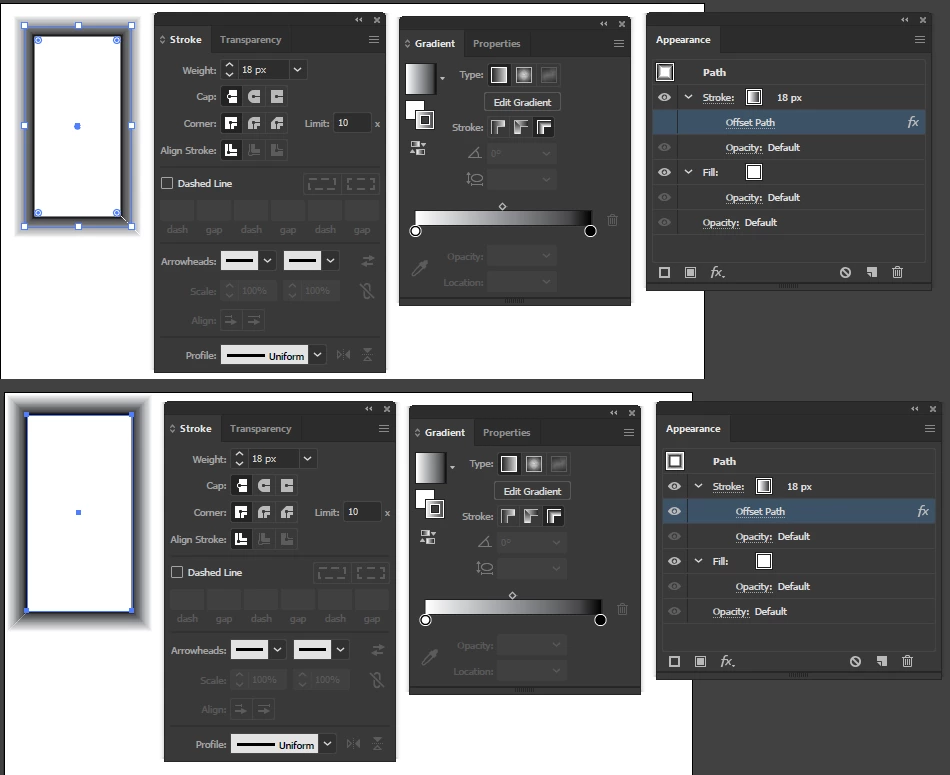
Such a simple thing that I have to do all the time in my line of work. Stroke an object with a gradient then put that on the outside of the object. Hasn't worked since they added gradients to strokes. And I have reported it, begged for it, and even demonstrated the bug to adobe at trade shows.

I even made a workaround, so I know it must be possible? Work around - make a stoke then offset it. fairly easy but every time I change the width of my stroke I have to also change the offset. I know it doesn't sound hard...but why go through this every time?

Here's an image.... top shows how I can't align 18 pt. stroke to outside, bottom shows it offset 9 pts.
    This topic has been closed for replies.

    3 replies

    hammer0909
    Community Expert
    Community Expert
    November 5, 2018

    Yes in CC 2019 it's still not possible. Do you typically apply a stroke size at consistent weights? Adding to your workaround, I'd create a graphic style for each stroke weight that you use so you can apply the formatting in one click.

    Known Participant
    October 1, 2019
    New version and still broken, even after getting an email response from Adobe support saying that the problem was fixed?
    barbara_a7746676
    Community Expert
    Community Expert
    November 5, 2018

    Using Illustrator CC 2019, release 23.0.1, I tried putting a gradient stroke on an object and it worked just fine. Looks like the issue was fixed in release 23.0.1, which was released only a day or two ago.

    Known Participant
    November 5, 2018

    Yes you can do a gradient, but not a gradient across stroke. (Gradient panel Strokes third icon)

    barbara_a7746676
    Community Expert
    Community Expert
    November 6, 2018

    I see what you mean. That feature is frustratingly still not available.

    Here's another clunky workaround suggestion. In the Appearance panel you could add multiple strokes of different weights, with the widest stroke on top of the stacking order. If you change the size of the objects, to make it smaller, hide the larger stroke, something like this.

    Jacob Bugge
    Community Expert
    Community Expert
    November 5, 2018

    Chris,

    Have you tried reporting it here?

    https://illustrator.uservoice.com/

    Known Participant
    November 5, 2018
    Doug A Roberts
    Community Expert
    Community Expert
    November 5, 2018

    I would guess it's just not getting enough votes to be prioritised. A shame as I would love all the little inconsistencies like this to be fixed.