
Known Participant
May 31, 2019
Answered

Accurately resize repeat pattern artwork to a larger artboard/tile size

  • May 31, 2019
  • 3 replies
  • 5784 views

I have a 'tile' which I created a few years ago at a (now seems) random document/artboard size and I want to transfer my patterns from the old tile/artboard size to a new (rounded number 0f 40mm) size.

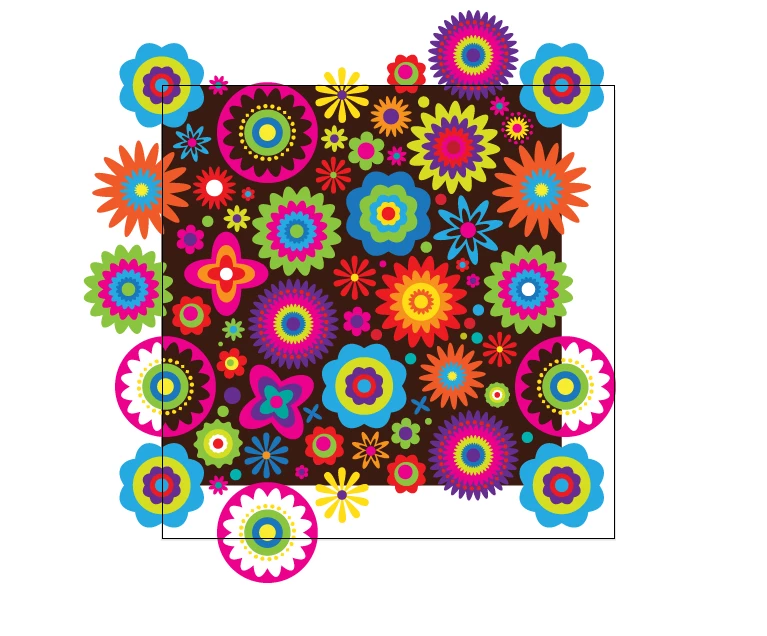
I have to make sure that the pattern resizes perfectly, if it doesn't the tiles won't match up and my repeat pattern will look bad, so my question is, (using the screen snap attached as reference, the square outline being my new 40mm artboard/tile size and the black square being my previous tile/artboard size) is there a way I can resize the black background and the all of the pattern to fit the new tile/artboard size perfectly please?

I realise that if it was just the black square alone I could set it the X and Y co-ordinates a 0 and make the box 40mm x 40mm but the flowers are the tricky bit and the spill over the black box (until I crop them to make the finished tile for repeating) and therefore to select all of it and set X and Y at 0 won't be correct.

What ideally I need to do is select everything and just resize the black area with the flowers following along so once the black box is in place if the flowers have followed the resizing and repositioning of the black box then the flowers will be in the exact position they need to be to make a perfect tile.

I hope I am explaining this clearly!

Any help would be greatly appreciated.
This topic has been closed for replies.
Correct answer Jacob Bugge

Miss Sparkles,

In 3), with the top left Reference point chosen (to keep the top left corner in place), after the value in the W box insert first * (to multiply) then 1.1338 (the value to reach the 40) and press Ctrl/Cmd+Enter to retain proportions.

3 replies

Ton Frederiks
Community Expert
Community Expert
June 4, 2019

Good to hear that was helpful.

Ton Frederiks
Community Expert
Community Expert
May 31, 2019

MissSparkles75  wrote

I have a 'tile' which I created a few years ago at a (now seems) random document/artboard size and I want to transfer my patterns from the old tile/artboard size to a new (rounded number 0f 40mm) size.

Be careful when using mm for the tile size.

If you ever want to export the tile as an image (pixel) format, 40mm will result in extra, unwanted pixels.

40 mm becomes 113,3858 px. Because a fraction of a pixel does not exist, the resulting tile wille export like this:

adding extra transparent pixels to the tile.

If you want to export as an image It would be better to use point or pixels as the unit.

113 px would not give you the unwanted pixels when exported at 72 ppi or a multiple of 72, but the mm size would be 39,864.

Known Participant
June 4, 2019

Thanks Ton, that is excellent, invaluable advice, I didn't know that, I shall resize the tile to be 113 pixels so I don't get any unwanted pixels. Thanks so much.

Jacob Bugge
Community Expert
Community Expert
May 31, 2019

Miss Sparkles,

As I (mis)understand it, you can just us the Transform palette, click the top left Reference point (to the left) and have Scale Strokes and Effects ticked (in the (flyout) options), then:

1) Click the black rectangle and see the present W (or H) value,

2) Determine the desired scaling factor (40 mm divided by the present value from 1)),

3) Add * followed by the scaling factor from 2) to the W value and press Ctrl/Cmd+Enter.

Always keep a copy of the original artwork before making such changes.

Known Participant
May 31, 2019

Thank you Jacob, though sorry you've lost me after point 2, so the percentage I need to scale up by is 113.38% can you just elaborate on what I have to do next please?

Jacob Bugge
Community Expert
Jacob BuggeCommunity ExpertCorrect answer
Community Expert
May 31, 2019

Miss Sparkles,

In 3), with the top left Reference point chosen (to keep the top left corner in place), after the value in the W box insert first * (to multiply) then 1.1338 (the value to reach the 40) and press Ctrl/Cmd+Enter to retain proportions.