


- Home
- Illustrator
- Discussions
- Re: Adding a background effect to a seamless patte...
- Re: Adding a background effect to a seamless patte...
Adding a background effect to a seamless pattern

Copy link to clipboard
Copied
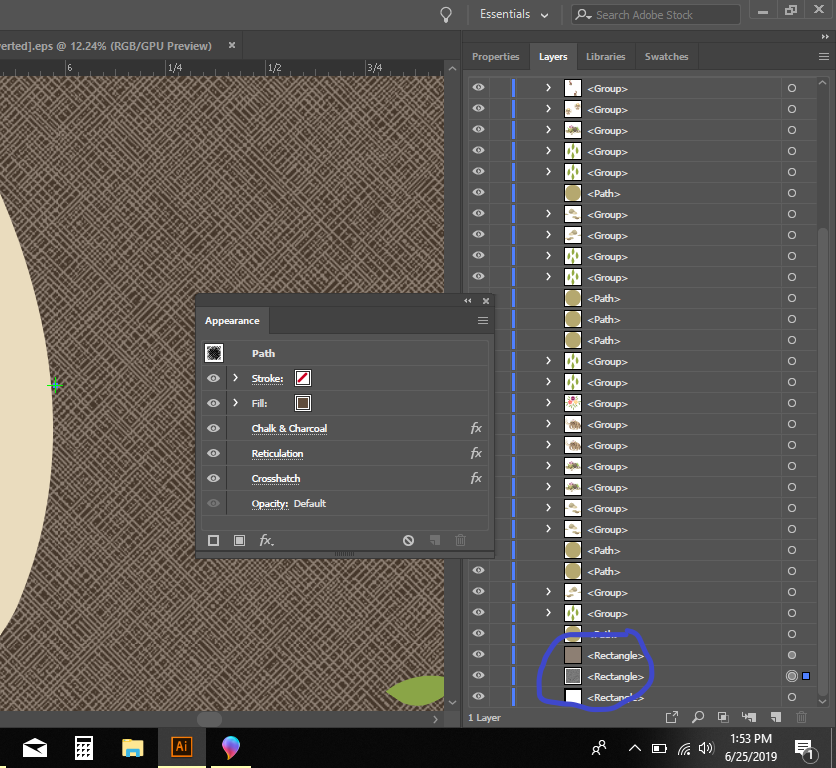
I'm designing a fabric swatch to have printed in CS6. I've created the seamless pattern, tested it using the pattern tool and the seams are perfect; no white lines. Once I add an effect to the background there are white seams around the edges when I use the pattern tool. If I zoom in as far as I can over the seam it doesn't have color, just black and white. How do I get the background effect edges to become seamless?
The first photo is the background effect I've set up.
The second photo is zoomed in within the pattern tool.




Explore related tutorials & articles
 8
Replies
8
8
Replies
8


Copy link to clipboard
Copied
Great looking pattern swatch!
Only thing I can think of - before defining the swatch, is it possible to zoom in decrease your selected area from just the very edges? Perhaps a Clipping Mask that just removes the very edges would do the trick?
Adobe Community Expert / Adobe Certified Instructor

Copy link to clipboard
Copied
I don't quite understand at which point you add the effects:
- to the complete background?
- to the pattern swatch artwork?
Copy link to clipboard
Copied
To the complete background. Then I’m verifying that it’s actually seamless using the pattern tool.

Copy link to clipboard
Copied
I'm with Monika on this. As far as I understand it (not much) I think you would be better off saving this as a Graphic Style rather than as a pattern swatch.
Peter
Copy link to clipboard
Copied
The reason I’m running it through the pattern tool is too double check that it’s actually seamless. When I send the tile to the printer it will repeat on the fabric. If it’s not seamless the white lines will print.
Copy link to clipboard
Copied
aadank schrieb
The reason I’m running it through the pattern tool is too double check that it’s actually seamless. When I send the tile to the printer it will repeat on the fabric. If it’s not seamless the white lines will print.
Ah, OK.
In that case check the tile in Photoshop (or make it there) and delete all the seams that might still be left.
When exporting raster artwork from Illustrator, it's important to align the artboard to the pixel grid and then also to only scale to multiples of 72 ppi when exporting.

Copy link to clipboard
Copied
I tried to make what you did , but could nto replicate the issue.

You should have better success bitmapping your pattern in Photoshop, and then adding those bitmapped effects. The direction you are going down currently makes for a slower file, and hard to see and tweak the result of the effects on those. You should also have no problem with white seams as the effect is appleid as a whole page in photoshop.
Copy link to clipboard
Copied
Ahh ok. It did cross my mind to create the background in photoshop first. I’ll give that a try.


Get ready! An upgraded Adobe Community experience is coming in January.
Learn more
 AdChoices