Exit
  • Global community
    • Language:
      • Deutsch
      • English
      • Español
      • Français
      • Português
  • 日本語コミュニティ
  • 한국 커뮤니티
0

Adding PMS 2287 to Illustrator

Engaged ,
Nov 16, 2020 Nov 16, 2020

I have a client that wants me to specify PMS 2287 in a spot-color print file, but I cannot find it anywhere in the color books? Where is this color or how do I add it?

2.0K
Translate
Report
Community guidelines
Be kind and respectful, give credit to the original source of content, and search for duplicates before posting. Learn more
community guidelines

correct answers 1 Correct answer

Engaged , Nov 24, 2020 Nov 24, 2020

I received an email from Pantone Tech Support which solved all my problems on both my devices...


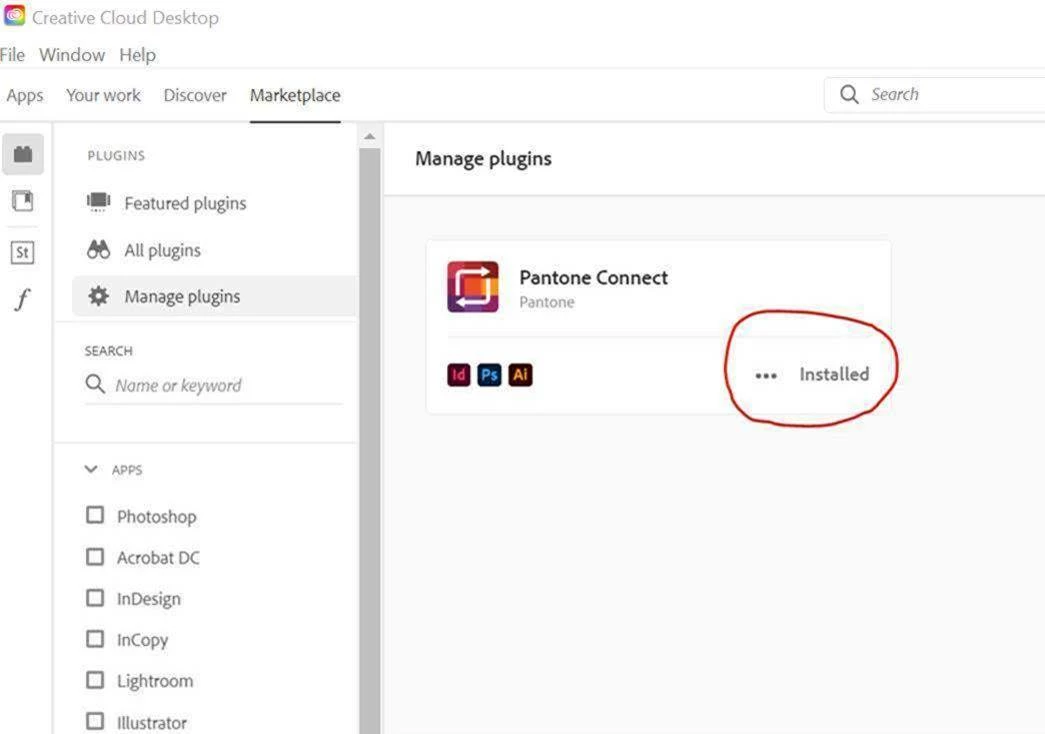
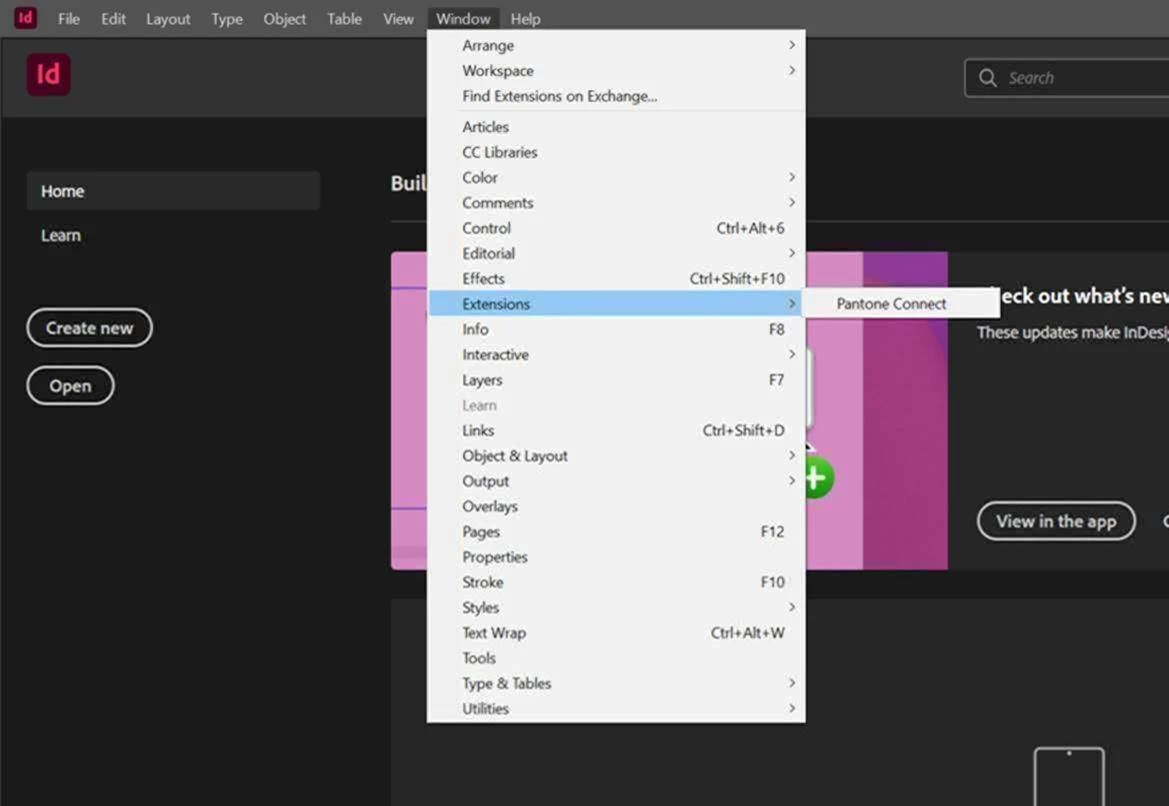
The method that is recommended is installing the app directly from the Adobe Exchange Marketplace which is Adobe CC’s platform for Extensions such as Pantone Connect.  Here is a link to our page on the Adobe Exchange Marketplace. https://exchange.adobe.com/creativecloud.details.103029.html.  Typically after downloading the Pantone Connect Extension from the Adobe Exchange Marketplace, this should sho

...
Translate
Adobe
Community Expert ,
Nov 16, 2020 Nov 16, 2020

You can install the Pantone color manager from pantone.com to update your libraries.

But you can also create a spot color yourself with the name and specs you find here:

https://www.pantone.com/eu/en/color-finder/2287-C


Translate
Report
Community guidelines
Be kind and respectful, give credit to the original source of content, and search for duplicates before posting. Learn more
community guidelines
Engaged ,
Nov 16, 2020 Nov 16, 2020

Ton,


Thanks for the quick response. I tried downloading and installing the Pantone Connect extension and these are my results:


MacBook Pro 2015 - Catalina 10.15.7 - Latest Adobe CC 2021:  "Installation Failed"

2019 Mc Pro - Catalina 10.15.7 - Latest Adobe CC 2021: Installer worked and Extension panel showed up in Illustrator, but just says "Reload Plugin". Clicking on the link text does nothing? Same behavior in both AI and PS?

Translate
Report
Community guidelines
Be kind and respectful, give credit to the original source of content, and search for duplicates before posting. Learn more
community guidelines
Community Expert ,
Nov 16, 2020 Nov 16, 2020

I did not know about this new extension, but  I just installed it.

I had to scroll down all the license agreement text before I  could click ok.

It is not very intuitive, but I could search and add the color to my document.

If you cannot get it to work, you can copy these settings.

Screenshot 2020-11-17 at 01.35.59.png

Translate
Report
Community guidelines
Be kind and respectful, give credit to the original source of content, and search for duplicates before posting. Learn more
community guidelines
Engaged ,
Nov 16, 2020 Nov 16, 2020

Are you on Mac or PC? I cannot get the interface shown in your screenshot to appear. I can get the Pantone Connect "panel" to appear, but it does not populate with the PANTONE and Sign In field?

Translate
Report
Community guidelines
Be kind and respectful, give credit to the original source of content, and search for duplicates before posting. Learn more
community guidelines
Community Expert ,
Nov 17, 2020 Nov 17, 2020

I am on a Mac. I am afraid I cannot be much of help with this extension.

Translate
Report
Community guidelines
Be kind and respectful, give credit to the original source of content, and search for duplicates before posting. Learn more
community guidelines
Engaged ,
Nov 24, 2020 Nov 24, 2020

I received an email from Pantone Tech Support which solved all my problems on both my devices...


The method that is recommended is installing the app directly from the Adobe Exchange Marketplace which is Adobe CC’s platform for Extensions such as Pantone Connect.  Here is a link to our page on the Adobe Exchange Marketplace. https://exchange.adobe.com/creativecloud.details.103029.html.  Typically after downloading the Pantone Connect Extension from the Adobe Exchange Marketplace, this should show the extension is acquired and a link to INSTALL using the Creative Cloud Desktop App.  You should then be able to launch Adobe CC programs and from the menu select WINDOW/EXTENSION to see Pantone Connect.  Are you not seeing this?  See screen shots below.  Note that in Adobe InDesign, the ‘Extensions’ option is a bit further down the list that in Adobe Illustrator or Photoshop and can be missed at times. 
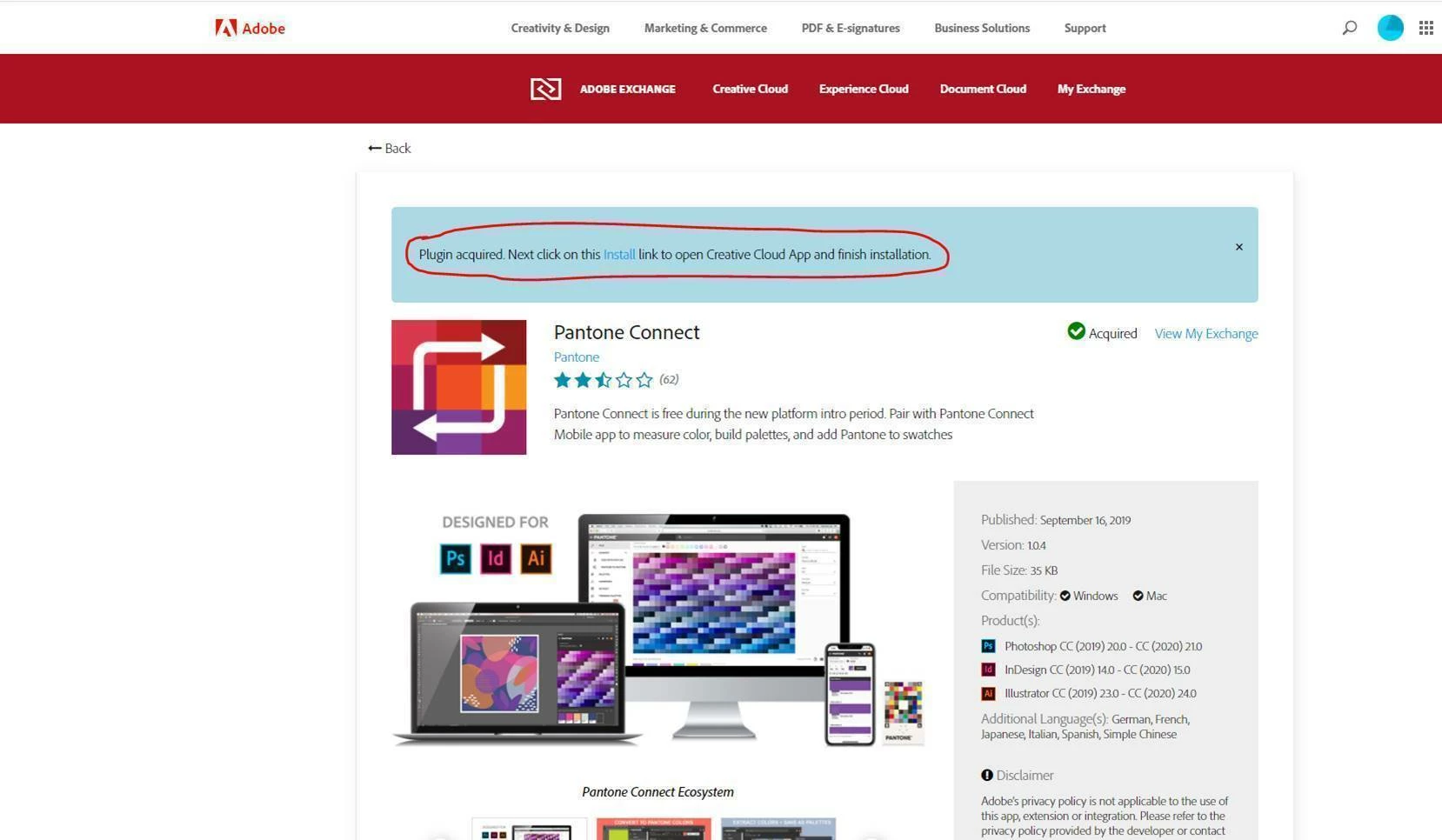
image001.jpgimage002.jpgimage003.jpg


Translate
Report
Community guidelines
Be kind and respectful, give credit to the original source of content, and search for duplicates before posting. Learn more
community guidelines
Community Expert ,
Nov 24, 2020 Nov 24, 2020
LATEST

Good to hear you've got it working.

Translate
Report
Community guidelines
Be kind and respectful, give credit to the original source of content, and search for duplicates before posting. Learn more
community guidelines