
Inspiring
July 22, 2021
Question

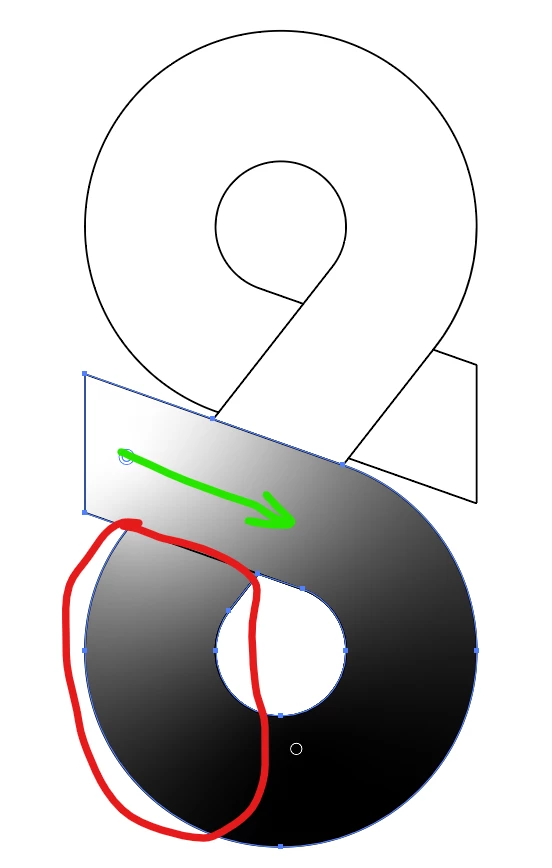
Adjust the gradient so that it follows the correct path in a SHAPE.
  • July 22, 2021
  • 3 replies
  • 688 views

The white colour in the gradient overflows into the bottom area marked in red in spite of having a line over there to block it. I want the white colour to follow the green path as it feels like it should by default.

I have attached the file for reference.

This topic has been closed for replies.

3 replies

Jacob Bugge
Community Expert
Community Expert
July 23, 2021

Sai Nikxith,


Why start this new second thread after you have thanked SJRiegel for an answer, which also covers your follow up up question to the similar answer from Mike?


https://community.adobe.com/t5/illustrator/how-to-adjust-the-gradient-so-that-it-follows-the-correct-path/td-p/12191686

Mike_Gondek10189183
Community Expert
Community Expert
July 22, 2021


NikxithAuthor
Inspiring
July 23, 2021

The gradient along the stroke would work, but this is not a stroke. Is there any other way to do it in this shape itself or is there any other way to do what I want? if yes, can you please use my attached file to show how to do it. :)))))

Met1
Legend
July 23, 2021

Wasn't this already asked and answered?

Blend, replace spine.

Mike_Gondek10189183
Community Expert
Community Expert
July 22, 2021

Look into Gradient along a stroke.