
Known Participant
September 1, 2023
Answered

Adjust To Grid shortcut

  • September 1, 2023
  • 3 replies
  • 1207 views

Hi! Anyone knows why Show Grid and Adjust to Grid have the same shortcut (Shift+Command+8)? This shortcut just work showing and hidding the grid. OK for this but I have created a shortcut for Adjust to the Grid and it doesn't work. I mean, is there any way to achieve to adjust to the grid without having to clik on it's button on properties panel? I use this a lot and it's really annoying if I'm working on a zoomed in zone as I have to zoom out for clicking on a free of objects zone so that the properties panel appears and click the button for then zoom in again to continue where I was working... Is this an error of the software itself? I use the Mac version.
This topic has been closed for replies.
Correct answer CarlosCanto

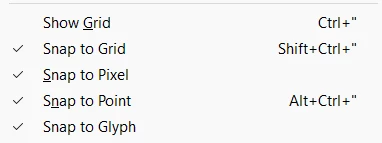
on Windows US English setup the default shortcuts are Ctrl+" and Ctrl+Shift+", both shortcuts work as expected

3 replies

CarlosCanto
Community Expert
CarlosCantoCommunity ExpertCorrect answer
Community Expert
September 1, 2023

on Windows US English setup the default shortcuts are Ctrl+" and Ctrl+Shift+", both shortcuts work as expected

YuriferAuthor
Known Participant
September 29, 2023

Sorry for the delay! Thank you so much for your kind reply! 👍😉

CarlosCanto
Community Expert
Community Expert
September 1, 2023

I don't remember seeing "Adjust to Grid", did you mean "Snap To Grid"?

YuriferAuthor
Known Participant
September 1, 2023

OMG! Sorry for my english!!! Yes, SNAP To Grid!

Monika Gause
Community Expert
Community Expert
September 1, 2023

You are referring to the Pixel grid?

Or which grid?

Can you please show the menu with those shortcuts?

YuriferAuthor
Known Participant
September 1, 2023

Sorry, I mean SNAP TO GRID

As you can see in the attached screenshot there are now two different shortcuts for each action but they doesn´t work. I can show/hide GRID with the shortcut SHIFT+COMMAND+8 (which is not the shortcut) and SHIFT+COMMAND+* which corresponds to SNAP TO GRID... SNAP TO GRID also doesn't work as the shortcut show and hide the grid... What a mess...

Monika Gause
Community Expert
Community Expert
September 1, 2023

Some keys just do not work very well as shortcuts (son't ask why, this has just happened over the years)

On top of that: keys might be taken by other apps or the system on your computer.

And: shortcuts might be affected by corrupt preferences.


Do other keys work? What's going on inthe system? Is Google Chrome running on your computer? When was your last system reboot?