Known Participant
March 16, 2017
Question

Adobe Create Suite Files

  • March 16, 2017
  • 5 replies
  • 1538 views

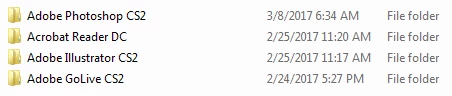
I have these folders

Within these folders are files that will not delete not matter what I do.  I just downloaded File Assassin but it wouldn't delete these specific files, it unlocked them but wouldn't delete them.  These are from the discontinued Adobe Creative Suite.  I have the username and password for my computer, as I got from someone else.  Microsoft suggested I contact you for these.  Please, please, please help me.

    This topic has been closed for replies.

    5 replies

    Legend
    March 21, 2017

    If you were following Adobe instructions that should be fine or as close to fine as you can get. You make it sound as if you are fishing around the files and registry for things to delete. I'm astonished Adobe helped you to be honest, CS2 Is so old and unsupported. They also know nothing about it, because all staff have changed since it was current.

    On the other hand asking Microsoft to delete Adobe software is asking for trouble. They know nothing about it. I think a need for a clean Windows install is emerging but even then CS2 probably won't work. You realise the original disks are useless, did anyone tell you that?

    Known Participant
    March 22, 2017

    I purchased the ancient software before it became ancient.  I've had viruses over the years but did not know until my recent installation that the activation server was disabled (I don't follow these things).  I reinstalled the software but couldn't activate and then when I attempted to uninstall, low and behold I couldn't uninstall the normal way because I kept getting an error message and was told the installation was probably done incorrectly.  I then reached out to the Microsoft Community for help and then Adobe just to get the software completely uninstalled.  Everything that I have done, including deleting files from the registry was done by instruction of either Adobe or Microsoft - more Adobe.  I'm not techy, I had no idea what I could do to get it uninstalled and was told I needed to do so manually.  So no, I didn't know.

    Legend
    March 21, 2017

    Nobody know that stuff, especially for ancient software. That's why it's so vital to uninstall properly - never delete files, never attack the registry and above all never run software that claims to uninstall things for you. All of these paths can leave you with a system so broken you need to reformat and start again.

    Known Participant
    March 21, 2017

    I couldn't uninstall properly as the software wouldn't uninstall normally so I was instructed to manually do it all and every time someone gave me instructions, no matter what they were I kept running into roadblocks and so because I'm not techy and did not want to damage my computer or files, I needed to go step by step w/Adobe and Microsoft.  I did not enjoy this process, it was is continues to be long and tedious. The software didn't install property but how would I know that; I didn't get any error messages and I'm not techy.   I was sent a link to manually delete the files including going into the registry.  So please don't tell me what shouldn't be done regarding ancient software.

    Legend
    March 18, 2017

    See if they are in the fonts control panel; if so msybe you an right click, delete or deactivate.

    Known Participant
    March 18, 2017

    These are the fonts.  I'm told they are "short cut fonts" because of the arrow(out of all my fonts, they are the only ones w/arrows).  When I try to delete, they don't, no error message, they're just there and I don't know how to get rid of them.

    Monika Gause
    Community Expert
    Community Expert
    March 21, 2017

    Hello, ok, I deleted every adobe file in the registry (and there were tons) at least all that were obvious to me to be adobe files.  I tried once again to download the software that doesn't need activation, but it's telling me that Adobe Illustrator is still in the computer.  I can't download until all can be downloaded.  Where else would these files be?


    Have you read that link I posted that instructs you how to manually delete stuff?

    Apart from that nobody knows. You might need to reformat your disk in order to delete the old stuff.

    Legend
    March 17, 2017

    Try this for the ones which are NOT fonts -- How to fix “You require permission from SYSTEM to make changes to this file” on Windows 7

    for or the fonts I'd just give up - why care?

    Known Participant
    March 17, 2017

    I followed the instructions in the link you provided, and aside from the fonts, I did delete the one file.  Many, many thanks.  The fonts that I'm trying to delete are Adobe fonts in Illustrator and Photoshop.  I need these files deleted so I could download the replacement for Adobe Creative Suite.    They all seem to be open in System.  How do I close and delete them?

    Legend
    March 16, 2017

    Reader DC is not the old Creative Suite, it's brand new and current.

    What at happens when you try to delete the files? Did you try to uninstall first? Please give any messages in full.

    Known Participant
    March 17, 2017

    Below are the files name and the error messages I get when I try to delete.  I have tried to simply uninstall the Creative Suite but kept getting a message that the installer couldn't start because of invalid personal information or library source.  I've been through the mill w/this stuff.  Over two weeks of working w/Microsoft and Adobe.  I had more files but some how I managed the get rid of many, but these are left.  I have windows 8. I have AVG on my computer and there's an option to "shred" w/it.  Would that get rid of them if it worked?  I need these deleted so I could install the replacement for the Adobe Suite.  Thank you.