Known Participant
June 16, 2015
Answered

Adobe Illustrator 2015 - Units-Bug

  • June 16, 2015
  • 14 replies
  • 26267 views

Hello,

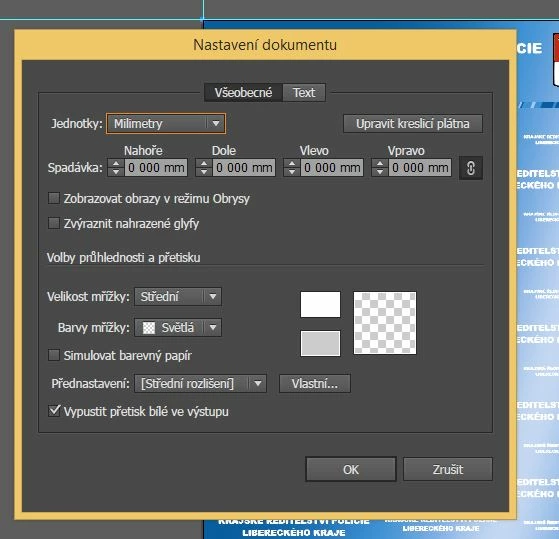
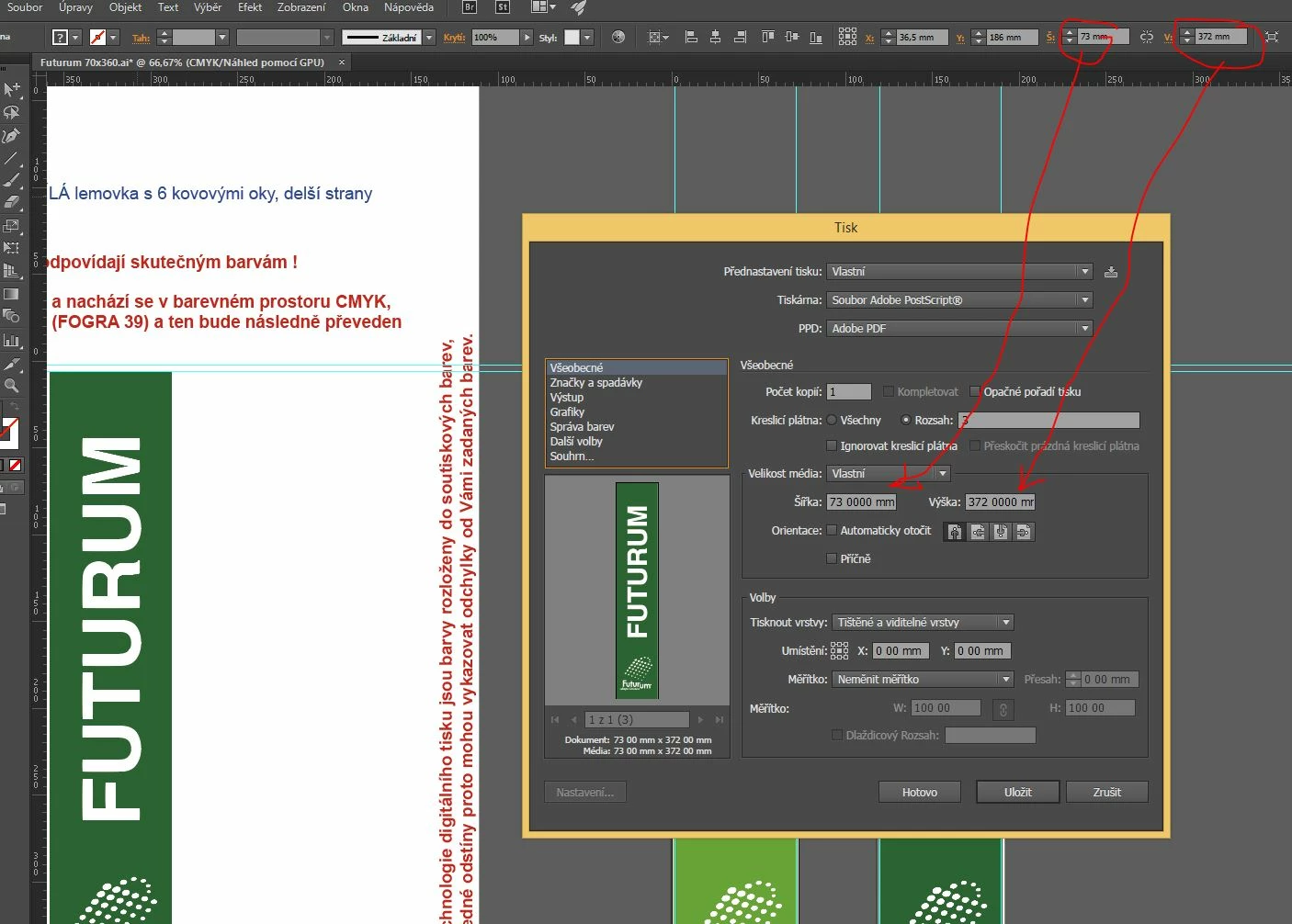
Today I updated the Adobe Illustrator program to the latest version in 2015, and after printing to Postscript me mysteriously changed decimals units shown.
The document has not been good. But now I have a bad drive everywhere.
E.g. I see the new document: A4 Paper is 210 00 mm x 297 00 mm and  Bleed is 0 000 mm.


I use the Czech version of Windows PC 8.1 64bit.


    This topic has been closed for replies.
    Correct answer AshutoshChaturvedi

    Hi,

    We have released a WINDOWS ONLY hot fix today that fixes the issue of corrupt preferences. Please go to Creative Cloud application and download the patch CC 20151.1 (19.1.1)

    If you do not see the patch in the Creative Cloud application wait for the refresh cycle to be over or you can sign out and sign in to force refresh the list of available patches.

    Regards,

    Ashutosh

    On behalf of Illustrator Engineering Team

    14 replies

    mikee426461937464562
    Participating Frequently
    August 20, 2015

    Dear Adobe,

    I also ran into this bug and lost quite a bit of work because of it - resetting preferences apparently removes any actions you have recorded but not saved as a separate file.

    In addition the workaround is not really practical in a lot of cases: we need to keep a non-english locale (in my case German) to have correct regional number formatting in other applications (PowerPoint, Excel).

    This is pretty ridiculous to be honest - in CC2014 a similar bug was causing frequent project corruption in PremierePro.
    It's not like the whole topic of decimal separators is new - this has been around for ages.

    I kind of get it that the 12 month release cycle of new full versions puts a lot of pressure on the developers but I won't be the beta tester for your applications.


    Kindly get this fixed as soon as possible - there are a lot of people who are affected by this.

    Best,

    Mike

    Participating Frequently
    August 20, 2015

    I'm surprised Adobe hasn't fixed the issue yet. I could never get the workaround to solve the problem, so I finally gave up and went back to CC2014. I guess I'll stay with CC2014 for a while yet!

    Patrick

    RenatoProspero
    Participant
    August 20, 2015

    Patrick be careful about the downgrade to illustrator cc 2014, im having bug with it, every file i created with Ai 2015 dont save and make illustrator crash, after i made the downgrade.

    I hope it never happen with you, cause its driving me crazy!

    sanjaykr
    Adobe Employee
    Adobe Employee
    July 25, 2015

    Hi Ales,

    Can you please check in your windows settings for decimal and comma separators. Ai normally honors the windows settings for showing comma and decimal.

    And does Ai CC 2014 show a different comma and decimal separators than CC 2015?

    Thanks,

    Sanjay.

    Known Participant
    July 25, 2015

    Hi Sanjay,

    setting in Windows is . The problem in AI CC 2015 I and my two colleagues. If I delete the preferences, everything is fine. But once I print anything to PostScript (see video above), the unit is damaged in some way. The problem in AI CC 2014 do not. If I print to PostScript not used, I would probably not with this problem. Unfortunately, this feature I use every day.

    Ales

    mystickrus
    Participant
    June 29, 2015

    same problem starts with cc 2015 update

    Known Participant
    June 29, 2015

    I'm glad I'm not alone, even though you probably will not help.

    I and my two colleagues, we had to go back to the 2014 version, because printing to PostScript is used several times a day and that the bug is not afraid to work. I hope that Adobe will repair it soon, though I to many pay so much for Cloud. I not understand English and I use Google translator.

    Greeting

    Ales Ulrych

    Known Participant
    July 9, 2015

    Hello,

    I just upgraded to a new version 19.0.1 and unfortunately the error still persists ...

    Known Participant
    June 16, 2015

    It seems that the missing decimal point.

    Jacob Bugge
    Community Expert
    Community Expert
    June 16, 2015

    Aleš,

    What happens if you copy some of the artwork into a new document (this may determine wheter it is document specific)?

    Otherwise, it may be worth considering at least the easy ones at the top of the following list:

    The following is a general list of things you may try when

    A) The issue is not in a specific file,

    B) You have a printer correctly installed, connected, and turned on if it is physical printer (you may use Adobe PDF/Acrobat Distiller as the default printer with no need to have a printer turned on, obviously you will need to specify when you actually need to print on paper), and

    C) It is not caused by issues with opening a file from external media (see at the bottom).

    You may have tried/done some of them already; 1) and 2) are the easy ones for temporary strangenesses, and 3) and 4) are specifically aimed at possibly corrupt preferences); 5) is a list in itself, and 6) is the last resort.

    If possible/applicable, you should save current artwork first, of course.

    1) Close down Illy and open again;

    2) Restart the computer (you may do that up to at least 5 times);

    3) Close down Illy and press Ctrl+Alt+Shift/Cmd+Option+Shift during startup (easy but irreversible);

    4) Move the folder (follow the link with that name) with Illy closed (more tedious but also more thorough and reversible), for CS3 - CC you may find the folder here:

    https://helpx.adobe.com/illustrator/kb/preference-file-location-illustrator.html

    5) Look through and try out the relevant among the Other options (follow the link with that name, Item 7) is a list of usual suspects among other applications that may disturb and confuse Illy, Item 15) applies to CC, CS6, and maybe CS5);

    Even more seriously, you may:

    6) Uninstall (ticking the box to delete the preferences), run the Cleaner Tool (if you have CS3/CS4/CS5/CS6/CC), and reinstall. It is important to use this full three step way: otherwise, things may linger.

    http://www.adobe.com/support/contact/cscleanertool.html

    Known Participant
    June 16, 2015

    Hello,

    I renamed all preferences, preference for Illustrator CC 2015 I deleted it, and I found that the error of measurement units enters after printing to PostScript graphics. More is seen on the video here: Screenr - Ales_Ulrych: Adobe Illustrator CC 2015 - Print to Postscript - units bug

    Greeting

    Ales Ulrych