Known Participant
June 16, 2015
Answered

Adobe Illustrator 2015 - Units-Bug

  • June 16, 2015
  • 14 replies
  • 26267 views

Hello,

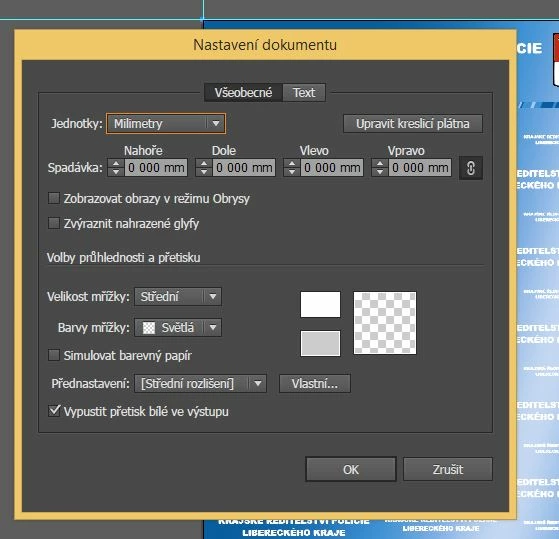
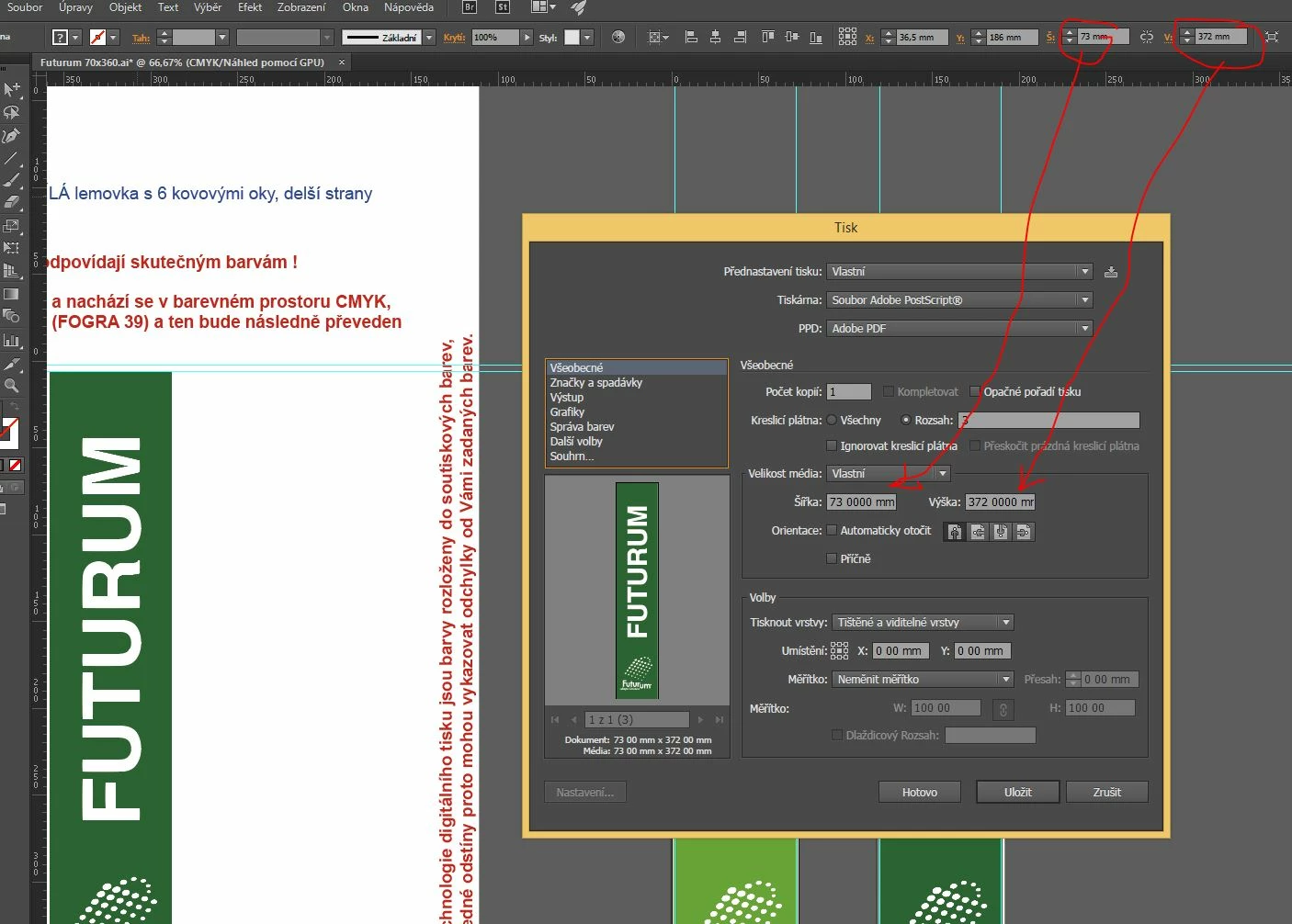
Today I updated the Adobe Illustrator program to the latest version in 2015, and after printing to Postscript me mysteriously changed decimals units shown.
The document has not been good. But now I have a bad drive everywhere.
E.g. I see the new document: A4 Paper is 210 00 mm x 297 00 mm and  Bleed is 0 000 mm.


I use the Czech version of Windows PC 8.1 64bit.


    This topic has been closed for replies.
    Correct answer AshutoshChaturvedi

    Hi,

    We have released a WINDOWS ONLY hot fix today that fixes the issue of corrupt preferences. Please go to Creative Cloud application and download the patch CC 20151.1 (19.1.1)

    If you do not see the patch in the Creative Cloud application wait for the refresh cycle to be over or you can sign out and sign in to force refresh the list of available patches.

    Regards,

    Ashutosh

    On behalf of Illustrator Engineering Team

    14 replies

    Known Participant
    August 16, 2017

    This problem still persists on macOS 10.12.6 with Illustrator 2017.1.0:

    Decimal point massive problems (AI CC 2017.1.0 macOS 10.12.6)

    There is no Avast software in sight on my MacBook Pro. I’m dismayed how this issue has been ignored by the Illustrator developers for so many years!

    Participant
    August 1, 2017

    Nunca saberão, acabei de descobrir o que fazer.

    É ALGO MUITO SIMPLES

    CHUPAAAAAAAA MUNDO

    Participant
    November 18, 2016

    Hello, today I've experienced the same problem. Illy 2015.3, Win 10 64bit, Czech Republic setup in Win.

    The problem started when I set up my Brother inkjet printer as default in Windows. It got fixed when I set up Adobe PDF as default printer back again. Works ok even if I have comma in "Decimal symbol" in region settings in Win. Anyway, it is a bug...

    Monika Gause
    Community Expert
    Community Expert
    November 18, 2016

    Tomáš Haman schrieb:

    Hello, today I've experienced the same problem. Illy 2015.3, Win 10 64bit, Czech Republic setup in Win.

    The problem started when I set up my Brother inkjet printer as default in Windows. It got fixed when I set up Adobe PDF as default printer back again. Works ok even if I have comma in "Decimal symbol" in region settings in Win. Anyway, it is a bug...

    Is Avast Antivirus on your machine?

    Try and uninstall it, use a different antivirus.

    Participant
    November 21, 2016

    Uninstalling Avast! antivirus solved all my problems with Adobe Illustrator like missing decimal point, bad "New document" dialog form and Libraries also work fine again. Thank you Monika.

    Participant
    November 4, 2016

    After hours of searching for a solution, I FINALY FOUND IT. I just installed a previous version of Illustrator and now everything works just fine . here is how to install a previous version :Install a previous version of any Creative Cloud application .

    Or just search "how to install previous version of cc apps".

    August 9, 2016

    Yes, this issue is still a problem. It’s not just irritating; it makes working with Illustrator difficult and less efficient.

    So far as I can tell, Illustrator swaps the decimal symbol with the system digit grouping symbol (or thousand separator). Consequently, the software multiplies numbers automatically as they are entered (not always in the same manner; with comma as decimal and point as grouping symbol, it seems to multiply by ten, i.e., 2,5 become 25, with comma as decimal and space as grouping symbol, it apparently does times one thousand).

    With United States regional settings, point as decimal and comma as grouping symbol, the Illustrator app accepts numbers correctly. But of course this is not a solution. Other applications on the same system will call regional settings, e.g., basic spreadsheet tools, and need to work correctly as well in all international versions. (Comments were made about this over a year ago on the Adobe forum…)

    This issue did not occur in previous versions of Illustrator and does not occur in other Adobe Creative Cloud applications such as Photoshop and InDesign. – Maybe solutions can be found there.

    Also, other CC programs, including Illustrator, handle periods and commas as interchangeable decimal points. Entering 4,5 or 4.5 both result in four and a half. – Which is genius when you’re working in varying regions.

    So, is it a system related issue? A preferences/units problem in Illustrator? A decimal or ‘missing decimal point’ problem?

    Some additional/optional information below.

    Examples

    Enter 4.5 as the width in the Transform panel and it turns into 4 5000 cm. Here, unit preferences are set to centimeters, but the issue remains with points or other general units settings.

    Trying to take this into account and typing a space instead of a comma, 4 5000 becomes 577 9911 cm. I’m not sure if this is actually five million seven hundred seventy-nine thousand nine hundred eleven centimeters (thousands divider in wrong place), i.e., 5 779 911, or five hundred seventy-seven and nine thousand eleven one ten thousandth of a centimeter, i.e., 577,9911 or 577.9911 (comma decimal or point decimal respectively). Either way it’s much beyond my artboard in Illustrator all of a sudden.

    Well, maybe there’s no need to compensate and substitute decimal symbols. However, if I enter 4.5 as I did first, and click on the object to continue working or press tab and continue, my 4 5000 cm becomes 577 9911 cm again. Depending on proportion constrain setting, both width and height or first height, but eventually both will change to that value.

    General Preferences also displays value in a strange way… 45 7200 cm as Keyboard Increment… 0 00°… 0 42 cm. Basically, any number in Illustrator is afflicted.

    System and application settings information

    I am using the English language version of Illustrator in a US English Windows OS (details below). My numbers format customization in Windows is, however, set to comma as decimal symbol and space for digit grouping. My location is set to Belgium.

    The problem is not document specific; decimal points or commas keep vanishing in new documents, whether I restart the software or both software and the whole system or not.

    I have also uninstalled and re-installed Illustrator, however I did, so far, keep preferences, and have not tried re-installing the entire Creative Cloud suite.

    System information: 64-bit Windows 10 Pro version 1511 operating system, Build 10586.494, running on a Dell XPS 8500 Intel® Core™ i7-3770 x64-based processor, CPU @ 3.40GHz, with 16 GB RAM installed (info file available).

    Software information: Adobe Illustrator CC 2015.3.0 Release 20.0.0 (64-bit); no further updates available at this time.

    tobiasl80298450
    Participant
    August 16, 2016

    I have the exact same problem, but changing the locals and decimal presentation doesn't work for me.

    Working with illustrator is really frustrating with an issue like this..

    Participant
    August 8, 2016

    After updating my Windows 10 to WIN10 Home version 1607 got same problem few days ago! Not solved yet! HELP! At this time I have Illustrator CC 2015.3.0 Release 64bit.

    August 4, 2016

    I still have this problem in Illustrator CC 2015.3.0 (20.0.0) 64-bit. Not in other CC products.

    AshutoshChaturvedi
    Community Manager
    AshutoshChaturvediCommunity ManagerCorrect answer
    Community Manager
    October 20, 2015

    Hi,

    We have released a WINDOWS ONLY hot fix today that fixes the issue of corrupt preferences. Please go to Creative Cloud application and download the patch CC 20151.1 (19.1.1)

    If you do not see the patch in the Creative Cloud application wait for the refresh cycle to be over or you can sign out and sign in to force refresh the list of available patches.

    Regards,

    Ashutosh

    On behalf of Illustrator Engineering Team

    Participating Frequently
    October 20, 2015

    The update certainly seems to remove the problem. Thank you Ashutosk!

    Patrick

    daghb
    Participant
    October 2, 2015

    I have this problem too, but if i just input using decimal point instead of comma (like "1.0"), the stroke input box still says a way off value like "1 000" pt but the stroke itself is correct.

    DagH

    Capt. Igor
    Inspiring
    October 2, 2015

    DagH,

    You have to change settings in Control Panel, Regional Settings, then it works.

    Participant
    October 6, 2015

    Choices are yours :-). May be (hopefully) Adobe will fix this bug soon.


    Nope it did'nt work for me but I'm running on Windows 10 so I suppose the most clever thing I can do now is to commit suicide or install my new home in Patagonia.

    It's always seem to be fixed, but for no reason the unit bugs come again.

    Also my pref file is always corrupt whatever I can do.

    My collegues don't seem to have been confronted to this bug for now, but fingers crossed because it will mean the end of peaceful days of work (they are "noober" than me).

    Sooomeeebodyy saaave uuus ?

    =)

    Participating Frequently
    September 11, 2015

    Seriously? Changing system wide settings to work around a bug in one or two apps? This is by far the worst advice I have ever seen.

    Earlier this year I was thinking of moving to Serif or Corel, now might be a good time to take the plunge...

    Take your responsibility and fix this now!

    mikee426461937464562
    Participating Frequently
    September 11, 2015

    FYI: I got the confirmation that the bug has been fixed and that the fix should be included in the next update.

    I didn't get any ETA for the update though.