
nuthawuts64479381
Participant
August 3, 2022
Answered

Adobe Illustrator 26.4.1 does not save document title in file info.

  • August 3, 2022
  • 2 replies
  • 1157 views

I'm using Adobe Illustrator to create stock illustration. After auto updated to 26.4.1. I cannot save document title anymore. It keep pick up file name as document title. This is real pain for me cause I save all my title/keywords in the file for submitting to multiple stock agencies. Please help!
This topic has been closed for replies.
Correct answer Ton Frederiks

Hi @Ton Frederiks,


I am unable to resolve the issue on my end. I saved the file, then reopened it, changed the title, saved it again & reopened it again, but the document title still reverts back to the file name. Would you mind sharing a small video of how you did that? Maybe I missed something.


Regards,

Anshul Saini


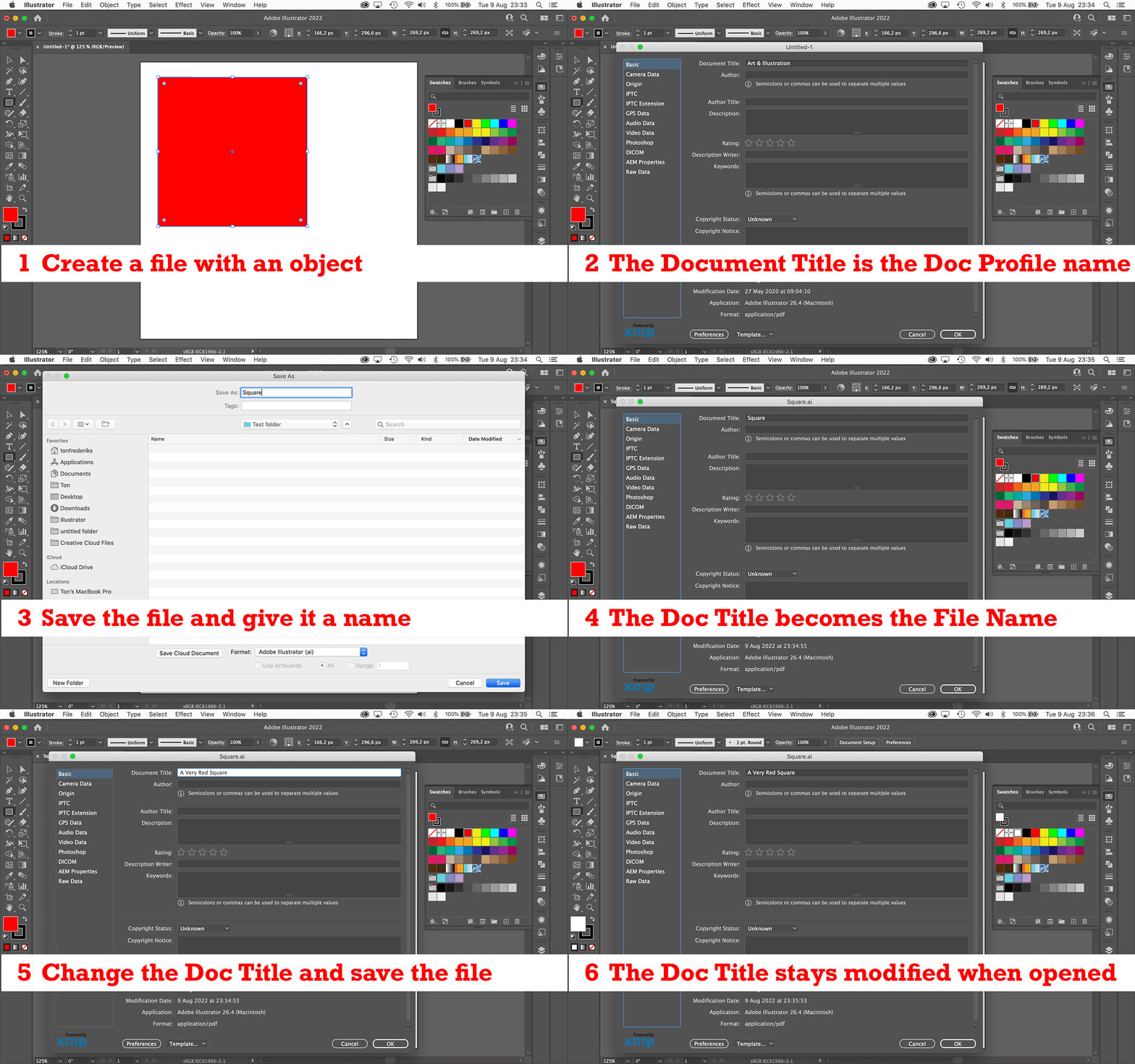
Hi @Anshul_Saini this is what I do:

2 replies

Anshul_Saini
Community Manager
Community Manager
August 9, 2022

Hi @nuthawuts64479381,


We are sorry for the trouble. We are able to replicate the same at our end and have logged a bug with the product team.


Would you mind posting this on UserVoice (https://illustrator.uservoice.com/) and sharing the link here?


Also, have you tried the workflow suggested by @Ton Frederiks to resolve this?


Regards,

Anshul Saini

nuthawuts64479381
Participant
August 10, 2022

Thanks for your reply, Anshul.

I used the work around just like @Ton Frederiks suggest, save the file to eps format then change the doc title again and save. The title sticked. Hope this issue will be solved for the next release.

Monika Gause
Community Expert
Community Expert
August 3, 2022

You could try if resetting the preferences helps (this will erase all your settings)

https://helpx.adobe.com/illustrator/using/setting-preferences.html


Can you perhaps tell us the steps you do, so other people can test if it needs to be reported as a bug?

nuthawuts64479381
Participant
August 3, 2022

I've role back to 26.3.1 and it works. To reproduce error in 26.4.1, you open or create new ai file then click File/File info on top of file info window is Document Title, add new title click ok and save the file. Then close and reopen this file and open file info again. You will see Document title to be same as file name. (not the one we added).


I'm using Mac OS 12.5


Any info needed, please let me know. I need this to be fixed then I can update to new version.

Monika Gause
Community Expert
Community Expert
August 3, 2022

I have version 26.4 - there is no update available for me.

When I save a document and give it a name, then close and re-open the document, the name of the document appears correctly in File info. Before saving, the document had the Name "Print", which was correct as well, because it's the name of the document profile.