
Participant
September 27, 2023
Question

Adobe Illustrator 27.9 gets stuck when opening files

  • September 27, 2023
  • 3 replies
  • 379 views

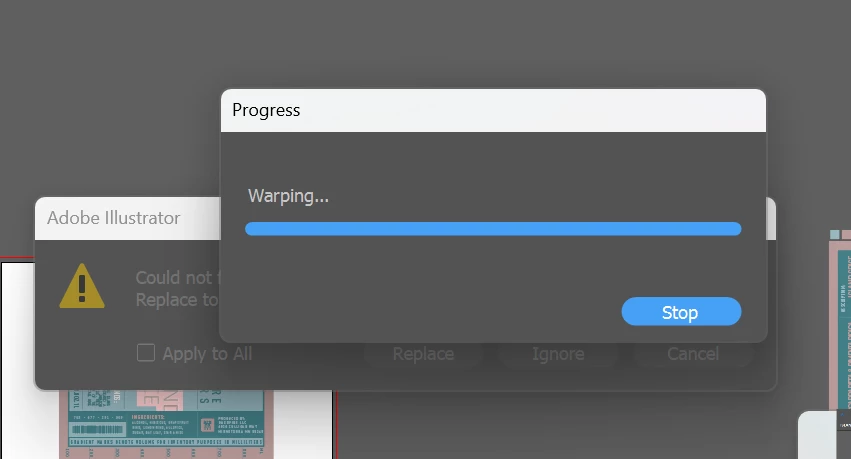
When I try to open a file, it gets stuck with this "warping" progress bar. Hitting "stop" does not stop it; hitting "stop" doesn't do anything at all. I have tried opening two different files with the same results. Is there something I can do on my end to fix this or does the person who sent this file to me need to adjust something? What do I need to do?
3 replies

Participant
June 18, 2025

i ve got the same problem, how to fix that guy @@ 


Abhishek Rao
Community Manager
Community Manager
June 18, 2025

Hi @Ngoc5CB3,


Thanks for jumping in! I'm sorry to hear you’re running into the same issue. To better understand what might be causing it, could you please confirm the version of Illustrator you're using and your operating system details?

Also, if you haven't already, please try testing the issue in Safe Mode and also by creating a new local admin user account on your system. This can help rule out conflicts with other software or user-specific settings.

Here are some helpful links to guide you:

Safe Mode on Windows: Start your PC in safe mode

Safe Mode on macOS: Start up your Mac in safe mode

Create a new user on Windows: Manage user accounts

Create a new user on macOS: Add a user on your Mac


Let me know how it goes or if the issue persists. Looking forward to your update.

Abhishek


Bill Silbert
Community Expert
Community Expert
September 28, 2023

Please provide what operating system that you are using. Also your screenshot seems to show a warning alert behind the progress bar that is partially obscured but seems to be the one that says a linked graphic or image is missing. If that is so then perhaps that is a contributing factor in this problem.

Monika Gause
Community Expert
Community Expert
September 27, 2023

What's in the file?

How much RAM is installed?