
Participant
June 16, 2017
Answered

Adobe illustrator cc 2017 has stopped working

  • June 16, 2017
  • 3 replies
  • 5854 views

Hello Team,

I am trying to resolve one issue from long time and its getting trouble day by day.

All other application works fine but only illustrator getting crash.

Here is a event detail from desktop.

Faulting application name: Illustrator.exe, version: 21.1.0.326, time stamp: 0x58c20f65

Faulting module name: Illustrator.exe, version: 21.1.0.326, time stamp: 0x58c20f65

Exception code: 0xc0000005

Fault offset: 0x0000000000366586

Faulting process id: 0x5ec

Faulting application start time: 0x01d2e66230b5d93c

Faulting application path: C:\Program Files\Adobe\Adobe Illustrator CC 2017\Support Files\Contents\Windows\Illustrator.exe

Faulting module path: C:\Program Files\Adobe\Adobe Illustrator CC 2017\Support Files\Contents\Windows\Illustrator.exe

Report Id: 04925abe-525f-11e7-8258-74d435ac4499

Faulting package full name:

Faulting package-relative application ID:

Kindly help us to resolve this asap
This topic has been closed for replies.
Correct answer Srishti Bali

Hi Nishant,

Thanks for the information. Please try to follow below mentioned steps

1) Copy one or 2 files on Primary HDD and check how it performs?

2) Reset preferences for Illustrator 

  • Close all Adobe applications
  • go to location C:\Users\User\AppData\Roaming\Adobe
  • Delete folders Adobe Illustrator and Adobe Illustrator 21 Settings
  • Launch Illustrator from creative cloud

3) If it still does not work, check performance in safe mode

4) If it still does not work Uninstall and reinstall from Creative cloud

  • Uninstall from creative cloud
  • Go to location C:\Program Files\Adobe\Adobe Illustrator CC 2017 and delete folder Adobe Illustrator CC 2017
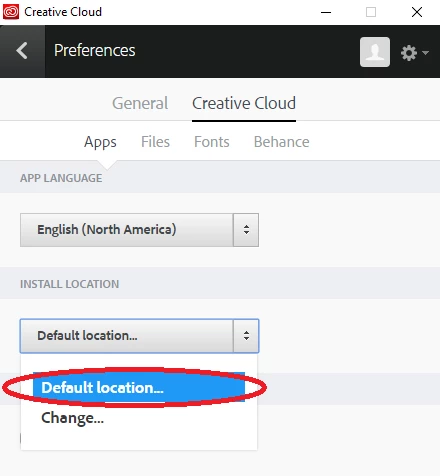
  • Reinstall from Creative Cloud (make sure it is installed on primary HDD(C:\Program Files\Adobe) )

Regards

Srishti

3 replies

Samsho
Participant
January 8, 2019

Please my Adobe illustrator cc 2017 has issues with the fill and stroke colours.

Anytime I click new file, the fill and stroke colours will be there but the moment I click "open" in the file option and copy a file like an exercise file, immediately the stroke and fill colours go away leaving only one colour which has the red diagonal line the box

Please what do I do ..

Thanks in advance

Monika Gause
Community Expert
Community Expert
January 8, 2019

Samsho  schrieb

Please my Adobe illustrator cc 2017 has issues with the fill and stroke colours.

Anytime I click new file, the fill and stroke colours will be there but the moment I click "open" in the file option and copy a file like an exercise file, immediately the stroke and fill colours go away leaving only one colour which has the red diagonal line the box

Please what do I do ..

Thanks in advance

Do you get exactly the same issues as described in this thread? If not, please create a new thread and tell us exactly what is happening and your system and version.

Screenshots help as well.

Participant
March 18, 2021

Id like some help with Illustrtor crashing on my IMAC but cant find where to post  new thread.

I got a warning popup message  that i had s problemtic  file..it crashed..and has crashed a couple of dozen more times before I gave up for the day.

Thank you.


Participant
June 27, 2017

Hello here some more details are:

  1. Exact version windows 10 professional  and Illustrator CC 2017 12.1.0
  2. It crashes while working on it
  3. It's also crashes on a single file.
  4. We do have two hdd internal connected. one for OS and one for data. We are saving the file on secondary disk.

Regards

Nishant

Srishti Bali
Community Manager
Srishti BaliCommunity ManagerCorrect answer
Community Manager
June 27, 2017

Hi Nishant,

Thanks for the information. Please try to follow below mentioned steps

1) Copy one or 2 files on Primary HDD and check how it performs?

2) Reset preferences for Illustrator 

  • Close all Adobe applications
  • go to location C:\Users\User\AppData\Roaming\Adobe
  • Delete folders Adobe Illustrator and Adobe Illustrator 21 Settings
  • Launch Illustrator from creative cloud

3) If it still does not work, check performance in safe mode

4) If it still does not work Uninstall and reinstall from Creative cloud

  • Uninstall from creative cloud
  • Go to location C:\Program Files\Adobe\Adobe Illustrator CC 2017 and delete folder Adobe Illustrator CC 2017
  • Reinstall from Creative Cloud (make sure it is installed on primary HDD(C:\Program Files\Adobe) )

Regards

Srishti

patrickj85776599
Inspiring
April 11, 2018

THANK YOU for this!
I've been dealing with my Illustrator crashing on startup since day 2 after install... Tried reinstalling and deleting a bunch of different files to no avail.

Not until now at least. So deleting the mentioned folders in this location did the job for me: C:\Users\User\AppData\Roaming\Adobe

Srishti Bali
Community Manager
Community Manager
June 16, 2017

Hi nishantm,

If I get your query Illustrator is crashing repeatedly.

In order to help you on this , I would need some more details like

Exact version windows and Illustrator

When does it crashes(On launch or while working on it) ?

If it crashes while working on it, does it crashes on a specific file or multiple files?

And where your files are saved(Local HDD or external drive or server(Network))?

Regards

Srishti