Participant
May 11, 2022
Answered

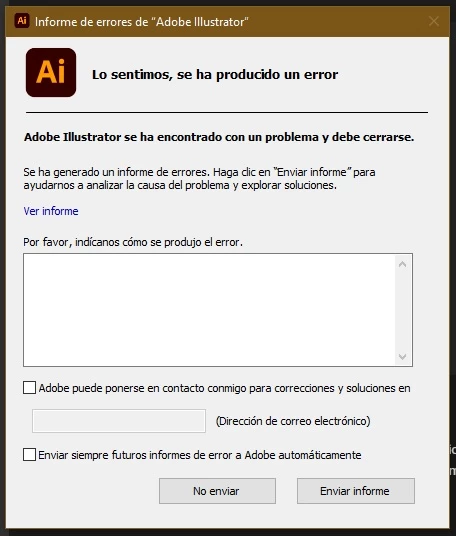
Adobe Illustrator genera informe de error y no inicia. Esto sucede con todas las aplicaciones

  • May 11, 2022
  • 3 replies
  • 1778 views

Hola, actualicé la suite a la version mas reciente, y ninguna aplicación inicia, cada una arroja un error denominado "lo sentimos, se ha producido un error", seguido de un informe de error, el cual, al clicar en las opciones enviar o no enviar el informe, la aplicacion se cierra. ¿Alguien me puede ayudar a solucionar este problema? ¡Muchas Gracias!
This topic has been closed for replies.
Correct answer Anubhav M

Hello @cinncoc79344740,


Sorry for the late response. I hope the problem is resolved by now. If not, kindly remove and then reinstall the Microsoft Visual C++ Redistributable from here (https://aka.ms/vs/17/release/vc_redist.x64.exe) and check if it helps.


Also, try running Illustrator under a different administrator account and share your observations.


Looking forward to your response.


Thanks,

Anubhav


Note: Marked correct for visibility.

3 replies

Anubhav M
Community Manager
Community Manager
May 11, 2022

Hello @cinncoc79344740,


Sorry to hear about this experience. I hope the suggestions shared by Marliton and Lambiloon helped resolve the problem. If not, kindly share a few more details like:

  • The exact version of the OS and Illustrator
  • Since when are you facing this problem?
  • Have any recent changes been made to your computer (OS Update/ Antivirus/ Plug-Ins)?
  • Kindly submit the Crash Report by following the steps in this article: https://helpx.adobe.com/in/illustrator/kb/crash-next-steps.html.
    While submitting the crash report, please use the same email address with which you are signed in on this community. This will help us find the crash report and help accordingly.


Looking forward to hearing from you.


Thanks,
Anubhav

Participant
May 11, 2022

Hola gracias por tu respuesta, ya realicé las sugerencias de Marliton y Lambiloon pero el problema persiste.

Aqui estan mis especificaciones:

  • Sistema operativo: Windows 10 Home Single Language
  • Version Illustrator: Illustrator (26.2.1)
  • El sistema operativo y los complementos han sido actualizados
  • Ya realicé el tramite del envío de informe de error.
    Aún así al abrir la aplicación aparece el cuadro de dialogo del envío de informes de error. Agradezco tu atención Anubhav.
Anubhav M
Community Manager
Anubhav MCommunity ManagerCorrect answer
Community Manager
June 8, 2022

Hello @cinncoc79344740,


Sorry for the late response. I hope the problem is resolved by now. If not, kindly remove and then reinstall the Microsoft Visual C++ Redistributable from here (https://aka.ms/vs/17/release/vc_redist.x64.exe) and check if it helps.


Also, try running Illustrator under a different administrator account and share your observations.


Looking forward to your response.


Thanks,

Anubhav


Note: Marked correct for visibility.

marliton
Community Expert
Community Expert
May 11, 2022
Participant
May 11, 2022

Gracias por tu respuesta Marlon, hace una semana actualicé la Suite a la ultima version desde la cuenta de Creative Cloud, antes de la actualizacion usé la herramienta Creative Cloud Cleaner Tool, pero el problema persiste. Mi sistema operativo es Windows 10 x 64 bits y tambien tiene actualizados todos los controladores y Drivers. En cuadro de dialogo envié el informe de error pero no tengo idea del paso a seguir; el problema persiste.


lambiloon
Community Expert
Community Expert
May 11, 2022

Hi, the best way which I think to use the new version is first uninstalled the all older apps using adobe clean remove tool then install latest one...regards

Ali Sajjad / Graphic Design Trainer / Freelancer / Adobe Certified Professional
Participant
May 11, 2022

Gracias por tu respuesta, hace una semana actualicé la Suite a la ultima version desde la cuenta de Creative Cloud, antes de la actualizacion usé la herramienta Creative Cloud Cleaner Tool, pero el problema persiste.