


Participant
October 24, 2017
Question

Adobe Illustrator: How to convert shape to line?

  • October 24, 2017
  • 4 replies
  • 92066 views

I would like to convert some texts/letters to lines in Illustrator.

I know how to convert text to outlines, but this creates shapes.

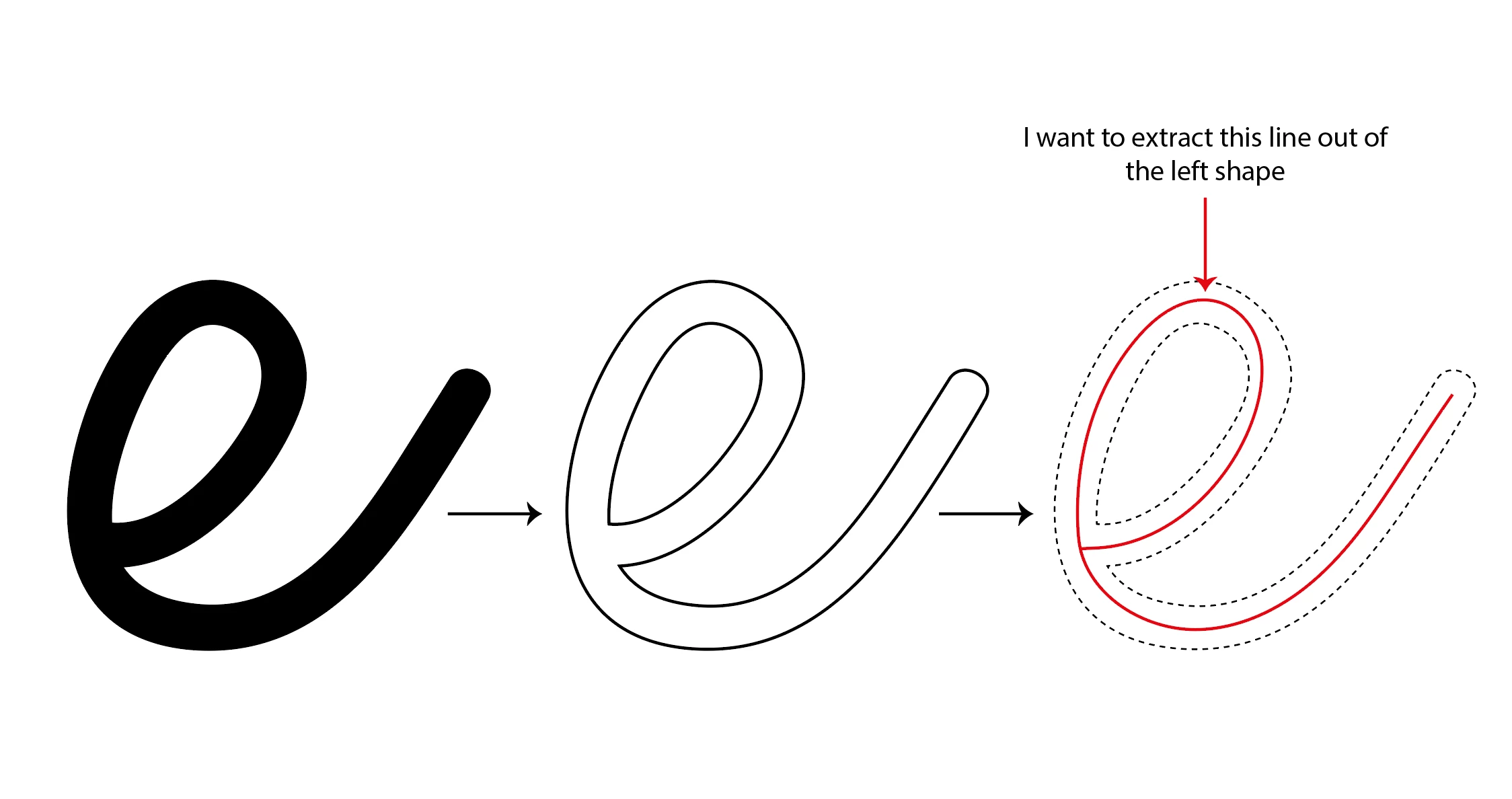
What I need is the average line of the letter shapes as I illustrated in the attached image.

Does someone know an easy way to achieve this?

I've tried the blend option from the object menu, but this didn't work out correctly.

It would be an awful lot of work to trace every character by hand, so I really hope there's another option.
4 replies

Known Participant
April 1, 2019

first, use a font that's very thin like helvetica neue ultra light for example

export your text as a png or other image file (make it large)

place that png back into illustrator

trace it with the trace tool as line art

you may have to play with the threshold - usually it's best at 0

expand the trace

Participant
April 25, 2022

If the point is to use a specific font that is *not* thing by nature, you can also do Create Outline, then set the fill color to black and the outline to white, bumping up the stroke width until the black becomes thing. Screenshot and import as line art - worked well for me! Thanks for the start, Casamia. 

Myra Ferguson
Community Expert
Community Expert
October 24, 2017

Try converting the letters to outlines (Type > Create Outlines or Shift + Ctrl + O) and change it from a solid with no stroke to a stroke with no fill. Use the Scissors Tool (C) to snip the ends so you get 2 distinct paths. Then use the Blend Tool (W) to connect them with just 1 step. You may need to adjust the center line to make it connect after doing the blend.

Participant
December 20, 2024

It was just like that what I was looking for one click and boom as I wanted

Ray Yorkshire
Participating Frequently
October 24, 2017

I doubt there is an easy way, I've seen similar threads here before

like this one , and that is a simpler shape than yours.

Maybe  find and use a single line font instead

Re: Convert a solid filled shape into a single line.