
Exit
  • Global community
    • Language:
      • Deutsch
      • English
      • Español
      • Français
      • Português
  • 日本語コミュニティ
  • 한국 커뮤니티
0

Adobe Illustrator Interface Preferences

New Here ,
Oct 24, 2022 Oct 24, 2022

Hi, Adobe Illustrator seems to have gone wierd on me... When I first installed it, it had a great, easy-to-navigate interface but I had to reinstall all my apps after doing a system restore to an earlier restore point. Now, I can't seem to get it to open a New File and, if I open an old file, it won't save a copy.  Plus it used to have this when I started it up, although this screen shot is from a Mac, I run Windows 10.Screenshot (25).png
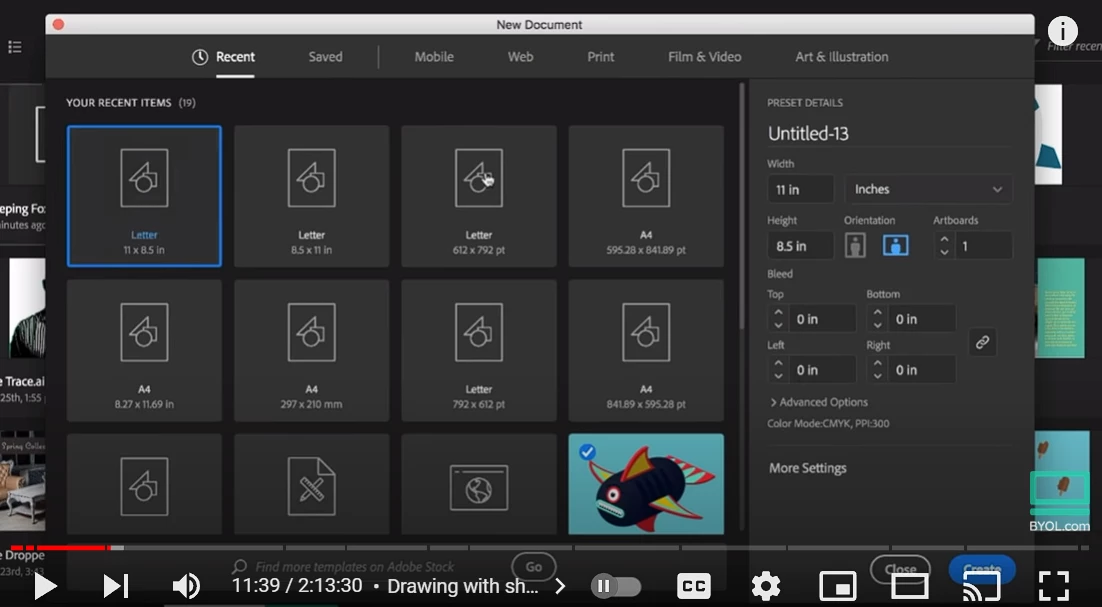
Please help!

Thanks,

Simon

197
Translate
Report
Community guidelines
Be kind and respectful, give credit to the original source of content, and search for duplicates before posting. Learn more
community guidelines
Adobe
Community Expert ,
Oct 24, 2022 Oct 24, 2022

Please tell us the exact steps that lead you to the issue.

Translate
Report
Community guidelines
Be kind and respectful, give credit to the original source of content, and search for duplicates before posting. Learn more
community guidelines
Adobe Employee ,
Oct 24, 2022 Oct 24, 2022

Hello @Simon26535905q3ff,


Sorry to hear about this experience. Would you mind trying the following steps and checking if it elopes:

  1. Close all Adobe applications:
  2. Rename the UXP folder to UXP.old from the following locations:
    (Windows) Navigate to C:\Program Files\Common Files\Adobe\UXP
    (macOS) Navigate to Macintosh HD/Library/Application Support/Adobe/UXP
  3. Relaunch Illustrator.


Also, try resetting Illustrator's preferences by following the steps shared in this article (https://helpx.adobe.com/illustrator/kb/troubleshoot-preference-issues.html) and sharing your observations.
Disclaimer: Please note that resetting preferences will remove all custom settings, and Illustrator will launch with the defaults. You may take a backup of these settings from the location mentioned in the article.

Looking forward to hearing from you.


Thanks,
Anubhav

Translate
Report
Community guidelines
Be kind and respectful, give credit to the original source of content, and search for duplicates before posting. Learn more
community guidelines
New Here ,
Oct 24, 2022 Oct 24, 2022
LATEST
Thank you so much for your help 😊 I will try all these things first thing
tomorrow morning and will let you know how it goes 😊
Thank you again,
Simon
Translate
Report
Community guidelines
Be kind and respectful, give credit to the original source of content, and search for duplicates before posting. Learn more
community guidelines