
Participant
February 6, 2021
Answered

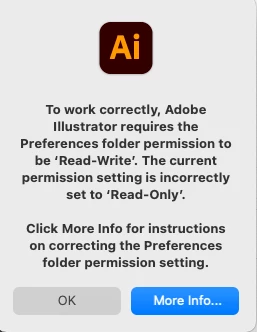
Adobe Illustrator requires Preferececes folder to be "Read-Write" in order to open...but it is!!!!

  • February 6, 2021
  • 2 replies
  • 3463 views

Just downloaded/installed Illustrator.  Trying to open it and getting the error message from above ("Preferences folder needs to be "read-write" but currently is "read-only").  Followed all the steps from Adobe's help page to manually set the all the listed folders to be 'read-write'.  They now all are (including a few more that I set to that for good measure...).  I've restarted the computer several times, checked and double checked that the permissions stayed that way.  I've done everything the help page says to do but it still won't open!!  (Running most current version of OS Big Sur.) 
This topic has been closed for replies.
Correct answer Ashutosh_Mishra

Hi there,


Sorry to hear about this. I see you've followed the troubleshooting which didn't help. I agree with @Kat Gilbert here. You may connect with Adobe technical support. Please click on the chat icon at the bottom of the page to begin the conversation. Team here will be able to help you remotely on  a live session.


Regards,

Ashutosh

2 replies

Ashutosh_Mishra
Ashutosh_MishraCorrect answer
Inspiring
February 24, 2021

Hi there,


Sorry to hear about this. I see you've followed the troubleshooting which didn't help. I agree with @Kat Gilbert here. You may connect with Adobe technical support. Please click on the chat icon at the bottom of the page to begin the conversation. Team here will be able to help you remotely on  a live session.


Regards,

Ashutosh

Kat Gilbert
Legend
February 6, 2021

Not sure if this will help but did you go to "command I" and change the file to open with Illustrator and check to make sure that the permissions do read as "read-write."


Participant
February 7, 2021

Thanks Kat!  Actually, it's not a file that won't open, it's Illustrator itself. For instance, if I go to applications and select it, then it fails to launch and gives me the error message.  So, I can't even create a new illustration because the program won't even open.  Don't know if it helps but I'm not having the same issue with Photoshop, that one launches just fine. 

Kat Gilbert
Legend
February 8, 2021

Then try this- click and hold on the Ai icon and go to "Options" and choose "Show in Finder":

When window opens in finder check to see if you have custom access- unlock and change if not so:

I am also on the latest version of Big Sur and there are no issues for me. I hope this helps and if not please ding back here and we'll try another route....