

WanderElla
Inspiring
June 8, 2020
Answered

Adobe Illustrator Text Direction in 24.1
  • June 8, 2020
  • 1 reply
  • 953 views

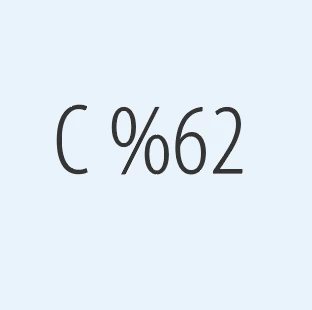
As you can see in the photo, whenever I will type the percentage symbol, it will go on the left side of the number. 

I am using MacOs Catalina 10.15.4 and Adobe Illustrator 24.1.

I am hoping you could help me with this. I am also having problem with "". Whenever I type ", it becomes >.
This topic has been closed for replies.
Correct answer WanderElla

I found the answer 🙂

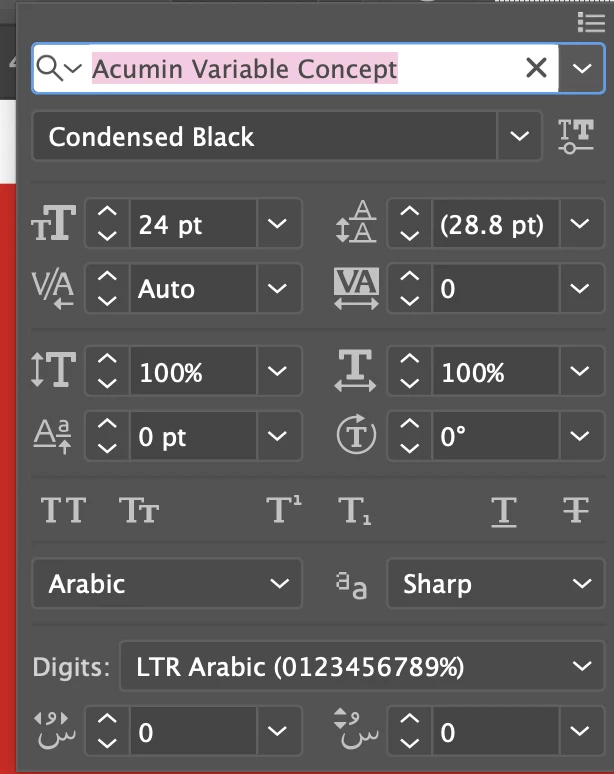
Just change to LTF Arabic which is Left to Right. 🙂


Thank you so much.


1 reply

Monika Gause
Community Expert
Community Expert
June 8, 2020

Which language is Illustrator set to?

The computer?

The keyboard?

Which language is applied to the text?

Does that happen with all fonts?

WanderElla
Inspiring
June 17, 2020


See attached photos if helpful.

My PC is set to ABC.
The Keyboard is fine anywhere except in Illustrator.
Left to right. 

It happens in all fonts inside AI only.


WanderElla
WanderEllaAuthorCorrect answer
Inspiring
June 17, 2020

I found the answer 🙂

Just change to LTF Arabic which is Left to Right. 🙂


Thank you so much.