
Participant
July 29, 2022
Answered

Adobe Illustrator - The file is locked or in use. ID: -54

  • July 29, 2022
  • 3 replies
  • 35163 views

Hello,


I am getting the following error: 
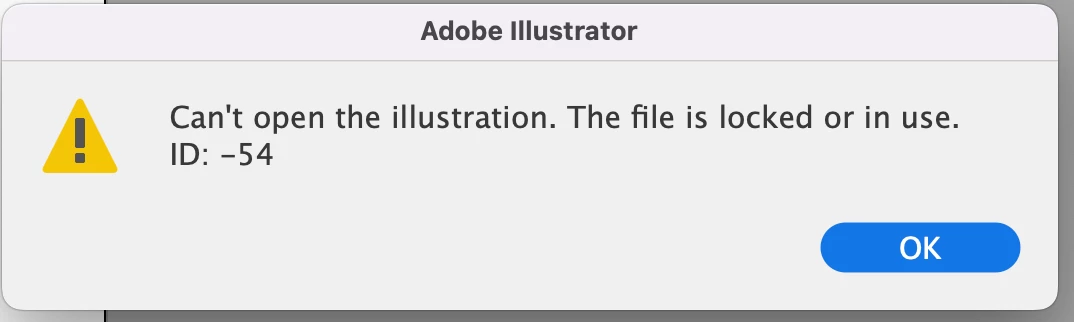
I will work on a file and save it. And when I try to re-open the file I will get this error. I am saving my files on a server. Also I do not want to keep moving my file from the server to the desktop and back to the server everytime.


Correct answer Kevin Stohlmeyer

Stop accessing files on a server. Drag them to your local HD and you wont have this issue. Then save and drag them back.

This is a common issue with remote drives/servers. The OS is not refreshing fast enough and thinks the file is still in use by either the OS (file previews, etc) or another application.

Officially Adobe does not support saving across network/remote servers/drives:

https://helpx.adobe.com/photoshop/kb/networks-removable-media-photoshop.html


3 replies

Participant
August 2, 2023

Same issue here on a M1 macbook. Newly downloaded file and get the same message. Tried duplicating and that doesn't work either.

Illustrator 2023

Monika Gause
Community Expert
Community Expert
August 2, 2023

Which system is it? Do you open the file directly from a server?

Participant
August 2, 2023

M1 Macbook Ventura - No, file is in my downloads folder, No servers involved.

Anubhav M
Community Manager
Community Manager
July 29, 2022

Hello @StevenTP,


Sorry to hear about this experience. As pointed out by Kevin, there can be various factors involved when accessing files directly from a network drive in Illustrator, and it is not recommended. I would suggest working on your files from a local hard drive in Illustrator and then manually backing them up to the network/removable media. You may learn more about this here: https://helpx.adobe.com/in/illustrator/kb/illustrator-support-networks-removable-media.html.


Kindly update this thread if you need further assistance. We'd be happy to help.


Thanks,

Anubhav

Participant
April 17, 2023

hey i need some support

Anubhav M
Community Manager
Community Manager
April 26, 2023

Hello @Devyn29439268rpyn,


Thanks for reaching out. Would you mind confirming if your files are located on an external/network drive or a cloud-synced folder (Dropbox/Google Drive/OneDrive etc.)? If yes, kindly try moving the files to a local folder location, like the desktop, as suggested by Kevin, and check if it helps.


Looking forward to hearing from you.


Thanks,

Anubhav

Kevin Stohlmeyer
Community Expert
Kevin StohlmeyerCommunity ExpertCorrect answer
Community Expert
July 29, 2022

Stop accessing files on a server. Drag them to your local HD and you wont have this issue. Then save and drag them back.

This is a common issue with remote drives/servers. The OS is not refreshing fast enough and thinks the file is still in use by either the OS (file previews, etc) or another application.

Officially Adobe does not support saving across network/remote servers/drives:

https://helpx.adobe.com/photoshop/kb/networks-removable-media-photoshop.html


Participating Frequently
August 4, 2023

How could this ever be marked as 'Correct answer' while it is utterly not!

1) not even a single comment on - if the aswer would be correct, which it is not - only being able to use illustrator in a 1999-way using local storage only.

2) "This is a common issue with remote drives/servers. ...". Where's the factual proof that this is the case in 2023? I've been using Illustrator with a NAS for a decade now and never experienced this so called 'common issue'.

3) the linked artical is about PHOTOSHOP not ILLUSTRATOR. I searched for Illustrator in this article: no match at all

Kevin Stohlmeyer
Community Expert
Community Expert
August 7, 2023

So, now you start to yell at me (in caps) too?! That just confirms how rude you are. I never said it is/should be working for everyone. You're turning it around. And please show me: where did I give a bad advise?


@olgad65073034 I'm locking this conversation as there is no futher positive contribution to the original post, but not before I point out - you specifically came on this thread to state "How could this ever be marked as 'Correct answer' while it is utterly not!" which is not true. My answer is correct in the context of the original issue stated in this post. That is bad advise.