
Adobe Products Display Failure with High Resolution Monitors on Windows 11
I recently subscribed to Adobe's Photoshop and Illustrator cloud applications. On launch, there are display issues with both programs. My research indicates this is common with high-resolution monitors.
System
Monitor
- LG UltraGear 27GL83A 27'' QHD IPS 1ms Gaming Monitor with G-Sync® Compatibility
- Graphix card: NVIDIA GeForce RTX 3070
- Running Windows 11 with the latest updates
Issue 1
The interface menus are unacceptable for comfortable reading. The text is so tiny you must squint to get a vague understanding of the letters. This obviously, is not correct.
I have attempted to resolve this issue myself and have been unsuccessful.
I located the Illustrator.exe file in the appropriate folder and clicked on compatibility. None of the available settings changed the interface legibility in Illustrator. I also used the setting on the User Interface preferences tab, and scaled the UI slider up, based on my screen resolution. This increased the drop-down options in the interface, but not the menu titles themselves. See screenshot.
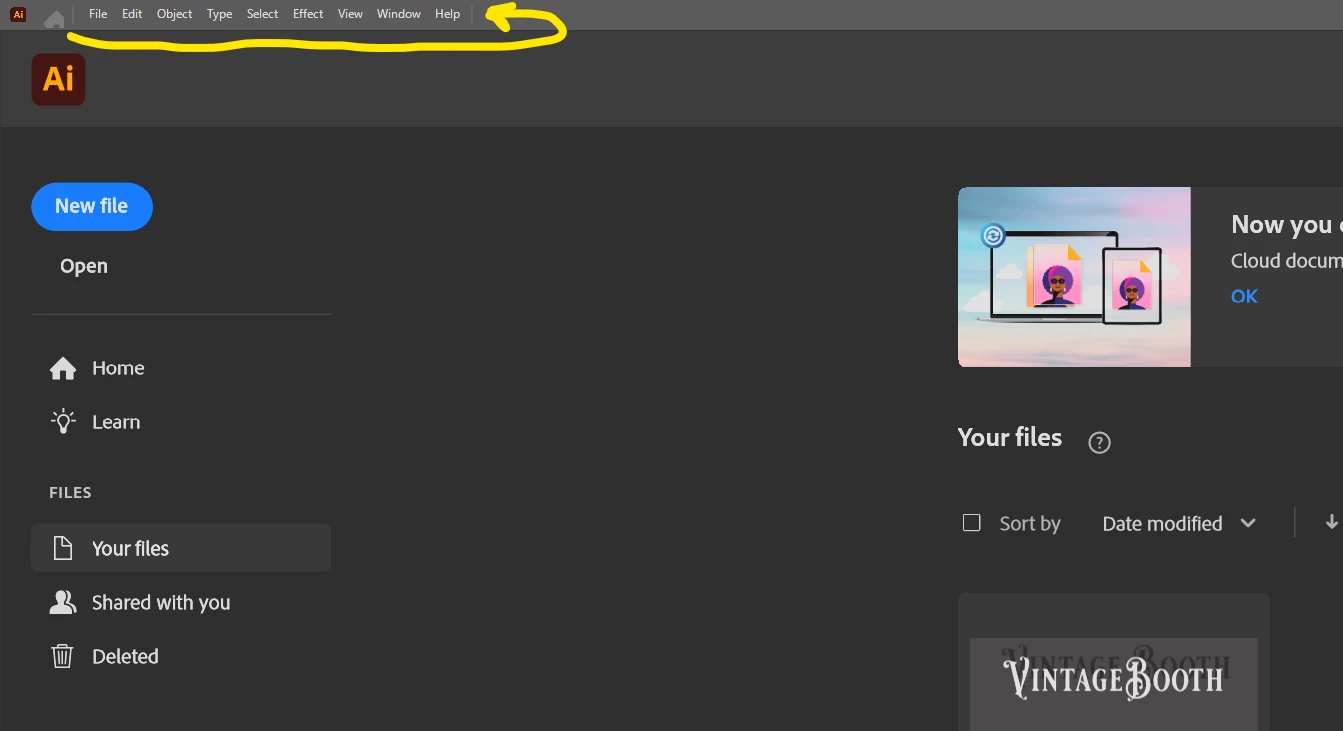
Is there a fix for this issue?
Issue 2
Attempting to change the artboard color to simulate paper is buggy. I can successfully simulate colored paper, but returning the artboard to a white background is not accomplished. Resorting to a colored background layer as a ‘fix’ defeats the purpose of the feature.
Is there a fix for this issue?
If I can not resolve these issues the software is useless for me. I don’t want to go blind using these applications. Please respond before my trial date is up. Thank you!
 AdChoices