
Participating Frequently
October 23, 2018
Question

AI CC 2019 Line Handles Missing

  • October 23, 2018
  • 8 replies
  • 4163 views

I'm sure it's because my Preferences were wiped out, but I am missing the "middle" handle boxes at the end of a line.  I used to be able to use my Black Arrow tool to pull on the middle box and change the length of the line.  Now there are only 2 boxes, one at the top and one at the bottom.  Can someone tell me how to get that function back.  I can use the White Arrow tool, but would prefer to not have to change tools.
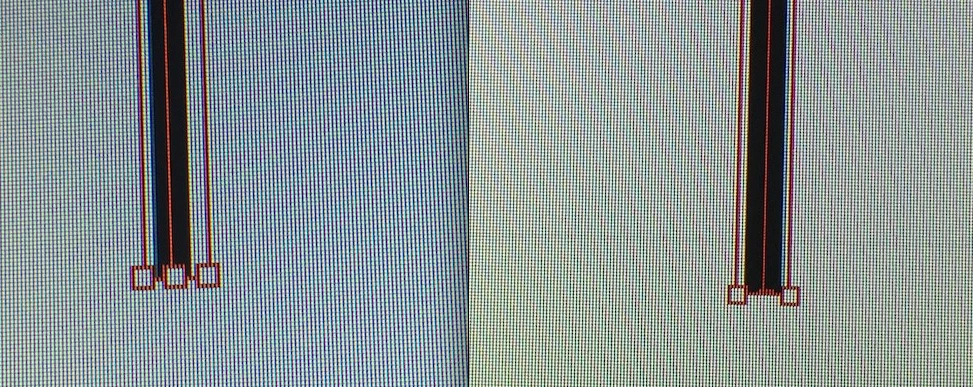
Before & After upgrade

This topic has been closed for replies.

8 replies

meganchi
Legend
May 3, 2019

I had the same issue, but it happens at 100% or lower zoom level. If I zoomed in at 150%, the middle handles appear.

Participant
May 3, 2019

The same thing happened to me all of a sudden and it was driving me crazy. I found out what the solution is. You need to go under View > Show Bounding Box. Or hit Command + Shift + B. Then the center handles should reappear. I remember I was messing around with the Hide/Show options and not too long after, I noticed the handles disappeared.

February 12, 2019

Same here. What the heck? This CC 2019 is really buggy... I can now call Adobug CC 2019

Effigy Studio
Participant
December 12, 2018

I've noticed that in CC 2019, they have made the left hand tool panel customisable (it may have been in previous versions, but I didn't use it). What I have found is that occasionally the tool panel goes crazy and re-arranges itself. Where the direct selection tool is normally (top right spot) another tool is in its place. I have noticed a correlation between this getting re-arranged and the handles disappearing.

If you reset the tool panel back to default layout (via the 3 little dots under the tool panel), this seems to fix the disappearing handles issue. Maybe Adobe should look into this (as to why the tool panel randomly re-arrage the tools).


Participant
October 4, 2019
Hey...This ACTUALLY worked for me. I just clicked the ... and my middle handle reappeared!!
eriknylund
Participating Frequently
December 7, 2018

I am also annoyed by this handle box issue. Those of you who solved the problem by reinstalling, are you using mac or PC? If mac, which OS?

Ton Frederiks
Community Expert
Community Expert
December 7, 2018

It is not solved by reinstalling.

please vote here:

Missing center handles for extending lines – Adobe Illustrator Feedback

Inspiring
November 14, 2018

What a mess! I suffer the same problem. Argh...

meganchi
Legend
October 23, 2018

Strange. Can you try turning off and on the "Show or Hide" bounding box option under your Window menu?

Ton Frederiks
Community Expert
Community Expert
October 23, 2018

Maybe because your line is a Shape.

If you select a line and go to Object > Shape > Expand Shape the handles will appear.

Edit, I see what you mean.

It is now difficult to change the length with the selection tool without also moving the line.

Participating Frequently
October 23, 2018

Nope. Tried that.  But thanks for weighing in.

Ton Frederiks
Community Expert
Community Expert
October 23, 2018

I see what you mean (and edited my reply).

Maybe Preferences > Selection and Anchor Display > Uncheck : "Show Anchor Points in Selection Tool and Shape Tools" will help?

You can also mention it here:

Adobe Illustrator Feedback