Participant
April 3, 2011
質問

AI CS5 - Inverted rounded corners

  • April 3, 2011
  • 返信数 3.
  • 37564 ビュー

Hi,

is it possible to create inverted rounded corners easily in AI CS5?
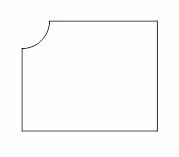
I need to specify the radius by milimeters.
And may I want to change the radius later on again 😉

Thanks for any hint!

    このトピックへの返信は締め切られました。

    返信数 3

    Participant
    August 31, 2014

    Hey, I was looking at this thread recently (trying to accomplish this), and just wanted to note that this feature has been added in Illustrator CC.

    Using the "Live Corners" feature, double click on the little toggle control and it will bring up a panel where "Inverted Round" is an option.

    Live Corners | Adobe Illustrator CC tutorials

    The second video down demonstrates.

    Cheers!

    -Travis

    TRMeyer作成者
    Participant
    April 5, 2011

    Hi,


    thanks to both of you.
    Seems to me it is always only a workaround, but thanks anyway.

    (Sometimes CorelDraw X5 is even better, better to have both CorelDraw and AI ;-))

    Inspiring
    April 6, 2011

    If it's something important to you and you think others would agree, you should file a feature request so Adobe knows.  They don't usually come down here into the user forums.

    I agree, a more robust corner rounding effect would be nice - to have it either global on an object or on a point to point basis and also capable of inverted corners.  At that point though, my "workaround" might be just as easy to pull off.

    Steve Fairbairn
    Inspiring
    April 3, 2011

    No, not in the same way as in InDesign. But there is a workaround:

    Draw an ordinary rounded rectangle select one of the corner anchor points (in this case the upper one) and use the Rotate tool to rotate it 90°.

    The selelect the other (lower) one and rotate it by -90°. Laborious but it works :-)


    Inspiring
    April 4, 2011

    Or, to allow you to change your mind later - another option.

    Draw your base shape and then a circle centered on the corner(s) you want rounded

    Group them and then from the Effect menu: Effect -> Pathfinder -> Subtract

    To adjust the corner-cutters later, deselect everything and then with the Direct Select Tool (the white arrow) click on the one you want to resize.  adjust to the mm using the transform panel, making sure that the reference point (the grid of 9 squares) is the center.