Correct answer Ton Frederiks

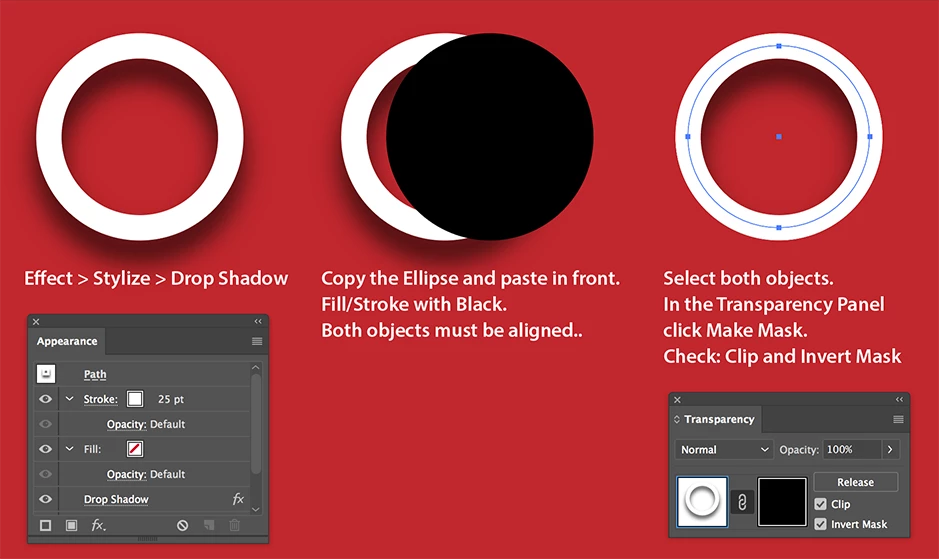
There is no Inner Shadow effect in AI.

There is a Drop Shadow

But to restrict it to the inside of the circle you need to mask it with a clipping mask or an opacity mask.
6 replies

Jumping Furple
Participant
October 31, 2022

Alternatively to the top answer, Adobe XD comes with an inner shadow option with high customizability. No messing around with masks is needed, super easy stuff. Just add it to your shape/text in XD and export it to illustrator as a PNG.

runninghead_design
Inspiring
November 1, 2022

... or you could use an airbrush on paper, photograph that with your phone and Place the raster image in AI. What is this- an ad for XD? 😏 Appreciate the helpfulness but Inner shadow in AI feels like a missing feature, resorting to raster really is not the point of AI, or this forum. Btw: if you don't  have an airbrush, charcoal powder and a blusher brush can achieve a similar effect 😁

runninghead_design
Inspiring
June 28, 2022

Edit: 😂

tromboniator
Community Expert
Community Expert
June 28, 2022

Perhaps not enough support for it? Go to

https://illustrator.uservoice.com/forums/333657-illustrator-desktop-feature-requests/suggestions/31030042-where-is-the-inner-shadow-effect, vote for it. Better still, also add a comment as to why it is important.


Peter

Participating Frequently
October 14, 2017

You could just use a radial gradient going from black to transparent.

Ton Frederiks
Community Expert
Ton FrederiksCommunity ExpertCorrect answer
Community Expert
October 14, 2017

There is no Inner Shadow effect in AI.

There is a Drop Shadow

But to restrict it to the inside of the circle you need to mask it with a clipping mask or an opacity mask.

Participant
February 26, 2024

This is probably not the same issue, but how do you do an inner shadow like the one in XD?

The issue I faced when trying to do it this way is that you can't have a shadow inside a solid object. I tried hiding the fill in the appearance but the shadow disappeared too.

I was able to make it in mere in XD but now I have to waste my morning trying to replicate it.

Ton Frederiks
Community Expert
Community Expert
February 26, 2024
You wouldn't get the exact same effect, because opacity in the corner won't
follow the same pattern as the middle. Plus controlling the position is a
pain because you can't just set the x and y value
I think that the inner shadow in adobe XD is the best and most stream lined
version of the effect.

I am not familiar with XD, but maybe you can copy and paste into Illustrator?

ivank39398723
Participant
October 14, 2017

in AI?

Mylenium
Legend
October 14, 2017

That's a simple "Inner shadow" effect.

Mylenium