

Alignment issues since last update (Illustrator 2024)
Hello everyone, I'm posting this here as I can't seem to find any mention of this problem anywere.
Something has changed since the last update on how objects align. Now Illustrator takes into account the outline thickness of two or more objects, and not the "basic shape" to calculate the alignment. If an object has an outline of 2 pt (for instance) and I try to allign another object "horizontally to the left" is now aligning to where the visual representation of the outline is, and not to the vector line of the first object. I know it might be difficult to understand so I'm attaching a reference picture of how alignment used to work and how it works now.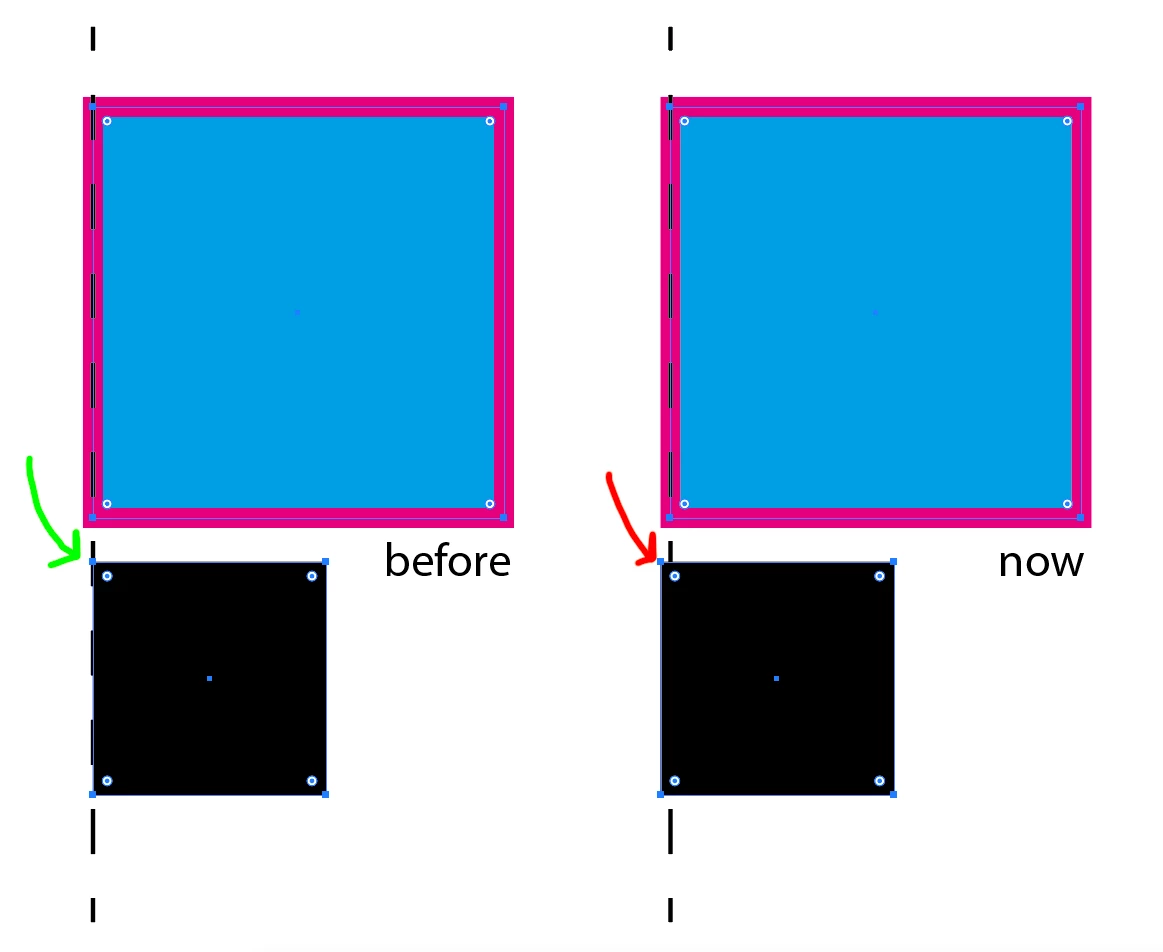
This is very detrimental to how I usually work as I use outlined objects as guides to center my objects, and I need to outline them in order to be visible.
Is there a way to fix this in the preferences? How does this major change in how Illustrator works has not been notified? I happen to have lots of my latest designs with alignment issues as is not an easy feat to notice (I work on packaging and playing cards design so being precise is a BIG issue here).
Thank you!
 AdChoices